
AI Agents for Frontend Development: 15 Best Tools, Use Cases & Real Examples (2026 Guide)


AI agents for frontend development now fall into four distinct categories: in-IDE coding agents (Cursor, Claude Code, GitHub Copilot, Windsurf), prompt-to-app builders (v0, Lovable, Bolt.new, Replit Agent), specialized design agents (Kombai, Builder.io, Replay), and production agentic platforms that live inside finished apps (CopilotKit, Assistents.ai).
The best stack depends on whether you're building the frontend, prototyping it, or embedding intelligence inside a shipped product. This guide covers all 15 leading tools, real implementation use cases, and a decision framework for choosing the right one.
What Are AI Agents for Frontend Development?
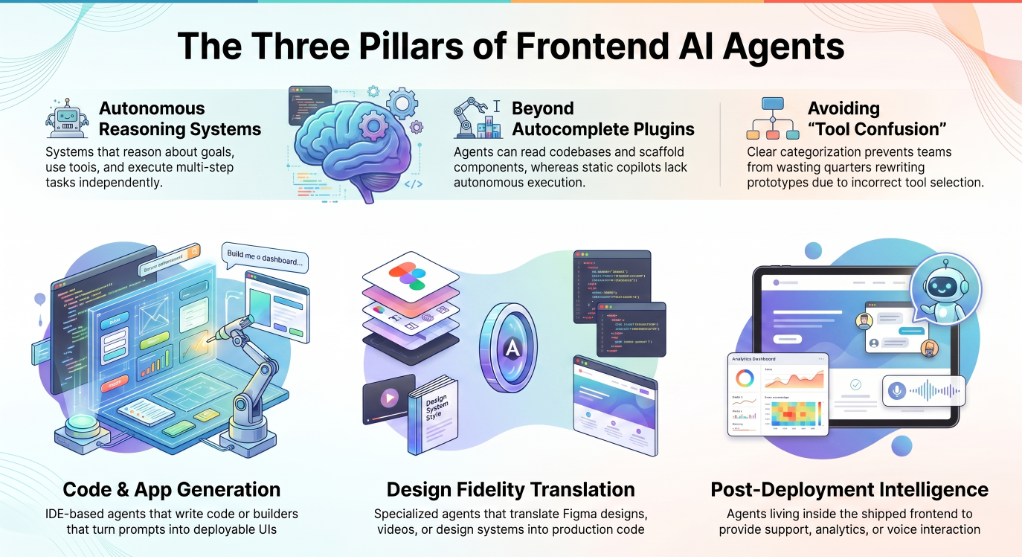
AI agents for frontend development are autonomous AI systems that help developers design, build, and operate user-facing web applications. Unlike chatbots or static copilots, they can reason about goals, decide which tools to use, read your codebase, and execute multi-step tasks — from scaffolding a React component to embedding a voice assistant inside a live product.
Most articles use the term loosely, lumping in everything from autocomplete plugins to no-code app builders. That confusion is the reason teams pick the wrong tool and waste a quarter rewriting prototypes.
The clearer way to think about AI agents for frontend development is by what they actually do:
- Some agents write the frontend for you (code-generation agents that operate inside an IDE).
- Some agents become the frontend for you (prompt-to-app builders that produce a deployable UI from a sentence).
- Some agents specialize in design fidelity (translating Figma, video recordings, or design systems into production code).
- Some agents live inside the frontend after it ships, providing intelligence to end users (customer support, analytics, voice, sales).
Every shortlist on Page 1 of Google focuses only on the first two. That's the gap this guide fills.
The 4 Categories of AI Agents for Frontend Development
Before naming tools, name the buckets. Mixing them is why most reviews confuse readers.
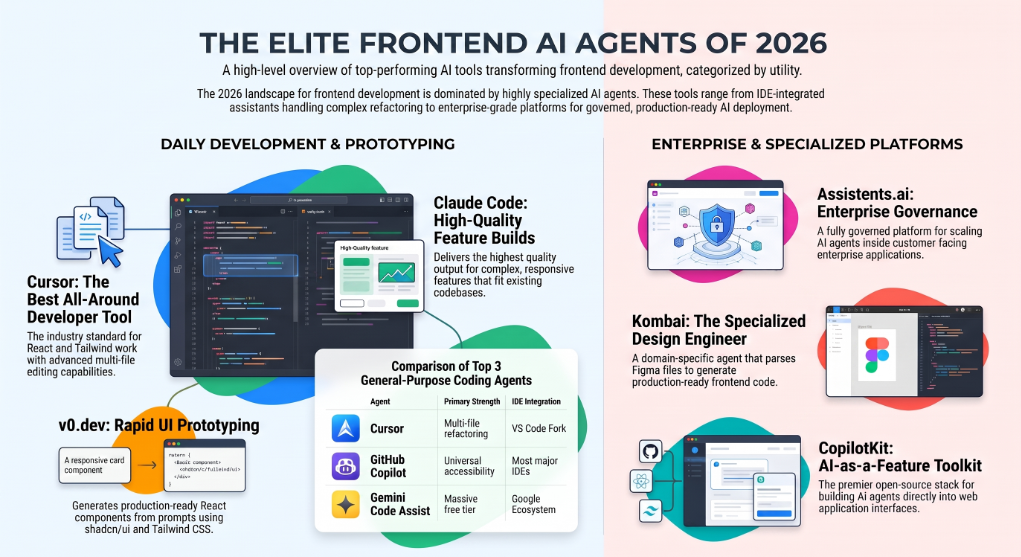
1. Code-generation & in-IDE agents. These work inside an existing codebase. They autocomplete, refactor, run multi-file edits, and increasingly take entire tickets autonomously. Best for professional developers shipping production code. Examples: Cursor, Claude Code, GitHub Copilot, Windsurf, OpenAI Codex, Gemini Code Assist.
2. Prompt-to-app & prototyping agents. These start from a blank canvas. You describe an app in natural language, and the agent generates a working frontend — often with backend and database scaffolding included. Best for prototypes, MVPs, and non-developers. Examples: v0.dev, Lovable, Bolt.new, Replit Agent.
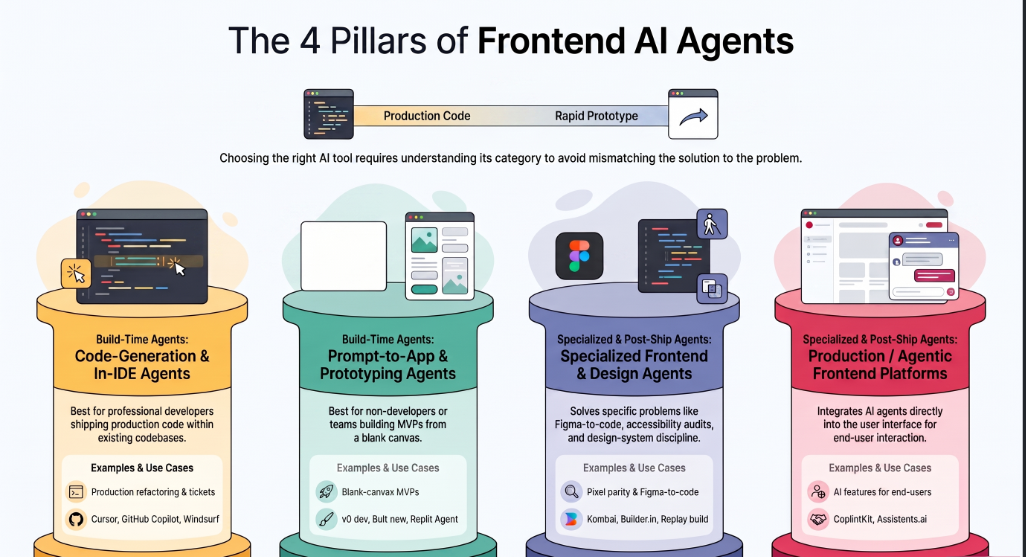
3. Specialized frontend & design agents. Built for a single, hard problem in frontend work: Figma-to-code, design-system enforcement, visual reverse engineering, accessibility audits. Best when you need pixel parity or design-system discipline. Examples: Kombai, Builder.io Fusion, Replay.build.
4. Production / agentic frontend platforms. These don't help you write the UI — they put AI agents inside the UI after it ships. Customer service agents in real estate portals, voice agents in retail apps, analytics agents inside enterprise dashboards. Best for teams shipping AI-powered experiences to end users at scale. Examples: CopilotKit, Assistents.ai by Ampcome, Mastra-built deployments.
Hold these four categories in mind for the rest of the article. They're the difference between picking a tool that fits your problem and one that doesn't.
Why AI Agents Matter for Frontend Development in 2026
The case is no longer theoretical. The adoption numbers tell the story:
- Cursor is now used by 64% of Fortune 500 companies, with its own agentic Composer 2.5 model shipping multi-file frontend changes in a single pass.
- GitHub Copilot has crossed 20 million users, according to GitHub CEO Thomas Dohmke — making it the most widely adopted AI coding assistant in history.
- According to Replay's 2026 analysis, 70% of legacy frontend rewrites fail because the logic is trapped in UI behavior, not source code — a problem AI agents using visual reverse engineering are starting to solve.
- Global technical debt is estimated at $3.6 trillion. Manual rewrites of frontends can no longer keep up.
- Independent teams report that AI coding assistants can cut frontend development time by up to 40% while improving code consistency.
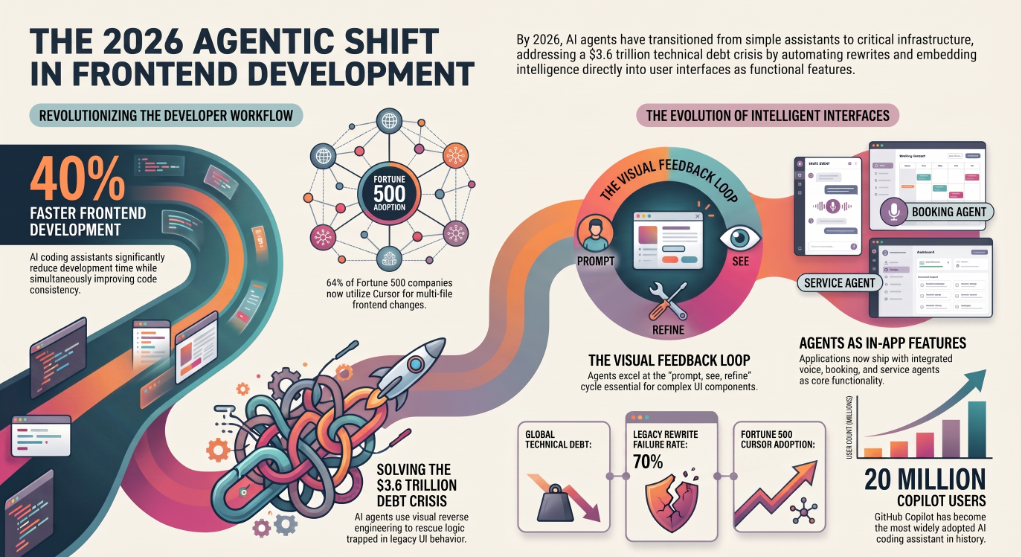
Frontend is also where AI agents produce their most visible results. A backend endpoint either returns the right JSON or it doesn't. A frontend component can be technically correct and still look wrong, feel wrong, or break at a screen size nobody tested. That visual feedback loop — prompt, see, refine — is exactly the loop AI agents are good at.
But the bigger 2026 shift is that AI agents are no longer just helping developers ship code. They're being deployed as features inside the apps developers ship. Voice support agents inside retail apps. Booking agents inside hospitality platforms. Tenant-service agents inside real estate portals. The frontend isn't just being built faster — it's being made intelligent.
That's the part this guide explains and most others ignore.
15 Best AI Agents for Frontend Development in 2026
Grouped by the four categories above.
1. Assistents.ai by Ampcome — Best governed enterprise platform for production AI agents in frontend applications.
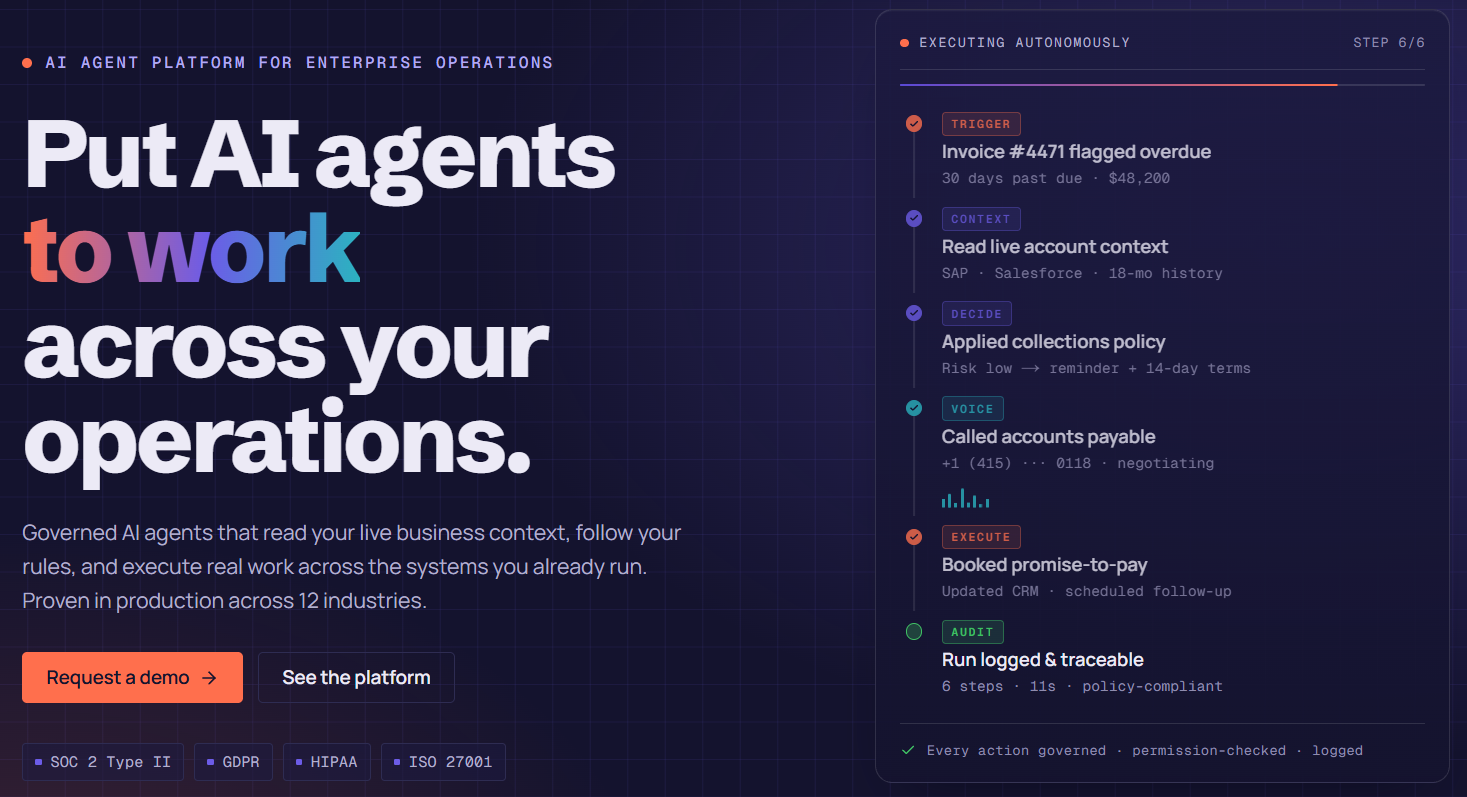
Where CopilotKit gives you the open-source primitives, Assistents.ai gives enterprises the full governed platform to design, deploy, and scale AI agents inside customer-facing and internal frontends. App Builder, workflow engine, semantic governance layer, RAG over enterprise documents, voice agents (STT-LLM-TTS), agentic actions with audit trails, and integrations with SAP, banking cores, retail POS, CRM, and ticketing systems. Used in production across hospitality, retail, banking, real estate, healthcare, energy, and logistics — covered in the use-case section below.
Code-Generation & In-IDE Agents
2. Claude Code — Best for full-feature frontend builds.
Claude Code is agentic to the core. Give it a design brief — "build the responsive hero with the animated gradient and scroll-triggered counter" — and it reads your project structure, respects your Tailwind config, generates TypeScript interfaces, and ships multi-file features that fit your codebase rather than fighting it. Its one limitation for frontend work is the lack of a visual preview; iteration on visual details is slower than in-editor tools. But the quality ceiling on output is the highest of any agent tested in 2026.
3. GitHub Copilot — Best universal coding companion.
The most widely deployed AI coding tool, with model choice across GPT, Claude, and Gemini families. Lives everywhere developers already work — VS Code, JetBrains, the terminal, GitHub.com, mobile. Strong inline completion, a cloud agent that opens PRs from issues, and AI code review. Its multi-file editing isn't as strong as Cursor's Composer, but it's half the price and the obvious choice for teams that want AI assistance without changing their setup.
4. Windsurf (Devin Desktop) — Best in-IDE agent UX.
Formerly Codeium, acquired by Cognition in 2025, now rebranding to Devin Desktop. Polished agent experience, with an Agent Command Center that manages local and cloud agents in a single Kanban view. Cited often as smoother than Cursor in context management. Strong enterprise traction with 4,000+ enterprise customers.
5. OpenAI Codex — Best for ChatGPT-native workflows.
Tightly integrated with ChatGPT Plus and Pro. Strong cloud delegation: dispatch frontend tasks while you work locally. Generous quota at the $20 Plus tier, but token-based pricing post-April 2026 makes heavy use harder to budget. A solid complement to an editor — not a replacement.
6. Gemini Code Assist — Best free tier for frontend developers.
Google's free tier offers up to 180,000 code completions a month — orders of magnitude more than most rivals. Lives in VS Code, JetBrains, Android Studio, and the terminal, with strong hooks into Firebase and BigQuery. The GitHub PR-review app is genuinely good. Friction points: GCP account setup, and a migration to Antigravity CLI rolling out in mid-2026 for free users.
Prompt-to-App & Prototyping Agents
7. v0.dev — Best for rapid UI prototyping.
Vercel's prompt-to-component agent. Describe a pricing table, dashboard, or landing page and v0 returns real React using shadcn/ui and Tailwind. The output is genuine code, not a proprietary format, so you can paste it into your project. The limit is its component vocabulary — anything outside the shadcn/ui pattern fights it. Strongest as the first step in a workflow that hands off to Cursor or Claude Code for production.
8. Lovable — Best for non-developers shipping live URLs.
Browser-based, full-stack generation with auto-provisioned databases. Excellent at getting to a working live URL with no developer involvement. Frustrating for the last 20% of production polish, so the recommended workflow is: prototype in Lovable, export to GitHub, finish in a real editor.
9. Bolt.new — Best for in-browser, no-install builds.
StackBlitz's WebContainer-based prompt-to-app agent. Dev server and package installs run client-side, with no remote VM. Publishes to a live bolt.host URL in seconds. Sweet spot is the same as Lovable: fast frontend and design output for prototypes and demos.
10. Replit Agent — Best for end-to-end browser deployment.
Strong for developers who want a browser-first IDE plus an agent that scaffolds, builds, and ships. The collaboration story is its differentiator: real-time multiplayer plus AI agents working inside the same workspace.
Specialized Frontend & Design Agents
11. Kombai — Best AI design engineer for frontend work.
A domain-specialized agent built specifically for frontend. Scans your repo, learns your stack, applies tested best practices for 400+ frontend libraries, parses Figma natively, and reuses your components, tokens, and hooks consistently. SOC 2 certified, never trains on customer code. The closest thing in 2026 to a frontend specialist that ships production code rather than just generating components.
12. Builder.io Fusion — Best background agent for design-system-aware frontend work.
Reads Figma files, reads your repository, generates UI code, and runs in the background across Slack or Jira. The only background agent in 2026 that can take a Jira trigger, pull the linked Figma frame, use your actual design-system components, and open a PR — verified through visual preview before merge.
13. Replay.build — Best for video-to-code and legacy modernization.
Pioneered visual reverse engineering: an engineer records a running application, and Replay extracts the React architecture with 1:1 visual parity. Automatically generates Playwright and Cypress tests from the recordings. The strongest answer to the 70% legacy-rewrite failure rate.
Production / Agentic Frontend Platforms
14. CopilotKit — Best open-source frontend stack for AI agents.
The de facto frontend toolkit for putting AI agents inside web apps. Pre-built chat components, headless UI primitives, generative UI rendering, persistent memory, debugging tools, and 13+ framework integrations including LangGraph, Mastra, and the AG-UI protocol. If you're building an app where the AI is a feature — not a tool for the developer — CopilotKit is where you start on the frontend side.
15. Cursor — Best all-around AI agent for frontend developers.
A VS Code fork with frontier AI built in. Its Composer mode handles multi-file frontend changes — threading a prop through a component tree, refactoring across files, updating Tailwind utilities project-wide. Every paid plan gives access to Claude, GPT, Gemini, and Cursor's own Composer 2.5 model. For day-to-day React, Next.js, and Tailwind work, Cursor is the default. Adoption inside Fortune 500 engineering teams is the strongest signal in the market.
AI Agents for Frontend Development on GitHub: Open-Source Options
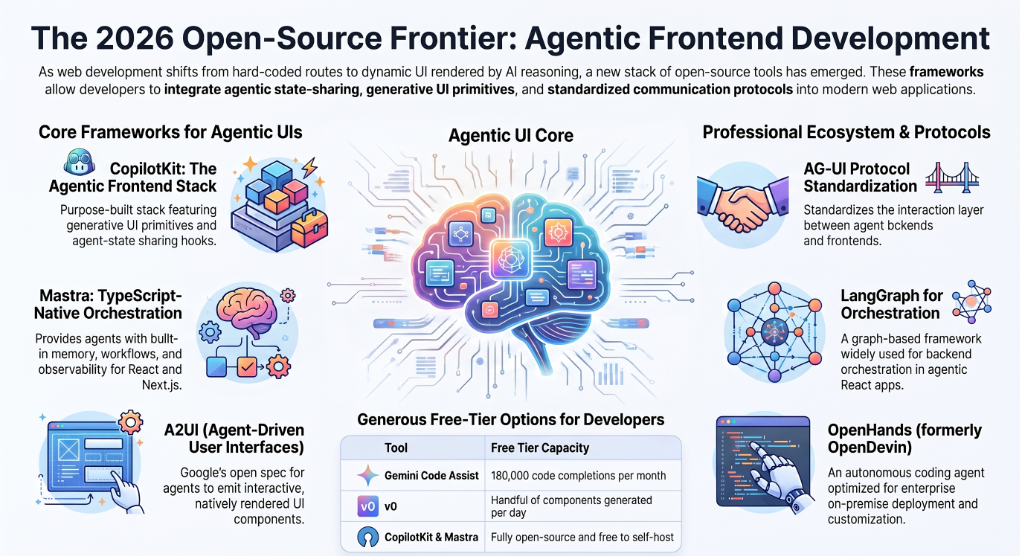
For teams that want full control over how agents reason, retrieve, and render UI, the open-source frontier in 2026 is healthy:
- CopilotKit — open-source frontend stack for agentic UIs, Apache-licensed, 13+ agent framework integrations.
- Mastra — TypeScript framework for AI agents and apps, Apache 2.0 core, connects to 90+ LLM providers through one interface, integrates with React, Next.js, and Node.
- LangGraph — graph-based agent orchestration framework, widely paired with CopilotKit for state-shared frontend UIs.
- OpenHands (formerly OpenDevin) — autonomous coding agent favored by enterprises that need on-premise deployment or deep customization.
- AG-UI Protocol — open spec connecting agentic backends with agentic frontends, with day-0 compatibility for A2UI.
- A2UI — Google's open project for agent-driven user interfaces, currently at v0.8 with client libraries for Flutter, Web Components, and Angular.
These are not consumer tools. They're the building blocks teams use when the off-the-shelf options don't go deep enough — or when governance, IP, and on-premise constraints rule out SaaS.
Free AI Frontend Agents & Generators Worth Trying
If you want to evaluate AI agents for frontend development without a credit card:
- Gemini Code Assist — up to 180,000 code completions per month free, the most generous in the market.
- GitHub Copilot Free — limited completions and chat, enough to validate fit before upgrading.
- v0 Free Tier — useful for generating a handful of components per day.
- Bolt.new Free — full prototyping experience with limits on builds per day.
- Replit Free — browser-based IDE with limited AI agent usage.
- CopilotKit & Mastra — fully open-source, free to self-host.
For most professional teams, free tiers are evaluation tools, not endgame stacks. The serious productivity gains start in the $20-$40/month range.
AI Frontend Frameworks for Building Agentic UIs
This is the section most listicles skip — and the section that matters most if you're building a product with AI agents inside it, not just using AI to build a product.
CopilotKit is the open-source frontend stack purpose-built for AI agents in web apps. Pre-built and headless chat components, generative UI primitives, agent-state sharing hooks (the useCoAgent pattern), and broad integration with LangGraph, Mastra, AG-UI, and A2UI.
AG-UI Protocol standardizes the interaction layer between agent backends and frontends — equivalent to what A2A did for agent-to-agent communication. Day-0 compatibility with A2UI.
Google's A2UI is the open spec for agent-driven interfaces. It lets agents emit not just text but interactive UI components — flight cards, forms, pie charts, dashboards — that render natively on any frontend. Already integrated into Flutter's GenUI SDK, Opal, and Gemini Enterprise.
Mastra is the TypeScript-native framework most often paired with React and Next.js for agents that need memory, workflows, and observability built in.
LangGraph brings graph-based orchestration and is increasingly the backend choice behind agentic React apps.
If you're a frontend developer in 2026, knowing these frameworks is no longer optional. The next generation of web apps will render UI dynamically based on agent reasoning — not just on hard-coded routes and components.
Real-World Use Cases: What Teams Have Built With AI Agents in Frontend Applications
This is what the listicles never cover. The 15 tools above are inputs — what actually matters is what teams shipped with them. Every example below is a real production deployment built on agentic platforms (anonymized to protect client identity). These show what AI agents inside frontend applications look like in the wild.
Hospitality & travel. A luxury collection operating 16 boutique safari lodges across East Africa now runs a digital booking agent that handles end-to-end luxury travel inquiries. Email intake, intent classification, conversational loop to capture missing details, real-time inventory checks, alternative-date negotiation, hybrid handoff to human concierges for curated itineraries, and automated PDF invoice generation. Result: faster booking turnaround on complex multi-property itineraries with no compromise to the white-glove brand experience.
Retail & e-commerce. A pan-India value retailer with 700+ stores deployed a voice support agent (STT-LLM-TTS) in Hindi and English alongside an inventory intelligence agent that surfaces per-store pricing, stock, and promotions, plus a RAG-powered knowledge agent over POS and SOP documents. Reduced manual helpdesk burden, faster onboarding for new store staff, and store-level inventory visibility leadership previously didn't have.
Banking & fintech. A global fintech serving banks and credit unions deployed omnichannel banking-support agents covering chat, email, and phone — with agent-assist summarization, next-best-action prompts, and full audit trails. Separately, an AI CFO agent built for SMBs connects accounting and banking data, runs forecast and scenario models, and alerts founders to cash-runway risks before they become emergencies.
Real estate. A major UAE real estate portfolio owner deployed an omnichannel customer service agent across web, WhatsApp, and email — handling tenant query triage, FAQs, rental and payment support, and ticketing with escalation to human teams. The result: 24×7 tenant experience and faster response on a portfolio spanning thousands of units.
Healthcare. A US healthcare staffing platform connecting nurses to facilities deployed an agentic workflow for talent onboarding and credential capture, facility request matching, scheduling, notifications, and compliance — collapsing fill cycles for shift-based staffing.
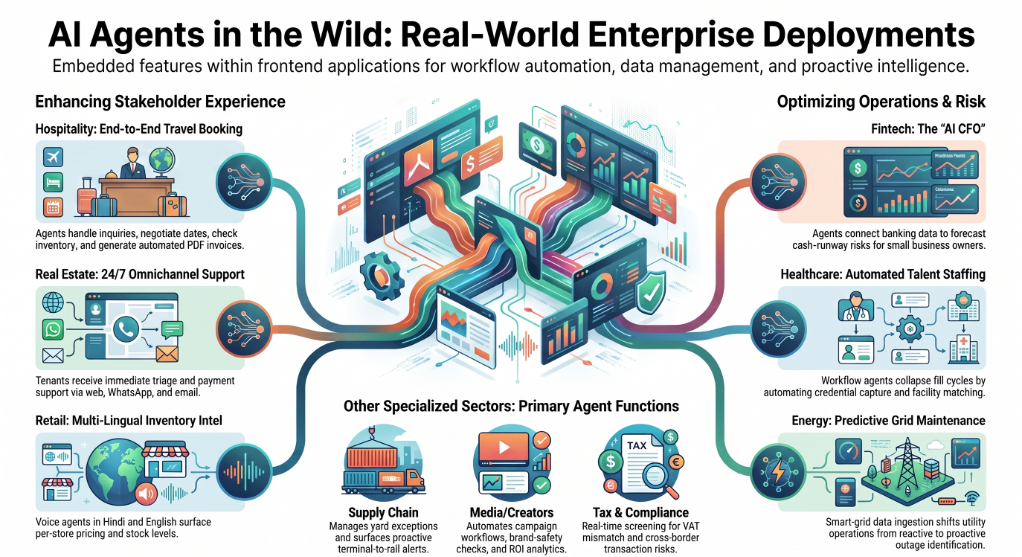
Supply chain & logistics. A global ports and logistics leader deployed a terminal-and-rail management solution that digitizes yard and rail operational workflows, manages exception scheduling, and surfaces executive dashboards with proactive alerts. Higher predictability of terminal-to-rail throughput at enterprise scale.
Media & creator economy. A creator-economy platform serving brands and creators deployed AI agents for creator discovery enrichment, campaign workflow automation, content KPI monitoring, brand-safety checks, and ROI analytics — collapsing manual ops across thousands of simultaneous campaigns.
Energy & utilities. A state-level power transmission utility deployed AI agents for smart-grid data ingestion, predictive analytics for outages and field issues, and automated alerts routed to field operations. Faster identification of grid exceptions and a meaningful shift from reactive to proactive operations.
Education. A global teacher community with 1M+ members across 131 countries deployed an AI support agent surfacing teacher profiles, competency insights, and learning resources — alongside analytics for program operators tracking engagement and outcomes at international scale.
Tax & compliance. A tax-tech product built an early-screening agent for cross-border transactions, classifying withholding tax, VAT mismatch, and permanent-establishment risks in real time, with evidence collection and explainability notes for tax experts.
Sales & B2B operations. A flagship UAE engineering and technology solutions provider deployed an agentic sales agent for always-on account monitoring, rule-governed opportunity identification, and CRM-integration-ready follow-up workflows. Higher account coverage without adding headcount.
These eleven examples come from a longer roster of 30+ production deployments across geographies and industries. The pattern is consistent: the value isn't in writing frontend code faster — it's in embedding AI agents as features inside frontends that customers and employees already use.
Will AI Replace Frontend Developers in 2026?
No. But it will replace certain frontend workflows — and the developers who refuse to adopt those workflows.
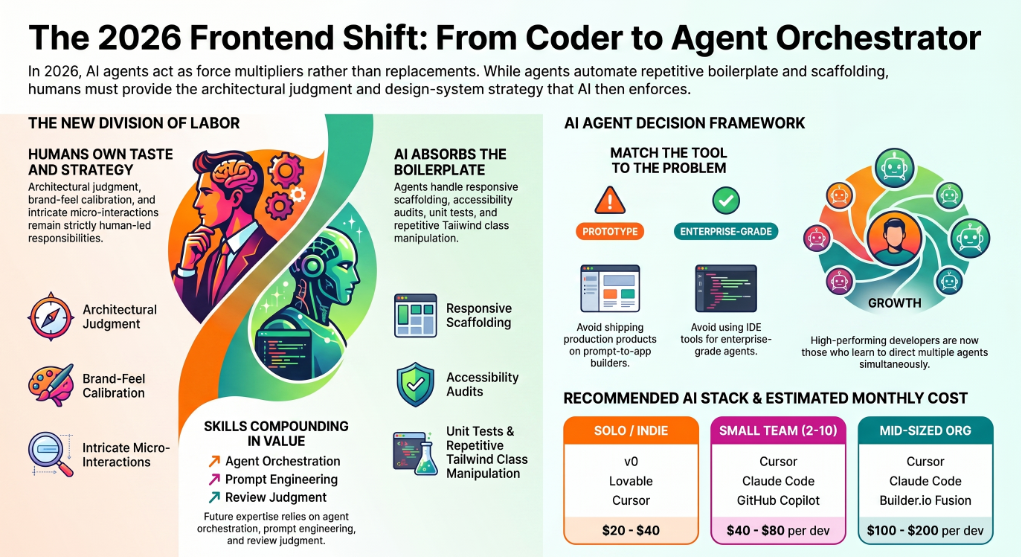
What AI agents are absorbing in 2026: boilerplate component generation, responsive-layout scaffolding, accessibility audits, ARIA tag insertion, design-system enforcement, repetitive Tailwind class manipulation, basic CRUD form generation, and unit-test writing for components.
What still belongs to humans: architectural judgment, user-experience taste, performance optimization beyond defaults, intricate animations and micro-interactions, brand-feel calibration, and the design-system strategy that AI agents then enforce. As Pinklime put it in their 2026 ranking: AI doesn't eliminate the need for frontend expertise; it amplifies whatever expertise you already have.
The skills compounding in value: prompt engineering for code, agent orchestration, design-system curation, eval design, and review judgment. The skills compounding in risk: pure boilerplate output without architectural awareness.
The takeaway for frontend developers is simple. AI agents are not a replacement — they're a force multiplier. The developers who shipped the most this year are the ones who learned to direct two or three agents simultaneously, not the ones who refused to.
How to Choose the Right AI Agent for Your Frontend Workflow
A simple decision framework based on what teams actually optimize for.
If you're a solo founder or indie developer prototyping a new product: Start with v0 or Lovable for the first build, then move to Cursor for refinement. Total monthly cost: $20-$40.
If you're a small frontend team (2-10) shipping production code: Cursor as the in-IDE default, Claude Code for big feature builds, GitHub Copilot as the always-on autocomplete. Optional: Kombai for design-heavy work. Total monthly cost: $40-$80 per developer.
If you're a mid-sized engineering org with a design system: Cursor + Claude Code + Builder.io Fusion for design-system-aware frontend automation. Add Replay.build if you have legacy modernization on the roadmap. Total cost: usage-based, typically $100-$200 per developer per month.
If you're an enterprise shipping AI agents as features inside production applications: This is a different problem entirely. You're not buying code-generation help — you're buying a governed platform to design, deploy, and audit AI agents that serve end users at scale. CopilotKit for open-source primitives. Assistents.ai by Ampcome for a fully governed, enterprise-grade platform with semantic governance, RAG, voice agents, agentic actions, audit trails, and deep integrations with SAP, banking cores, CRM, and retail systems.
If you're a non-developer with a product idea: Lovable or Bolt.new will get you to a working URL. Plan for a developer to take over once usage starts to matter.
The mistake to avoid: trying to ship a production AI-powered product on prompt-to-app builders alone, or trying to deploy enterprise-grade customer-facing agents using IDE tools. Pick the category that matches the problem.
Best Practices for Deploying AI Agents in Frontend Applications
Five principles that separate successful production deployments from prototypes that die in staging.
Build human-in-the-loop from day one. For any agent action with real-world consequences — sending an email, booking inventory, creating a SAP sales order, escalating a ticket — require human approval flows. Synchronous for high-stakes operations, asynchronous for everything else.
Enforce your design system in the agent layer. AI agents will happily invent new patterns if you let them. Use a skill or rules layer (CopilotKit, Cursor rules, SKILL.md files) to make your design system non-negotiable.
Govern the data the agent sees. RAG over enterprise documents is powerful and dangerous. A semantic governance layer that enforces consistent definitions, hierarchies, and formulas matters more than the model choice — and is the area where most DIY implementations fail.
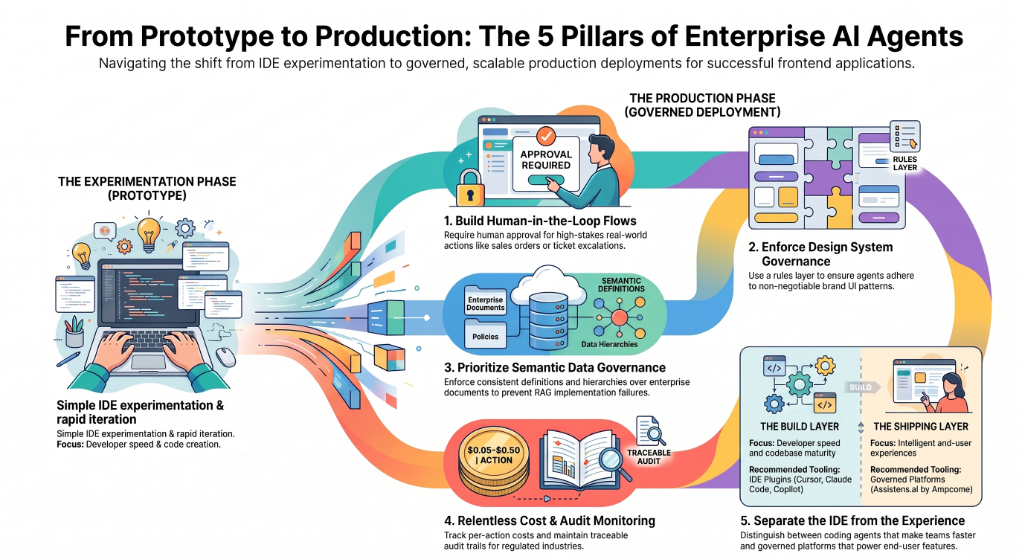
Monitor cost relentlessly. Multi-step agentic workflows stack LLM calls fast. A single complex agent run can cost 5-50 cents. At scale, that becomes the second-largest line item after cloud compute. Track per-action cost from day one.
Build observability and audit trails. Every agent action should be traceable: which inputs, which tools called, which outputs, which user approved. This is non-negotiable in regulated industries — banking, healthcare, tax, energy — and increasingly the baseline expectation everywhere else.
The Real Choice in 2026
AI agents for frontend development split into two questions, not one.
The first question is how you build. Pick a coding agent — Cursor, Claude Code, GitHub Copilot, or one of the prompt-to-app builders — based on team size, codebase maturity, and budget. The differences between the leading tools are real but narrowing; any of the top four will make you measurably faster.
The second question is what you ship. If your product is just a website or a SaaS dashboard, stop at question one. If your product is meant to be intelligent — if end users will interact with AI inside the experience you ship — you're in the production-agent category, and the question is no longer "which IDE plugin" but "which governed platform."
The teams shipping the most ambitious frontend products in 2026 are running both layers in parallel: an in-IDE agent stack for the build, and a governed agentic platform for the AI-powered experience inside the product. That's the pattern behind every use case in this guide.
If you're an enterprise team ready to deploy production AI agents inside customer-facing or internal frontend applications, explore Assistents.ai by Ampcome — the governed agentic platform behind production deployments across hospitality, retail, banking, real estate, healthcare, energy, and logistics. Book a demo to see how teams are turning frontends into intelligent experiences.
FAQs
What is an AI agent in frontend development?
An AI agent in frontend development is an autonomous AI system that performs frontend tasks — either by writing frontend code on a developer's behalf (Cursor, Claude Code) or by living inside a deployed application and serving intelligent experiences to end users (CopilotKit, Assistents.ai). Unlike static AI tools, agents can reason, plan, use tools, and execute multi-step tasks.
What's the difference between AI coding agents and AI copilots?
Copilots assist a human in real time — autocomplete, inline suggestions, chat. Agents act on their own — they read your project, plan a multi-step task, execute it, and return a result. GitHub Copilot started as a copilot; in 2026 it has agent features. Claude Code and Cursor's Composer are full agents.
Are AI agents for frontend development free?
Several offer free tiers. Gemini Code Assist gives up to 180,000 completions per month free, GitHub Copilot has a free tier, and v0, Bolt.new, and Replit offer free tiers with usage limits. For production use, expect $20-$40 per developer per month at the low end and $100-$200 for premium tiers like Claude Max or Cursor Ultra.
Which AI agent is best for React and Next.js?
Cursor and Claude Code are the strongest for production React and Next.js work. Cursor wins on in-editor iteration; Claude Code wins on complete feature builds. v0 is best for component prototyping. Kombai is best for design-system-heavy React work.
Can AI agents replace frontend developers?
No. AI agents are absorbing repetitive frontend work — boilerplate, scaffolding, accessibility audits, test writing — but architectural judgment, UX taste, performance optimization, and design-system strategy still belong to humans. The developers gaining the most leverage are the ones directing multiple agents simultaneously.
What's the best AI agent for Figma-to-code?
Kombai for native Figma parsing inside a frontend-specialized agent, Builder.io Fusion for design-system-aware Figma-to-code with PR generation, and Replay.build for video-based reverse engineering when Figma files don't exist.
How are AI agents different from ChatGPT for frontend work?
ChatGPT is a chat interface — useful for code snippets and debugging but not aware of your codebase. AI agents read your repo, respect your conventions, execute multi-step tasks across multiple files, and can take entire tickets without continuous prompting. The difference is project-level awareness.
What do developers on Reddit say about AI agents for frontend?
Across r/webdev, r/reactjs, and r/cursor, the 2026 consensus is that Cursor leads for daily in-IDE work, Claude Code leads for autonomous feature builds, Kombai is highly regarded for design-heavy work, and Windsurf is the closest Cursor alternative. Sentiment toward pure prompt-to-app tools (Lovable, Bolt) is positive for prototypes but skeptical for production.
Which AI agents work with GitHub natively?
GitHub Copilot has the deepest GitHub integration (issues, PRs, code review). Cursor, Claude Code, and Windsurf integrate via standard Git workflows. Builder.io Fusion is unique in taking Jira/Slack triggers and opening PRs autonomously.
What is Kombai and how does it compare?
Kombai is a domain-specialized AI design engineer for frontend work — it scans your repo, applies best practices for 400+ frontend libraries, parses Figma natively, and reuses your existing components and tokens. SOC 2 certified with no training on customer code. Best fit when frontend work is the entire workload, not just part of it.
How do enterprise teams deploy AI agents inside production frontends?
Enterprises don't deploy AI agents inside production frontends using IDE tools. They use governed agentic platforms — CopilotKit for open-source primitives, or full enterprise platforms like Assistents.ai by Ampcome for design, deployment, governance, RAG over enterprise documents, voice agents, agentic actions with audit trails, and integration with SAP, banking cores, CRM, and retail systems. The use cases above — booking agents, tenant-support agents, banking-support agents, smart-grid agents — are all examples of this pattern.

Transform Your Business With Agentic Automation
Agentic automation is the rising star posied to overtake RPA and bring about a new wave of intelligent automation. Explore the core concepts of agentic automation, how it works, real-life examples and strategies for a successful implementation in this ebook.
Sarfraz Nawaz is the CEO and founder of Ampcome, which is at the forefront of Artificial Intelligence (AI) Development. Nawaz's passion for technology is matched by his commitment to creating solutions that drive real-world results. Under his leadership, Ampcome's team of talented engineers and developers craft innovative IT solutions that empower businesses to thrive in the ever-evolving technological landscape.Ampcome's success is a testament to Nawaz's dedication to excellence and his unwavering belief in the transformative power of technology.

More insights
Discover the latest trends, best practices, and expert opinions that can reshape your perspective







Contact us

