
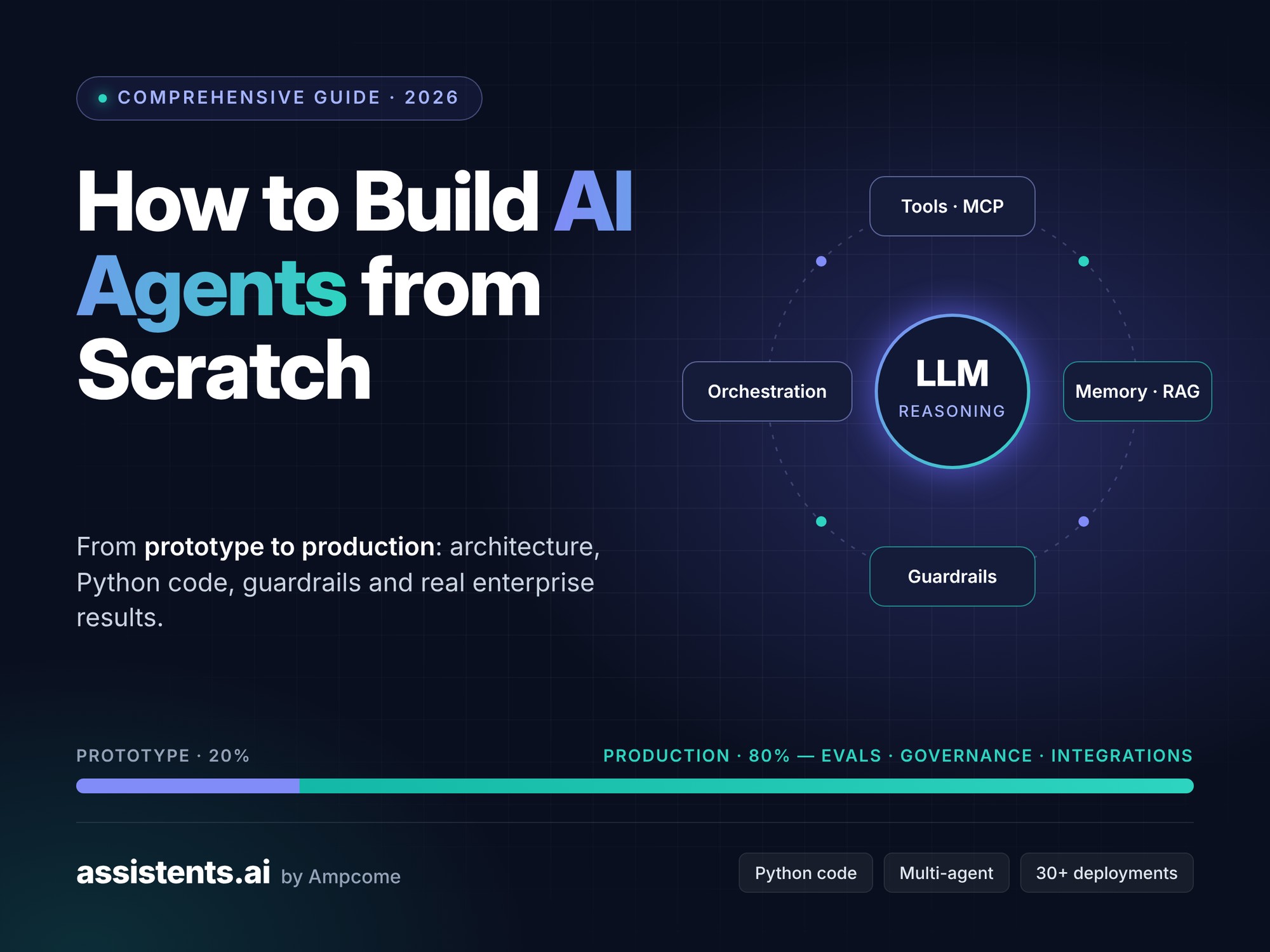
How to Build AI Agents from Scratch: A Comprehensive Guide from Prototype to Production (2026)


Key takeaways
- An AI agent is a large language model (LLM) in a loop that can call tools, remember context and work toward a goal with limited human input.
- You can build a working agent from scratch in about 40 lines of Python. The code is in Step 4.
- The prototype is roughly 20% of the work. The other 80% is integrations, guardrails, evaluation, monitoring and governance.
- Start with a narrow, measurable use case and a low autonomy level, then expand authority as the agent proves itself.
- Enterprise platforms like Assistents.ai by Ampcome cover the production 80%, so teams go from prototype to a governed, live agent in weeks instead of quarters.
This is a comprehensive guide to building AI agents from scratch, written for developers who want to understand how agents work and for business leaders who need one running in production. Building a demo agent takes an afternoon. Getting that agent to work reliably on real business data, inside real systems, with the right controls, takes most teams months.
This guide covers both halves. You'll learn the architecture, write a working agent loop in Python, add tools, memory and guardrails, and then see what it takes to run agents at enterprise scale. Along the way we share anonymised results from more than 30 enterprise deployments that Ampcome has delivered across Africa, Asia-Pacific, India, the Middle East, Europe and North America.
What Is an AI Agent? (And What It Isn't)
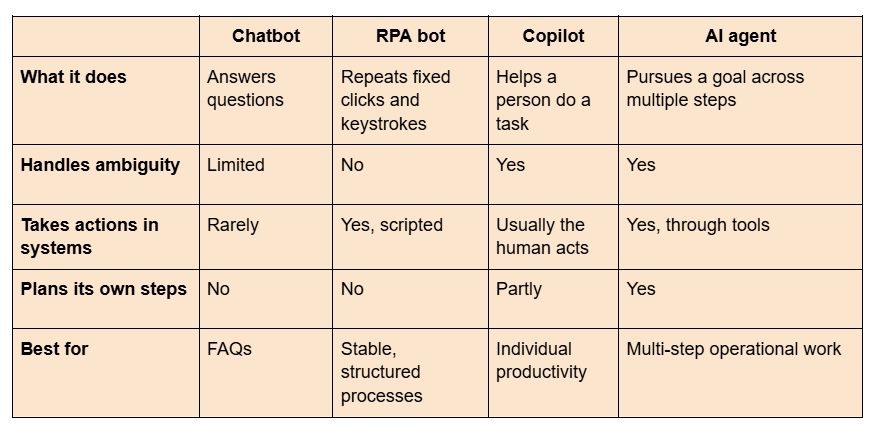
An AI agent is software that uses a large language model to understand a goal, decide which steps to take, call tools or systems to act, observe the results and repeat until the goal is met. Unlike a chatbot, which only replies, an agent acts. Unlike traditional automation, which follows a fixed script, an agent adapts its path when the situation changes.
The breakthrough isn't that software can chat. It's that software can now do a bounded form of knowledge work: interpret an objective, gather evidence, choose tools, break a task into steps, revise the plan and hand off to people when needed.
AI agent vs chatbot vs RPA vs copilot
The 5 types of AI agents
Classic AI theory describes five agent types. Modern LLM agents usually combine several of them.
- Simple reflex agents act on the current input only. Example: an email router that tags messages by keyword.
- Model-based reflex agents keep an internal picture of the world. Example: a support agent that remembers what the customer said three messages ago.
- Goal-based agents choose actions that move toward a goal. Example: a booking agent that keeps working until a reservation is confirmed.
- Utility-based agents weigh trade-offs to pick the best outcome. Example: a procurement agent balancing price, lead time and supplier reliability.
- Learning agents improve from feedback. Example: an agent whose prompts and tools are refined based on evaluation results.
Core Components of AI Agent Architecture
Every AI agent has five building blocks: a reasoning engine (the LLM), tools it can call, memory, a planning and orchestration layer, and guardrails. Get these right and the framework you choose matters much less.
┌──────────────────────────────────────────────┐
Goal ───► │ ORCHESTRATION / PLANNING LOOP │
│ ┌────────────┐ ┌────────────────────┐ │
│ │ LLM │◄───►│ MEMORY │ │
│ │ (reasoning)│ │ short-term · RAG │ │
│ └─────┬──────┘ └────────────────────┘ │
│ │ tool calls │
│ ┌─────▼──────────────────────────────────┐ │
│ │ GUARDRAILS: permissions · rules · │ │
│ │ approvals · audit log │ │
│ └─────┬──────────────────────────────────┘ │
└─────────┼────────────────────────────────────┘
▼
TOOLS: ERP · CRM · email · databases · APIs · humans
Figure: AI agent architecture: reasoning, memory, tools, orchestration and guardrails. (Replace with the designed diagram; alt text: "AI agent architecture diagram showing LLM, memory, tools, orchestration and guardrails".)
The reasoning engine (LLM)
The LLM interprets the goal, decides the next step and writes the final answer. Most production agents use a frontier model for hard reasoning and a smaller, cheaper model for routine steps. Keeping your design model-neutral protects you as models improve and prices change.
Tools and function calling (including MCP)
Tools are how an agent acts: query a database, create a ticket, send an email, post a sales order. The LLM outputs a structured "tool call", your code runs it, and the result goes back to the model. See OpenAI's function calling guide for the basic pattern. The Model Context Protocol (MCP) is now the common open standard for exposing tools and data to agents across vendors.
Memory: short-term, long-term and enterprise context
- Short-term memory is the conversation and the steps taken so far.
- Long-term memory stores facts across sessions, such as customer preferences or past decisions.
- Enterprise context is the agent's grounding in your data: documents, policies, metrics and records, usually delivered through retrieval-augmented generation (RAG).
A key principle: give the agent the smallest authorised context it needs for the task. Dumping all your data into the prompt raises cost, leakage risk and reasoning errors.
Planning and orchestration
The orchestration layer runs the loop: think, act, observe, repeat. The best-known pattern is ReAct (reason + act). For longer processes, use a durable workflow to control state, deadlines, approvals and retries, and let the agent make adaptive choices inside it. We call this "deterministic macro, agentic micro." Anthropic's guide to building effective agents makes a similar case for keeping designs simple.
Guardrails, permissions and human-in-the-loop
Guardrails decide what the agent is allowed to do: which data it can see, which tools it can call, which actions need human approval and what gets logged. In production, authority should be enforced by the system, never just requested in a prompt.
Before You Build: Pick the Right Use Case
The best first agent targets a task that is repetitive, data-rich, measurable and low-risk if it makes a mistake. Picking the wrong use case is the most common reason agent projects stall.
The 4-question use-case filter
- Is it repetitive? Does the task happen dozens or hundreds of times a week?
- Is the data available? Can the agent reach the documents, systems and records it needs?
- Is success measurable? Can you define a clear metric, such as cycle time, accuracy or tickets resolved?
- Is the risk bounded? If the agent gets it wrong, can a person catch it before it causes harm?
Strong first use cases include document intake and extraction, customer and tenant support, order processing, KPI monitoring and alerts, and research or report drafting.
Choose your autonomy level
Autonomy isn't on or off. It's a ladder, and you should design for where you want to end up while starting low.
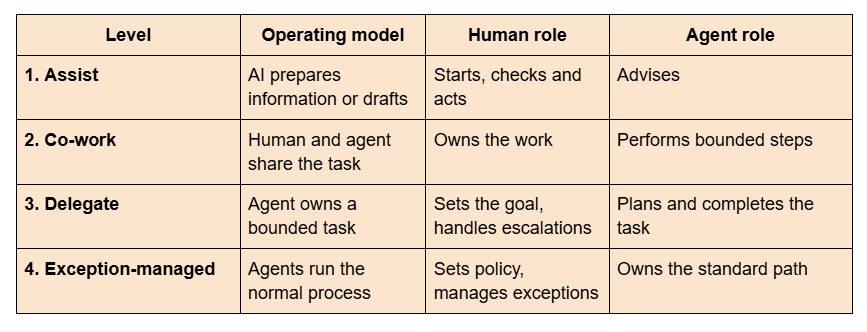
Most enterprises get strong value at Levels 2 and 3. Requiring human approval on every step keeps the old bottleneck; unrestricted autonomy creates unacceptable risk. The target is exception-managed operations: agents handle the normal path inside a defined authority envelope, and humans handle material exceptions. Autonomy should be earned through testing, shadow runs and proven results.
How to Build an AI Agent from Scratch: Step by Step
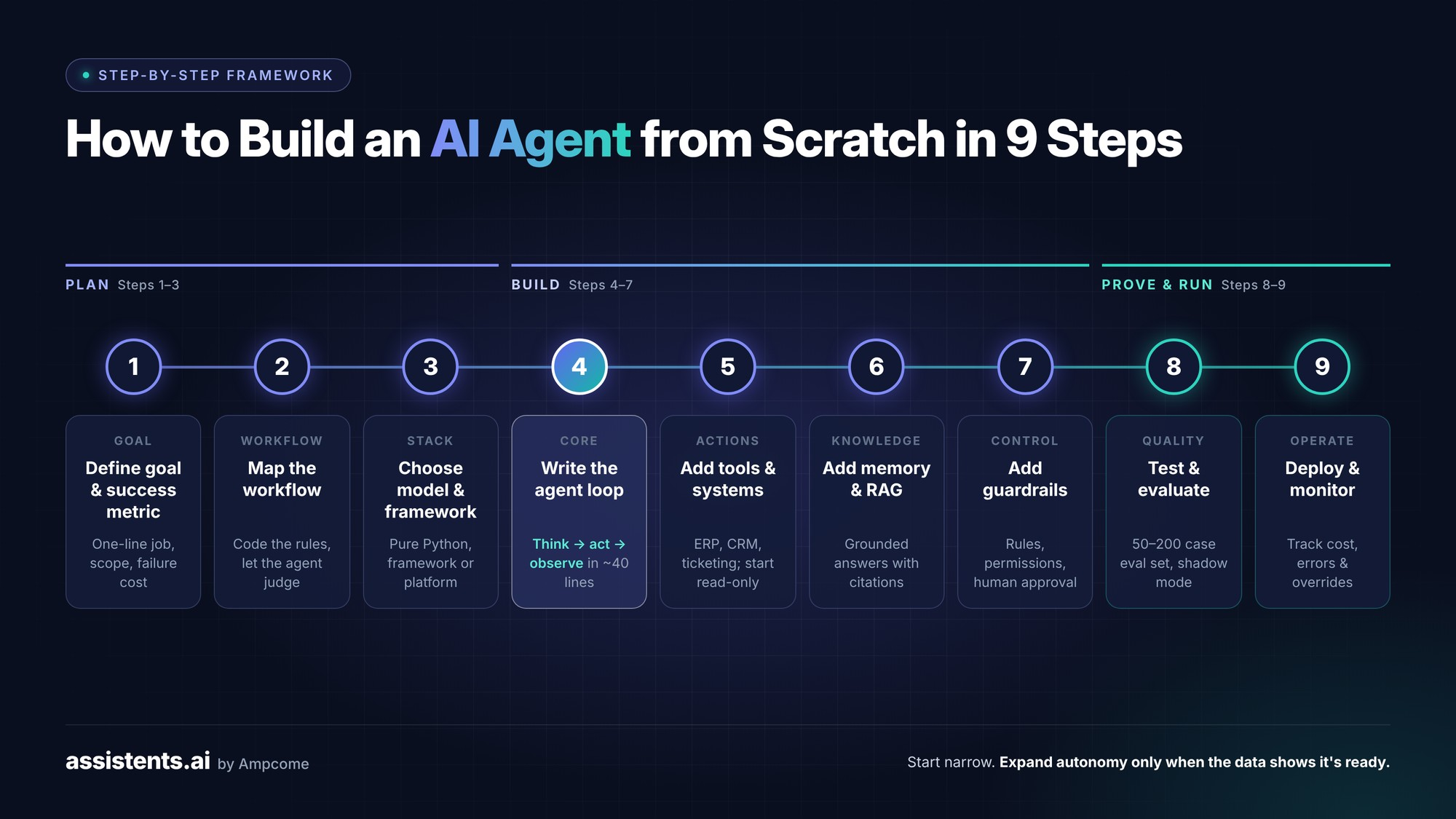
To build an AI agent from scratch: (1) define the goal and success metric, (2) map the workflow, (3) choose a model and framework, (4) write the agent loop, (5) add tools, (6) add memory and knowledge, (7) add guardrails, (8) test and evaluate, and (9) deploy and monitor.
Step 1 — Define the goal, scope and success metric
Write a one-sentence job description for the agent. "Resolve order-status questions from customers by email and chat, escalating refunds over $200 to a human." Then define:
- In scope / out of scope: what the agent must never attempt
- Success metric: e.g., 80% of order-status queries resolved without a human, under 2 minutes each
- Failure cost: what happens if it gets it wrong
Step 2 — Map the workflow and decision points
Draw the current process as it really runs: inputs, systems touched, decisions, exceptions and handoffs. Mark each step as deterministic (always the same rule, so code it) or judgement-based (needs interpretation, so give it to the agent). This one exercise prevents most over-engineering.
In practice: For a healthcare staffing platform in the US, we mapped intake, credential checks, matching, scheduling and compliance before writing any agent logic. The agents then handled matching and scheduling inside that map, which led to faster fill cycles and better workforce utilisation.
Step 3 — Choose your model and framework
You have three options:
- No framework (pure Python + model API): best for learning and simple agents. You control everything.
- Agent frameworks: LangGraph, CrewAI, the OpenAI Agents SDK and Microsoft AutoGen give you state, multi-agent patterns and tool handling. Compare them in our guide to AI agent frameworks in 2026.
- Enterprise agent platforms: such as Assistents.ai, which add governance, integrations and deployment control on top of agent building.
Python is the default language for AI agents because of its libraries and model SDKs. TypeScript is a close second for web-first teams.
Step 4 — Write the agent loop in Python
Here is a complete, framework-free agent. It takes a goal, lets the model decide whether to call a tool, runs the tool, feeds the result back and stops when the model has an answer or hits a step limit.
# pip install openai
import json
from openai import OpenAI
client = OpenAI() # reads OPENAI_API_KEY from your environment
MODEL = "gpt-4.1-mini" # any model that supports tool calling works
# 1. A tool: replace the fake data with a real call to your ERP or order system
def get_order_status(order_id: str) -> dict:
fake_db = {"A-1001": "shipped", "A-1002": "processing"}
return {"order_id": order_id, "status": fake_db.get(order_id, "not_found")}
# 2. Describe the tool so the model knows when and how to call it
TOOLS = [{
"type": "function",
"function": {
"name": "get_order_status",
"description": "Look up the current status of a customer order by its ID.",
"parameters": {
"type": "object",
"properties": {"order_id": {"type": "string"}},
"required": ["order_id"],
},
},
}]
REGISTRY = {"get_order_status": get_order_status}
# 3. The agent loop: think -> act -> observe -> repeat
def run_agent(goal: str, max_steps: int = 5) -> str:
messages = [
{"role": "system", "content": "You are an order-support agent. "
"Use tools to look up facts. Never guess an order status."},
{"role": "user", "content": goal},
]
for _ in range(max_steps):
response = client.chat.completions.create(
model=MODEL, messages=messages, tools=TOOLS
)
msg = response.choices[0].message
if not msg.tool_calls: # no tool needed: final answer
return msg.content
messages.append(msg) # keep the tool request in memory
for call in msg.tool_calls:
args = json.loads(call.function.arguments)
result = REGISTRY[call.function.name](**args)
messages.append({
"role": "tool",
"tool_call_id": call.id,
"content": json.dumps(result),
})
return "Step limit reached. Escalating to a human." # simple guardrail
if __name__ == "__main__":
print(run_agent("Where is my order A-1001?"))
That's a real agent: an LLM, a tool, short-term memory (the messages list), a loop and a basic guardrail (the step limit). Everything else in this guide builds on this core.
Step 5 — Add tools and connect business systems
Agents create value when they act inside the systems you already run: ERP, CRM, ticketing, email, data warehouses. For each tool:
- Write a clear description so the model calls it at the right time
- Use typed, validated inputs. Never pass raw model output straight into a database query.
- Make write actions idempotent (safe to retry) and log every call
- Start read-only, then add write actions once tests pass
In practice: A premium appliance distributor in the UAE replaced a costly legacy order-capture tool with an agent that reads order triggers, validates them against business rules and creates SAP sales orders automatically, with approvals for exceptions. Result: less manual order entry, a faster order-to-confirmation cycle and a full audit trail for every order.
Step 6 — Give your agent memory and company knowledge (RAG)
To answer from your data, not the model's general training, connect the agent to a knowledge base:
- Ingest documents, SOPs, policies and records
- Chunk and embed them into a vector store, ideally combined with keyword search (hybrid retrieval)
- Retrieve the most relevant passages for each question, filtered by the user's permissions
- Ground the answer in those passages and cite sources so people can verify
For structured data such as sales, inventory and finance, pair RAG with governed text-to-SQL over a semantic layer, so "revenue" means the same thing to every agent and every person. You usually don't need to train or fine-tune your own model; retrieval and good prompts solve most accuracy problems.
In practice: A large Indian value retail chain with hundreds of stores deployed three agents: a Hindi and English voice support agent, an inventory agent with store-level pricing, stock and promotions, and a knowledge agent using RAG over POS and SOP documents. The result was a lower helpdesk burden, faster store issue resolution and faster onboarding for new staff.
Step 7 — Add guardrails and human approval steps
Guardrails turn a clever demo into something you can trust:
- Input guardrails: detect prompt injection and off-topic requests (see the OWASP Top 10 for LLM Applications)
- Permission guardrails: the agent inherits only the access of the user or role it acts for
- Business rules: hard limits enforced in code or a rules engine, such as "no refunds over $200 without approval"
- Human-in-the-loop: route high-value, low-confidence or unusual cases to a person
- Output checks: validate format, policy compliance and facts before anything is sent
In practice: A luxury safari hospitality group in East Africa uses a booking agent that reads guest emails, classifies intent, captures missing details through conversation, checks live inventory and proposes alternative dates or properties. Curated itineraries go to a human specialist through a hybrid handoff. Bookings are faster with less back-and-forth, and the luxury service standard is kept.
Step 8 — Test and evaluate
Agents are non-deterministic, so unit tests aren't enough. Build an evaluation set: 50 to 200 real examples with the expected outcome. Measure:
- Task success rate: did it reach the right outcome?
- Tool accuracy: did it call the right tool with the right inputs?
- Groundedness: is every claim supported by retrieved sources?
- Escalation quality: did it hand off when it should have?
- Cost and latency per task
Run the eval set on every change to prompts, tools or models. Before going live, run the agent in shadow mode next to humans and compare results.
Step 9 — Deploy, monitor and improve
Once live, track every run: inputs, tool calls, outputs, cost, latency and human overrides. Set alerts for spikes in errors, escalations or spend. Review failures weekly and feed them back into the eval set. Expand the agent's authority only when the data shows it's ready. Use frameworks such as the NIST AI Risk Management Framework to structure ongoing governance.
From One Agent to Many: Multi-Agent Systems
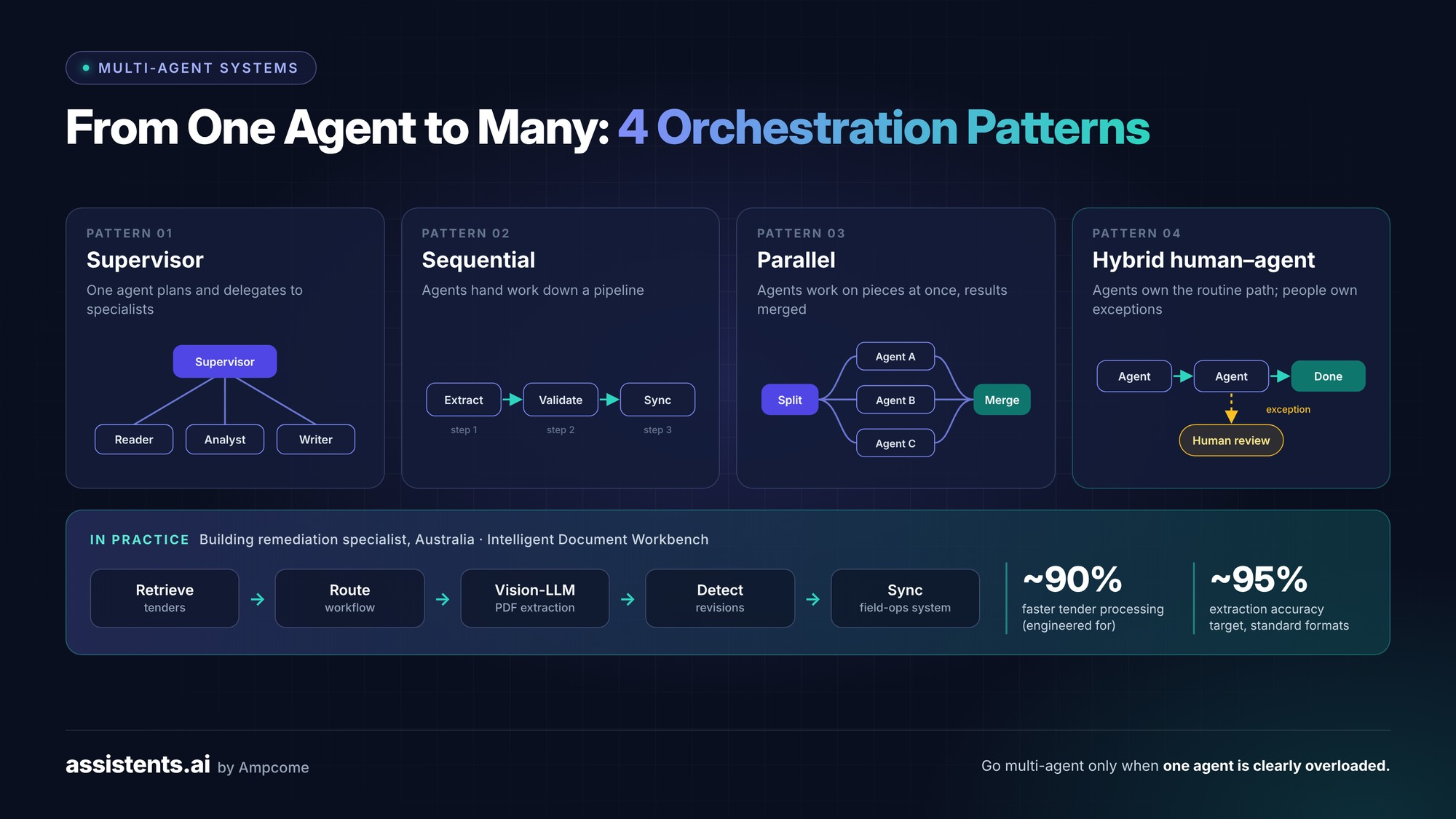
A multi-agent system splits a complex job across specialised agents, such as a reader, an analyst and a writer, coordinated by an orchestrator. It improves accuracy on complex work, but adds cost and complexity, so use it only when one agent is clearly overloaded.
When to use multiple agents (and when not to)
Use multiple agents when the task needs distinct skills, different tool permissions or parallel work on large inputs. Don't use them just because a framework makes it easy. Treating every process as multi-agent is one of the most common and expensive mistakes we see.
Orchestration patterns
- Supervisor: one agent plans and delegates to specialists
- Sequential: agents hand work down a pipeline (extract, then validate, then sync)
- Parallel: agents work on separate pieces at once and results are merged
- Hybrid human–agent teams: people own decisions and exceptions; agents own the routine path
In practice: An Australian building remediation specialist needed to process complex tender documents. We built an Intelligent Document Workbench using multi-agent orchestration: agents retrieve tenders, determine the workflow, extract data from complex PDFs with vision-capable LLMs, detect revisions between versions and sync everything into the company's field-operations system, with quote locking and audit logs. The system is engineered for up to ~90% faster tender document processing, with a ~95% extraction accuracy target on standard formats, and lowers bid risk through change detection.
The Prototype-to-Production Gap: What Most Guides Skip
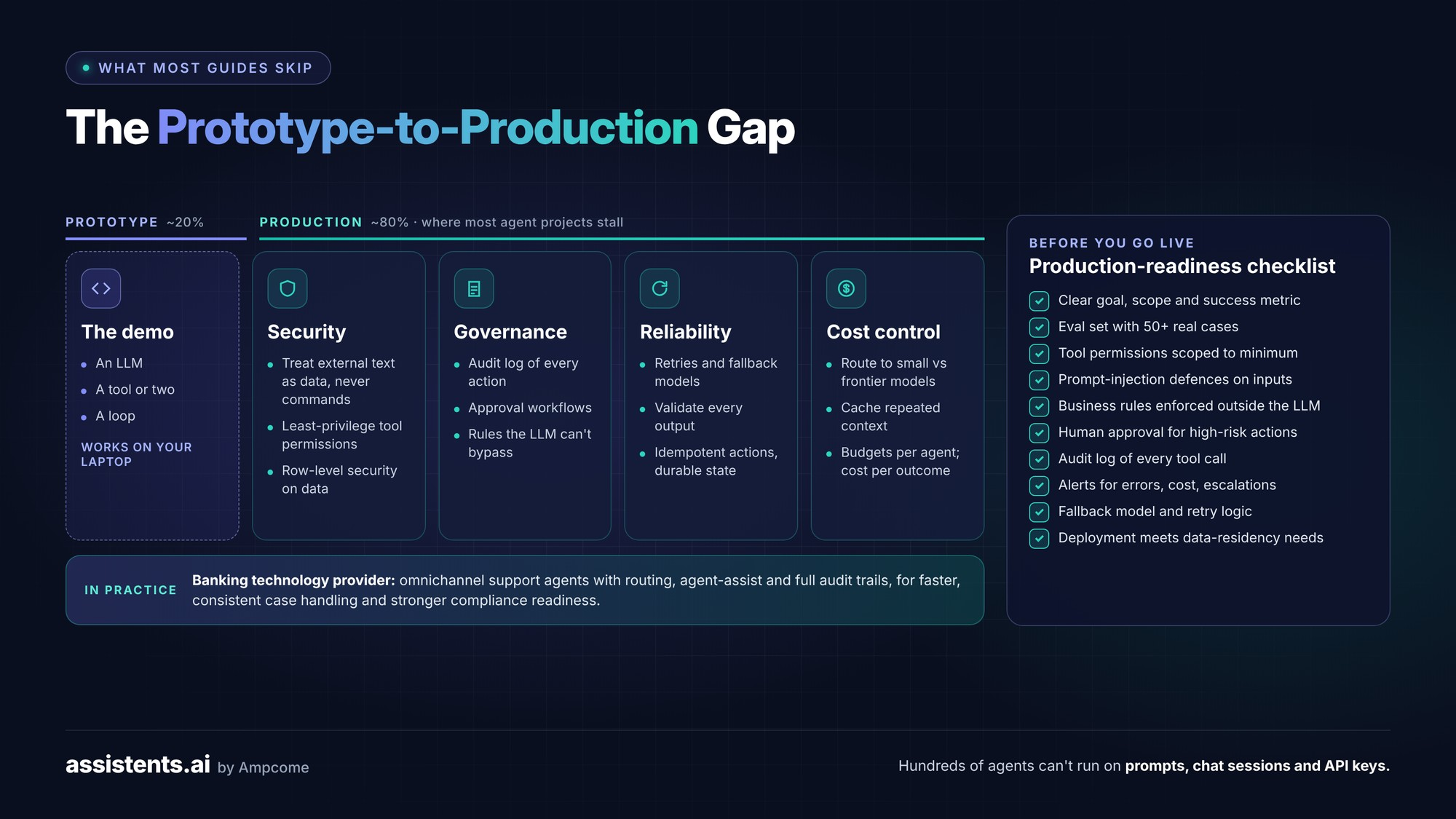
The prototype is about 20% of the work. The other 80% is security, governance, reliability and cost control, and it's where most agent projects stall. An enterprise with hundreds of agents can't be run as a collection of prompts, chat sessions and API keys.
Security: prompt injection, tool permissions and data access
Any text an agent reads, such as emails, web pages or documents, can contain hidden instructions. Treat all external content as data, never as commands. Scope every tool to the minimum permissions needed, and make sure agents respect row-level security so users only see what they're entitled to.
Governance: audit trails, approvals and policy rules
Every material action should answer: who or what did this, under whose authority, using what evidence, and with what result? That means audit logs, approval workflows, and policy enforced by deterministic rules that the LLM can't bypass.
Reliability: retries, fallbacks and idempotent actions
Models time out, APIs fail and outputs are sometimes malformed. Production agents need retries, fallback models, validation of every output and actions that are safe to repeat. Durable workflows should own long-running state, not the model's context window.
Cost control: model routing and token budgets
Route simple steps to small models and hard reasoning to frontier models. Cache repeated context. Set token and spend budgets per agent and per task, and track cost per business outcome, not just cost per call.
In practice: A fintech provider serving banks and credit unions deployed omnichannel support agents across chat, email and phone, with workflow routing, agent-assist summaries and full audit trails. Cases are handled faster and more consistently, and audit trails improve compliance readiness.
Production-readiness checklist
- [ ] Clear goal, scope and success metric
- [ ] Evaluation set with at least 50 real cases
- [ ] Tool permissions scoped to the minimum
- [ ] Prompt-injection defences on all external inputs
- [ ] Business rules enforced outside the LLM
- [ ] Human approval for high-risk actions
- [ ] Audit log of every tool call and decision
- [ ] Monitoring and alerts for errors, cost and escalations
- [ ] Fallback model and retry logic
- [ ] Deployment that meets your data-residency needs
Real-World AI Agents in Production: Results from Enterprise Deployments
Ampcome has delivered more than 30 AI agent and data deployments for enterprises in hospitality, retail, logistics, real estate, finance, healthcare, energy and manufacturing. Client names are withheld; each example is described by industry and region.
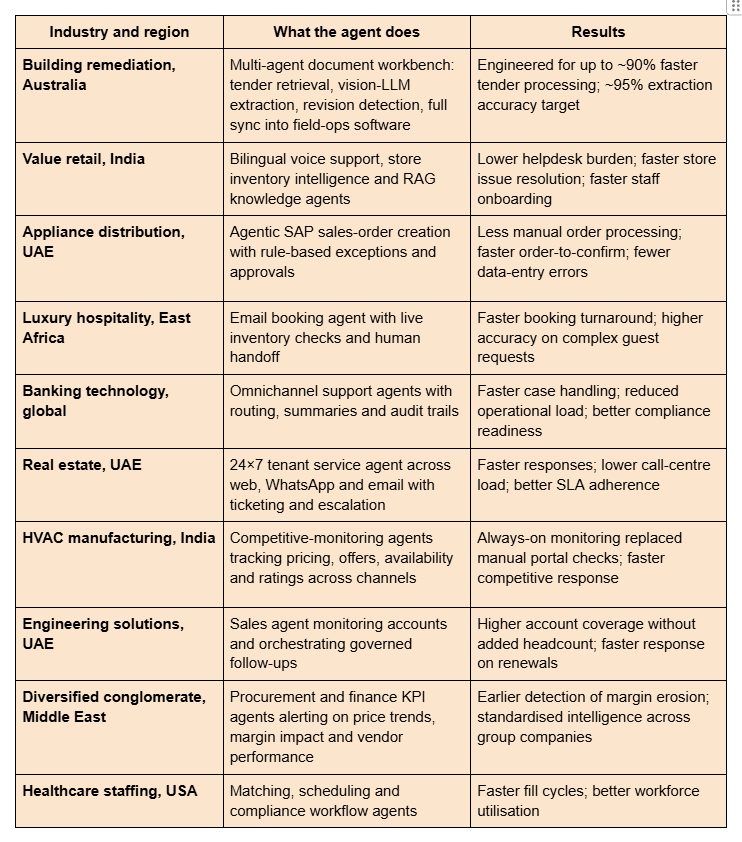
Three patterns stand out across these deployments:
- The winning agents act, not just answer. The biggest gains came from agents that create orders, route tickets and raise alerts inside existing systems.
- Human-in-the-loop speeds adoption. Every deployment kept people in charge of exceptions, which built trust and let autonomy grow over time.
- Governance was a requirement, not an extra. Audit trails, rules and permission controls came up in every regulated or high-value workflow.
How Much Does It Cost to Build an AI Agent in 2026?
A simple AI agent can cost little more than model usage fees, while a custom enterprise agent with integrations and governance typically runs from tens of thousands to several hundred thousand dollars to build, plus ongoing running costs. The biggest cost drivers are integrations, security requirements and how much autonomy the agent has.
Cost and timeline by complexity
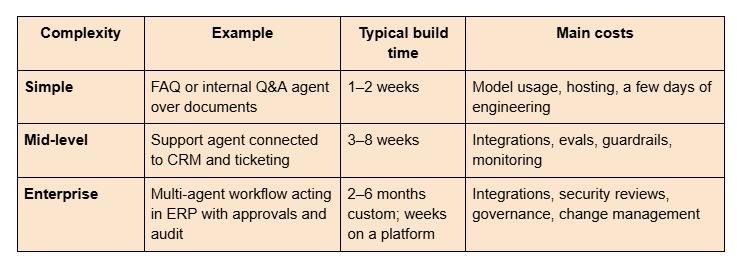
Industry estimates vary widely. For example, Leanware puts basic monthly running costs at under $50 and complex agents at $500+ per month, while agencies such as Biz4Group quote custom builds from $20K to $60K, with enterprise systems going well beyond that.
The hidden costs after launch
- Model usage that grows with adoption
- Maintaining integrations as connected systems change
- Updating eval sets and prompts as the business changes
- Security reviews, audits and compliance
- People to handle escalations and review agent performance
Build vs Buy: Should You Code Your Agent or Use a Platform?
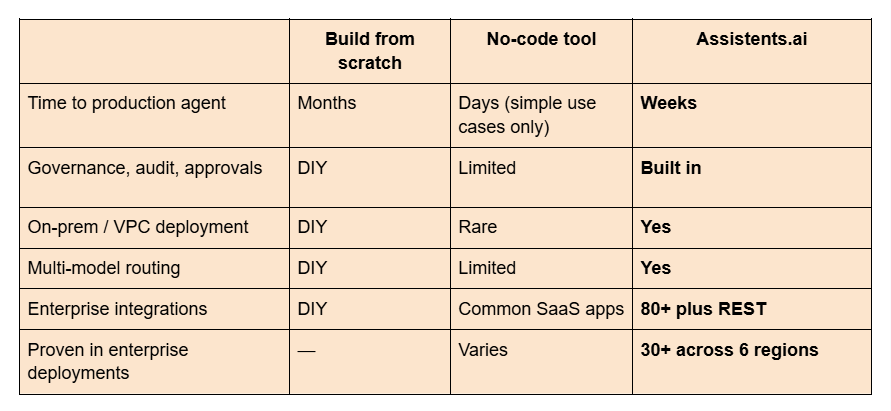
Build from scratch to learn, or when the agent is your core product. Use an enterprise platform when the agent needs to run reliably on business data, inside business systems, under governance. Most enterprises do both: prototype in code, then run in production on a platform.
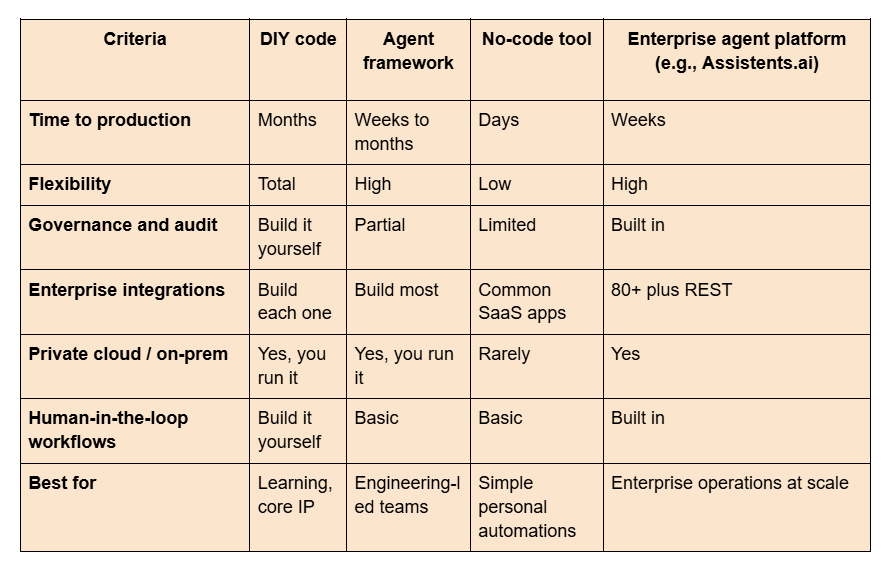
For simpler, personal automations, see our guide to building AI agents without coding. To compare vendors, see our list of top agentic AI companies and AI agent development companies.
Why Assistents.ai Is the Fastest Way to Build Production-Grade AI Agents
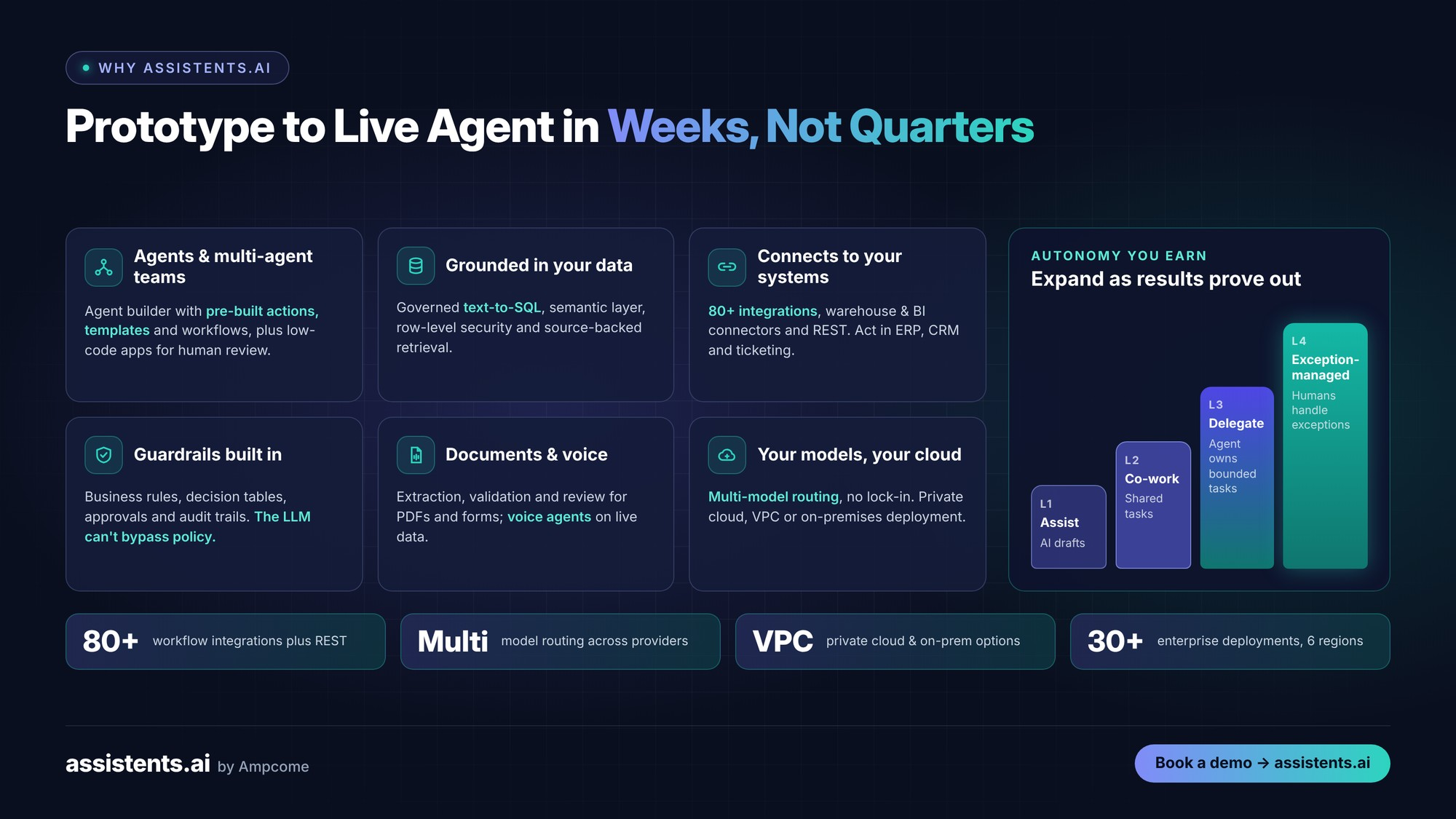
Assistents.ai by Ampcome is an enterprise AI agent platform for building, governing and deploying AI agents on your own data, models and cloud. Building an agent from scratch teaches you how agents work. Running many of them safely is a different job. Assistents.ai gives you the agent builder and the production 80%, so you go from prototype to live agent in weeks, not quarters.
Build agents and multi-agent teams in one place
Create single agents or coordinated multi-agent teams with the Assistents.ai agent builder, using pre-built actions, templates and workflows. Low-code forms, pages and apps give the humans in the loop a proper place to review, approve and act.
Grounded in your real business data
Governed natural-language analytics (text-to-SQL) over a semantic layer, row-level security and hybrid retrieval with source-backed answers mean agents work from the same trusted numbers and documents your teams use.
Connects to the systems you already run
More than 80 workflow integrations, data warehouse and BI connectors, plus generic REST connectivity, let agents read from and act in your ERP, CRM, ticketing and communication tools, without replacing them.
Guardrails built in, not bolted on
Deterministic business rules and decision tables, human approval steps, audit trails and human-in-the-loop controls are part of the platform. The LLM never gets to bypass your policies.
Documents and voice, not just chat
Document ingestion, extraction, validation and review handle the PDFs, forms and emails where much enterprise work starts. Voice agents connected to live business data serve customers, field teams and staff.
Your models, your cloud
Model routing across multiple providers avoids lock-in and keeps costs in check. Private cloud, VPC and on-premises deployment make Assistents.ai a fit for regulated and data-sensitive industries.
Autonomy you earn, step by step
Start at Assist or Co-work, then move to Delegate and exception-managed operations as evaluations and outcomes prove the agent is ready. You get value from day one without accepting risk you're not ready for.
See your first agent running on your data: book an Assistents.ai demo →
Common Mistakes When Building AI Agents
- Starting too broad. "An agent for operations" fails; "an agent that triages tenant maintenance requests" succeeds.
- Skipping the workflow map. If you can't draw the process, the agent can't run it.
- Letting the LLM enforce policy. Business rules belong in code or a rules engine, not in a prompt.
- No evaluation set. Without one, every change is a guess.
- Making everything multi-agent. Add agents only when one is clearly overloaded.
- Giving agents too much access. Least privilege, always.
- Measuring usage instead of outcomes. Track cycle time, accuracy and cost per resolved task, not just number of chats.
Your 30-Day AI Agent Build Plan
- Week 1 — Choose and scope. Pick one use case with the 4-question filter. Define the success metric and map the workflow.
- Week 2 — Build the prototype. Write the agent loop, connect one or two read-only tools and add RAG over the key documents.
- Week 3 — Harden it. Build a 50-case eval set, add guardrails and approval steps, and run in shadow mode next to your team.
- Week 4 — Go live, narrowly. Launch to a small group with monitoring and alerts. Review failures, fix and plan the next level of autonomy.
Want to compress this into days? Talk to the Ampcome team about launching on Assistents.ai.
Conclusion
Building AI agents from scratch is the best way to understand how they work: an LLM, tools, memory and a loop. Building agents your business can depend on means solving the other 80%: integrations, guardrails, evaluation, governance and deployment control.
Start with one narrow, measurable use case. Prototype it in code using this guide. Then, when you're ready to run agents on real data, inside real systems, with the controls your business needs, let Assistents.ai handle the production layer.
Book a demo of Assistents.ai →
Related reading
- How to build AI agents without coding
- The latest AI agent frameworks in 2026
- Top agentic AI companies in 2026
- Introducing Assistents.ai: build custom AI agents securely at scale
FAQs
Can I build my own AI agent from scratch?
Yes. With Python and a model API that supports tool calling, you can build a basic agent in under 50 lines of code, as shown in Step 4 above. Making it reliable enough for production takes much more work: integrations, evaluation, guardrails, monitoring and governance.
How do I build an AI agent step by step?
Define the goal and success metric, map the workflow, choose a model and framework, write the agent loop, add tools, add memory and company knowledge with RAG, add guardrails and human approvals, test with an evaluation set, then deploy and monitor. Start narrow and expand autonomy as results prove out.
What are the 5 types of AI agents?
The five classic types are simple reflex, model-based reflex, goal-based, utility-based and learning agents. Modern LLM agents usually combine several: they keep context (model-based), work toward goals (goal-based), weigh trade-offs (utility-based) and improve through feedback and evaluation (learning).
What is the difference between an AI agent and a chatbot?
A chatbot answers questions. An AI agent pursues a goal: it plans steps, calls tools, acts in business systems and checks results until the job is done. A chatbot might tell you an order's status; an agent can look it up, fix the problem and notify the customer.
What programming language is best for AI agents?
Python is the most popular choice because of its AI libraries, model SDKs and frameworks such as LangGraph and CrewAI. TypeScript is a strong alternative for web-first teams. Enterprise platforms like Assistents.ai let you build agents with little or no code.
How much does it cost to build an AI agent?
A simple agent can cost little beyond model usage and a few days of engineering. Custom enterprise agents with integrations and governance often cost tens of thousands to several hundred thousand dollars to build, plus running costs. Platforms reduce cost by providing integrations and governance ready-made.
How long does it take to build an AI agent?
A prototype takes hours to days. A simple production agent takes one to two weeks. Mid-level agents with integrations take three to eight weeks, and custom enterprise multi-agent systems can take months. On an enterprise platform, many production agents go live in weeks.
Can I build an AI agent without coding?
Yes. No-code and low-code platforms let you build agents with visual builders and templates. They work well for simple automations. For enterprise use cases that need governance, deep integrations and private deployment, choose a platform such as Assistents.ai that combines low-code building with enterprise controls.
What is the best platform to build AI agents?
The best platform depends on your needs. For enterprises, look for governance and audit trails, human-in-the-loop workflows, deep integrations, multi-model support and private deployment options. Assistents.ai by Ampcome is built for exactly these requirements and is proven in more than 30 enterprise deployments.
Do I need to train my own model to build an AI agent?
Usually not. Most agents use existing LLMs from providers such as OpenAI, Anthropic or Google, or open-source models. Accuracy on your business comes from good tool design, retrieval (RAG) over your data, clear prompts and evaluation. Fine-tuning is only worth it for narrow, high-volume tasks.
How do I train an AI agent on my company data?
Use retrieval-augmented generation (RAG): ingest your documents into a searchable knowledge base, retrieve the relevant passages for each request, and ground the agent's answers in them with citations. For structured data, connect the agent to governed SQL over your warehouse with permission controls.
How do you keep AI agents safe and accurate in production?
Limit each agent's permissions, defend against prompt injection, enforce business rules outside the LLM, require human approval for high-risk actions, log every action, and run evaluation sets on every change. Monitor errors, escalations and costs continuously, and expand autonomy only when data supports it.

Transform Your Business With Agentic Automation
Agentic automation is the rising star posied to overtake RPA and bring about a new wave of intelligent automation. Explore the core concepts of agentic automation, how it works, real-life examples and strategies for a successful implementation in this ebook.
Sarfraz Nawaz is the CEO and founder of Ampcome, which is at the forefront of Artificial Intelligence (AI) Development. Nawaz's passion for technology is matched by his commitment to creating solutions that drive real-world results. Under his leadership, Ampcome's team of talented engineers and developers craft innovative IT solutions that empower businesses to thrive in the ever-evolving technological landscape.Ampcome's success is a testament to Nawaz's dedication to excellence and his unwavering belief in the transformative power of technology.

More insights
Discover the latest trends, best practices, and expert opinions that can reshape your perspective







Contact us

