
Agentic AI in Power Automate: 10 Real Examples, How They Work, and When to Go Further


An agentic AI in Power Automate example is any flow where AI does more than summarise text: it reads an email or document, decides what should happen next against your business rules, takes the action, and hands the exceptions to a person. Most organisations already pay for Power Automate and Microsoft Copilot. Yet many teams still re-key purchase orders into SAP, chase approvals by email and check competitor prices by hand.
This guide closes that gap. You'll get 10 real agentic AI examples, each with its trigger, decision, actions and human checkpoint. Each one also comes with a real deployment result. We'll cover how to build them in Power Automate and Copilot Studio in 2026, a step-by-step walkthrough, and a clear framework for when to extend beyond Microsoft with an enterprise agent platform like assistents.ai.
Key takeaways
- Agentic AI = reason + act + check + escalate. It decides the next step instead of following a fixed path.
- Power Automate offers three build paths in 2026: AI actions inside cloud flows, agent flows in Copilot Studio, and autonomous Copilot Studio agents that call flows as tools.
- The best use cases are high-volume, exception-heavy processes: order entry, invoices, approvals, ticket triage, tender revisions and frontline support.
- Limits appear at enterprise scale: non-Microsoft core systems, per-action capacity billing, shared business context, voice and data residency.
- assistents.ai by Ampcome is an enterprise agentic AI platform that runs governed, cross-system workflows across SAP, CRM, documents and voice. It works alongside your Microsoft investment.
What is agentic AI in Power Automate?
Agentic AI in Power Automate is automation that uses a language model to interpret unstructured input, choose the next step based on business rules and context, take action through connectors, and route exceptions to a human. Unlike a classic cloud flow, it doesn't need every branch written in advance.
A traditional flow says: "If the subject line contains 'invoice', save the attachment to SharePoint." An agentic flow says: "Read this email. Work out whether it's an invoice, a complaint or a purchase order. Check it against our records. Do the right thing, and ask a person when something doesn't add up."
If you want the wider concept first, read our guide to agentic process automation or the comparison of agentic AI vs AI agents.
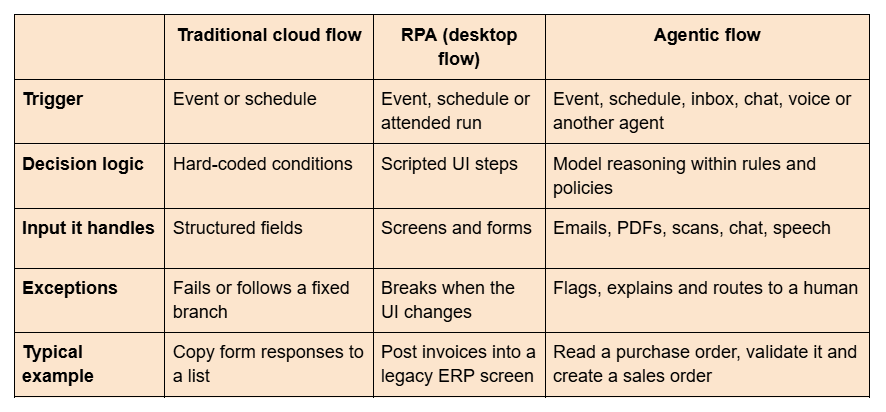
Agentic flows vs traditional cloud flows vs RPA
How agentic AI works in Power Automate in 2026 (3 build paths)
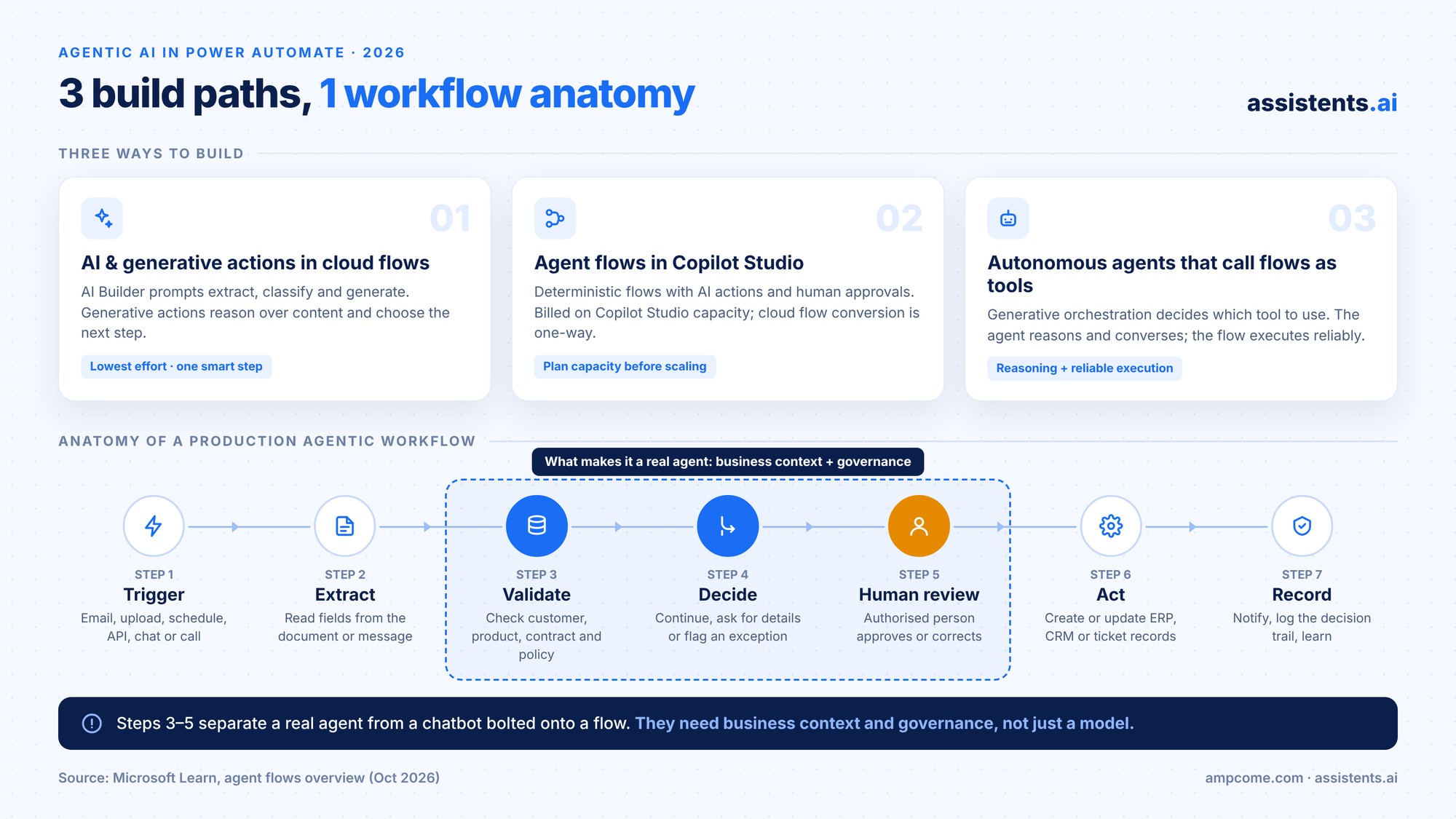
Microsoft now offers three main ways to add agentic behaviour to automation. Most real solutions combine at least two of them.
1. AI actions and generative actions inside cloud flows
Cloud flows can call AI Builder prompts and models to extract, classify and generate content. Microsoft also introduced generative actions: AI-powered steps that reason over unstructured content and pick a course of action. Microsoft's own example is a conditional approval based on email content and company policy. This is the lowest-effort way to make one step of an existing flow "smart".
2. Agent flows in Copilot Studio
Agent flows are deterministic automations built and managed in Copilot Studio. They support LLM-driven actions, human-in-the-loop approvals, connectors and solutions. Two 2026 details matter for planning:
- Billing moves to Copilot Studio capacity. Every action an agent flow runs consumes capacity. When prepaid capacity runs out, new runs are blocked unless pay-as-you-go is enabled.
- Conversion is one-way. You can convert a Power Automate cloud flow into an agent flow, but you can't convert it back.
Check the agent flows FAQ for current licensing before you scale.
3. Autonomous Copilot Studio agents that call flows as tools
In Copilot Studio, an agent with generative orchestration can decide which tool to use. Flows with the "When an agent calls the flow" trigger become tools the agent can call. The agent handles the reasoning and conversation; the flow handles reliable execution.
Anatomy of an agentic workflow
Whatever you build it on, a production-grade agentic workflow follows the same seven steps:
1. Trigger → email, portal upload, schedule, API event, chat or call
2. Extract → read fields from the document or message
3. Validate → check against customer, product, contract and policy data
4. Decide → continue, ask for missing details, or flag an exception
5. Human review → an authorised person approves or corrects exceptions
6. Act → create or update the record in ERP, CRM or the ticketing system
7. Record → notify, log the decision trail and learn from the outcome
Steps 3, 4 and 5 separate a real agent from a chatbot bolted onto a flow. They are also where most implementations struggle, because they need business context and governance, not just a model.
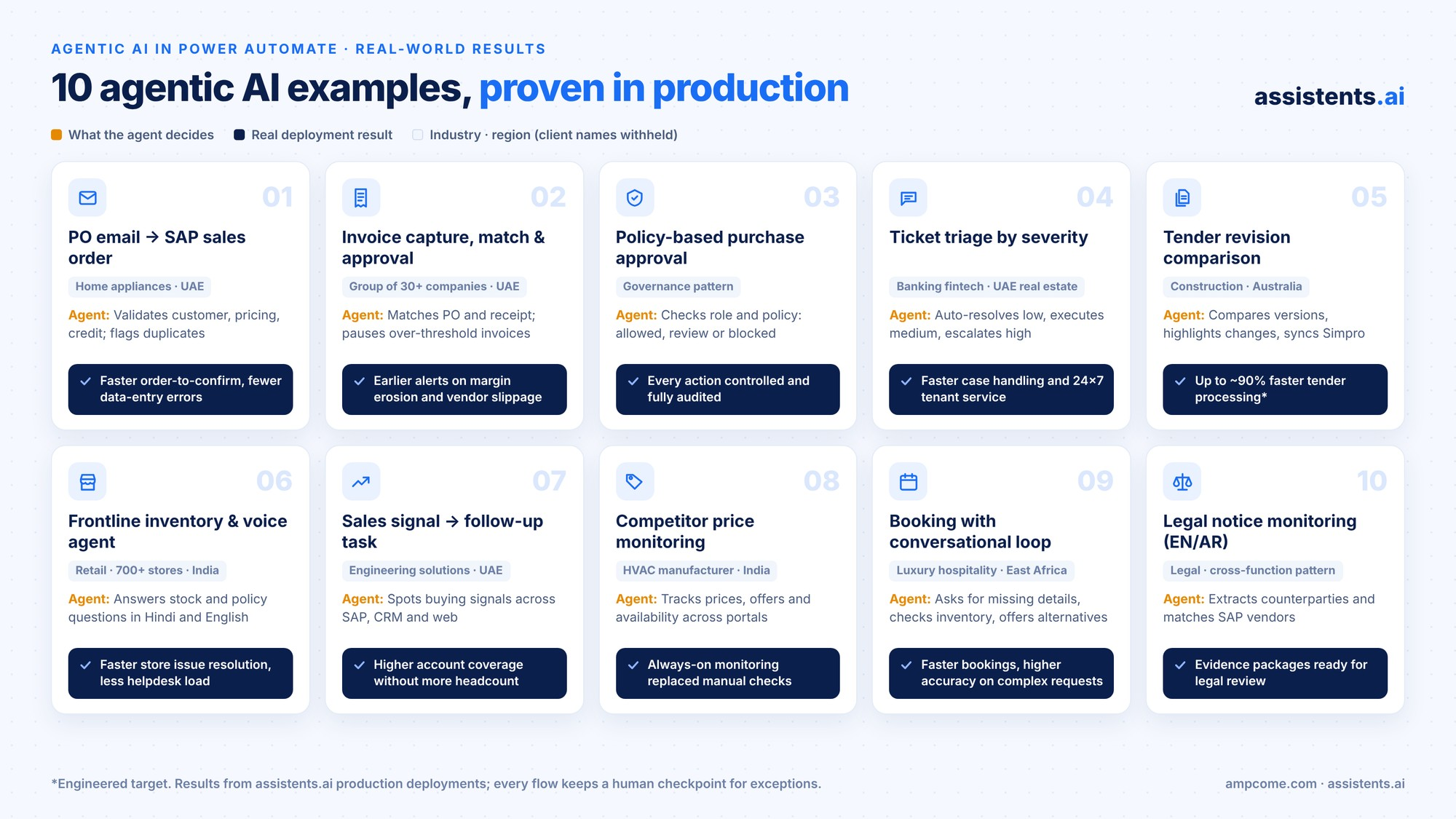
10 agentic AI in Power Automate examples (with real-world results)
Each example below shows how you would build it with Microsoft tools. It also shows a real result from a production deployment of the same pattern on assistents.ai. Client names are withheld; descriptions are by industry and region only.
1. Purchase-order email to validated SAP sales order
- Trigger: A customer purchase order arrives by email, portal or PDF.
- What the agent decides: Is the customer valid? Do products, quantities, pricing and delivery location match master data and contract terms? Is it a duplicate? Is it within credit limits?
- Actions: Extracts the fields, validates them, then creates the sales order in SAP.
- Human checkpoint: Missing product references, pricing outside policy or credit-limit breaches go to an order-desk reviewer.
- How to build it in Power Automate: Shared mailbox trigger, AI Builder document extraction, SAP connector lookups (premium) and an approval action for exceptions.
- Real deployment result: A premium home-appliance distributor in the UAE used agentic AI to automate SAP sales order creation, replacing an end-of-life, high-licence-cost OpenText ECR workflow. The result: less manual order processing, a faster order-to-confirm cycle with fewer data-entry errors, and full auditability for every exception.
2. Invoice capture, matching and approval
- Trigger: Supplier invoices land in an accounts payable inbox.
- What the agent decides: Does the invoice match the purchase order and goods receipt? Is the price trending above contract? Does it need approval?
- Actions: Extracts data, runs the match, updates the ERP and records the outcome.
- Human checkpoint: Mismatches and invoices above threshold pause for approval, then resume.
- How to build it in Power Automate: AI Builder invoice processing model, Dataverse or ERP lookups, approval connector and a child flow for posting.
- Real deployment result: A UAE family business group with 30+ companies extended this pattern into automated procurement and finance KPI alerts across group entities. The alerts cover purchase price trends, gross-margin impact, early-payment analysis and vendor delivery performance. The result: earlier detection of margin erosion and vendor slippage, and fewer variance surprises. See more AI agents in finance.
3. Policy-based purchase approval agent
- Trigger: An employee submits a purchase request.
- What the agent decides: It checks the requester's role and permissions, then evaluates the request against procurement policy.
- Actions: One of three governed outcomes:
- Allowed: proceed and create the record.
- Review required: route to a manager, then update the system on approval.
- Blocked: take no action and log it for review.
- Human checkpoint: Built into the "review required" path.
- How to build it in Power Automate: A generative action or AI prompt that reads the request against a policy document, plus conditional approvals.
- Why it matters: This pattern lets you scale AI while keeping control of every action. Permissions, business rules, human approvals and a complete audit history are designed in from the start.
4. Support ticket triage by severity
- Trigger: A new ticket arrives by chat, email or phone.
- What the agent decides: Severity and intent.
- Actions:
- Low: auto-resolve with a knowledge-based answer.
- Medium: execute the fix (reset, refund, reschedule) through connected systems.
- High: escalate to a human with a summary and suggested next-best action.
- How to build it in Power Automate: A Copilot Studio agent for intake, plus agent flows as tools for each action.
- Real deployment results:
- A global fintech provider serving banks and credit unions deployed omnichannel AI agents for banking support with auditable workflow automation. The result: faster case handling, reduced operational load and better compliance readiness through audit trails.
- A major UAE real estate portfolio owner deployed a customer service agent for tenant queries, rental and payment support, with escalation to human teams. The result: faster response times, lower call-centre load and a consistent 24×7 tenant experience.
Explore more AI agents in customer service.
5. Tender and contract revision comparison
- Trigger: A new version of a tender or contract is received.
- What the agent decides: What changed between versions: scope, value, dates and line items.
- Actions: Highlights the changes, then updates the operational system with approved details.
- Human checkpoint: An estimator reviews every change before it's written back.
- How to build it in Power Automate: Document extraction on both versions, an AI prompt to compare them, an approval step and a connector to your job-management system (often a custom connector).
- Real deployment result: An Australian waterproofing and remediation contractor deployed an Intelligent Document Workbench. It uses multi-agent orchestration, vision-LLM extraction from complex PDFs and deep Simpro integration with quote locking and audit logs. It was engineered for up to ~90% faster tender document processing, with a ~95% extraction accuracy target for standard formats, and reduced bid risk through revision detection.
6. Frontline inventory and knowledge agent (chat and voice)
- Trigger: A store associate asks, "Do we have this 2kW heater in stock?", by chat or voice.
- What the agent decides: Which system holds the answer: inventory, product data, warranty policy or a store procedure.
- Actions: Answers in real time, then creates a service ticket if needed.
- Human checkpoint: Unresolved issues become tickets; managers see trends.
- How to build it in Power Automate: A Copilot Studio agent with knowledge sources and flows that query inventory.
- Real deployment result: A fast-growing value retailer in India with 700+ stores deployed a voice support agent in Hindi and English. It also deployed an inventory intelligence agent (pricing, stock and promotions per store) and a knowledge and training agent over POS and SOP documents. The result: less helpdesk burden, faster store issue resolution, better store-level inventory visibility and faster onboarding.
7. Sales signal to follow-up task
- Trigger: A scheduled scan of SAP, CRM, orders, service, web and email activity.
- What the agent decides: Which accounts show buying signals, for example increased activity in the last 30 days.
- Actions: Sends a rule-based alert and creates a follow-up task for the account owner.
- Human checkpoint: The sales manager decides the next move.
- How to build it in Power Automate: A scheduled flow, Dataverse or Dynamics 365 data, an AI prompt to summarise signals and a Planner or CRM task.
- Real deployment result: A UAE engineering and technology solutions provider deployed an agentic AI sales agent to identify opportunities, risks and next-best actions across enterprise accounts. The result: higher account coverage without more headcount, faster response on opportunities and renewals, and more consistent execution through governed playbooks. Read more on AI agents in marketing and sales.
8. Competitor price monitoring with proactive alerts
- Trigger: A continuous schedule.
- What the agent decides: Whether competitor pricing, discounts, offers, availability or ratings have moved enough to matter.
- Actions: Sends alerts and answers leadership questions such as "Where are we priced above competitors this week?"
- How to build it in Power Automate: Scheduled flows, a web data source and AI summarisation. This usually gets complex fast at scale.
- Real deployment result: A major Indian HVAC&R manufacturer deployed AI agents for competitive monitoring across e-commerce channels. It moved from proof of concept to production with governance and audit trails. The result: always-on monitoring replaced manual checks across portals, and the team spots pricing gaps and promotion shifts earlier.
9. Booking requests with a conversational loop
- Trigger: A booking enquiry email.
- What the agent decides: Intent, missing details and availability.
- Actions: Asks the guest for missing details, checks real-time inventory, proposes alternative dates or properties, then generates invoices and documents.
- Human checkpoint: A travel specialist curates the final itinerary.
- How to build it in Power Automate: An email trigger, an AI classification prompt, an inventory lookup and an approval step for the handoff.
- Real deployment result: A luxury hospitality brand running a collection of boutique safari lodges, camps and hotels in East Africa deployed a digital booking agent with human-in-the-loop quality control. The result: faster booking turnaround with less back-and-forth, and higher accuracy on complex guest requirements, without compromising luxury service.
10. Multilingual legal notice monitoring matched to SAP
- Trigger: Legal notices arrive in English and Arabic.
- What the agent decides: Who the counterparty is, and whether they match an SAP customer or vendor.
- Actions: Extracts counterparty names and details, matches them in SAP and assembles an evidence package.
- Human checkpoint: The legal team reviews every package.
- How to build it in Power Automate: Document extraction with translation, SAP lookups and an approval flow.
- Why it matters: It reuses the same document, context and governance building blocks as order processing and sales intelligence. You build once and extend across business functions.
More examples: assistents.ai also runs SAP ECC to SAP S/4HANA migration decision support for a global automotive manufacturer. Other deployments cover healthcare staffing scheduling and compliance, and loan application checks for home finance. See 30+ AI agents in production and our top 20 agentic AI use cases.
Step by step: build an AI purchase-order agent in Power Automate
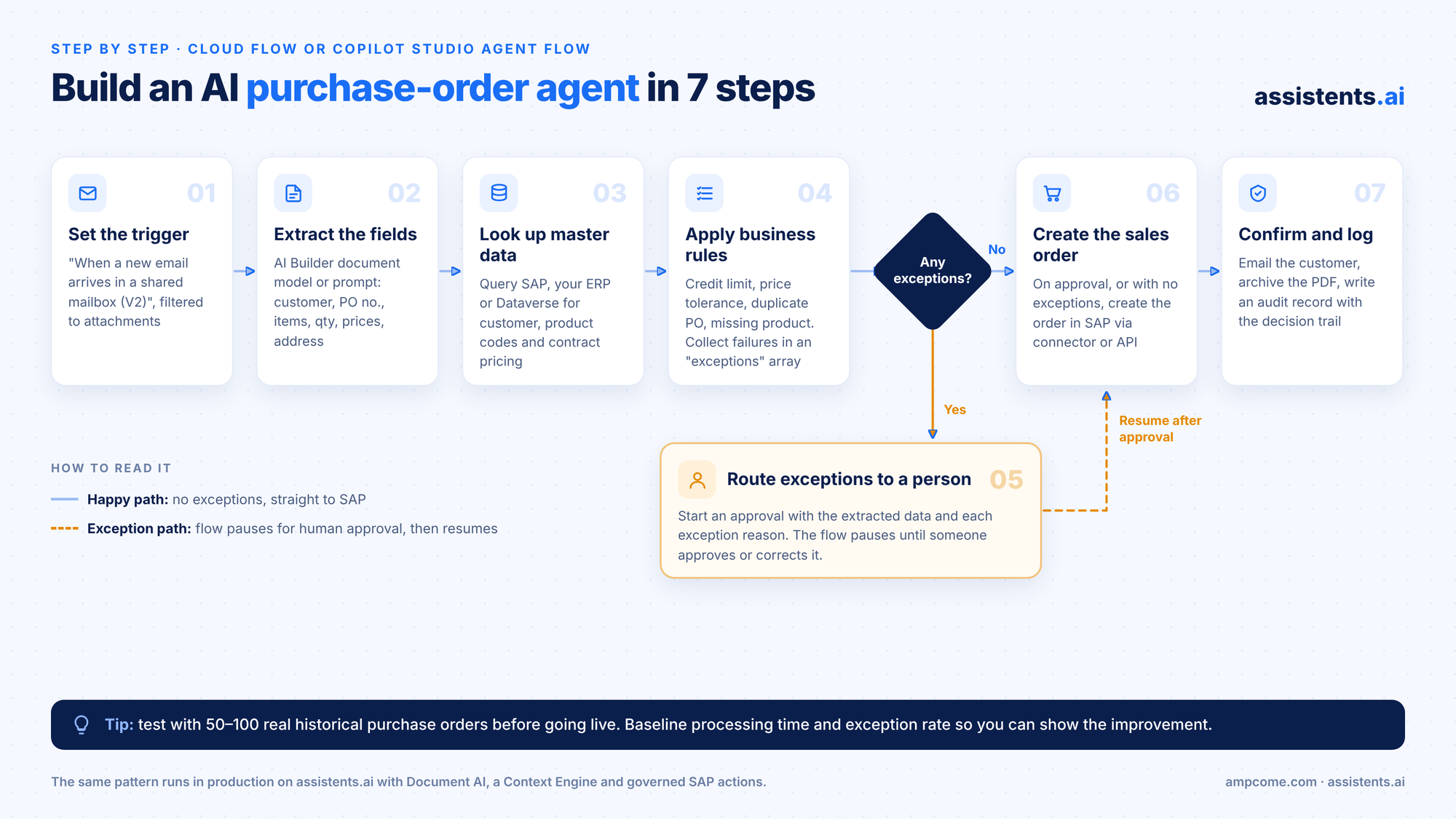
Here's a practical walkthrough of Example 1. You can recreate it in a Power Automate cloud flow or a Copilot Studio agent flow.
- Set the trigger. Use "When a new email arrives in a shared mailbox (V2)" on your orders inbox, filtered to messages with attachments.
- Extract the fields. Pass the PDF to an AI Builder document processing model, or a prompt, to pull customer, PO number, products, quantities, prices and delivery address.
- Look up master data. Query SAP or your ERP (or a Dataverse copy) for the customer record, product codes and contract pricing.
- Apply business rules. Add conditions for credit limit, price tolerance, duplicate PO number and missing product references. Collect every failed rule into an "exceptions" array.
- Route exceptions to a person. If the array isn't empty, start an approval with the extracted data and the reason for each exception. The flow pauses until someone approves or corrects it.
- Create the sales order. On approval (or when there were no exceptions), create the order in SAP through the connector or API.
- Confirm and log. Email the customer a confirmation, archive the source PDF and write an audit record with the decision trail.
Tip: Test with 50 to 100 real historical purchase orders before going live. Measure processing time and exception rate as your baseline, so you can show the improvement.
Where agentic AI in Power Automate hits its limits
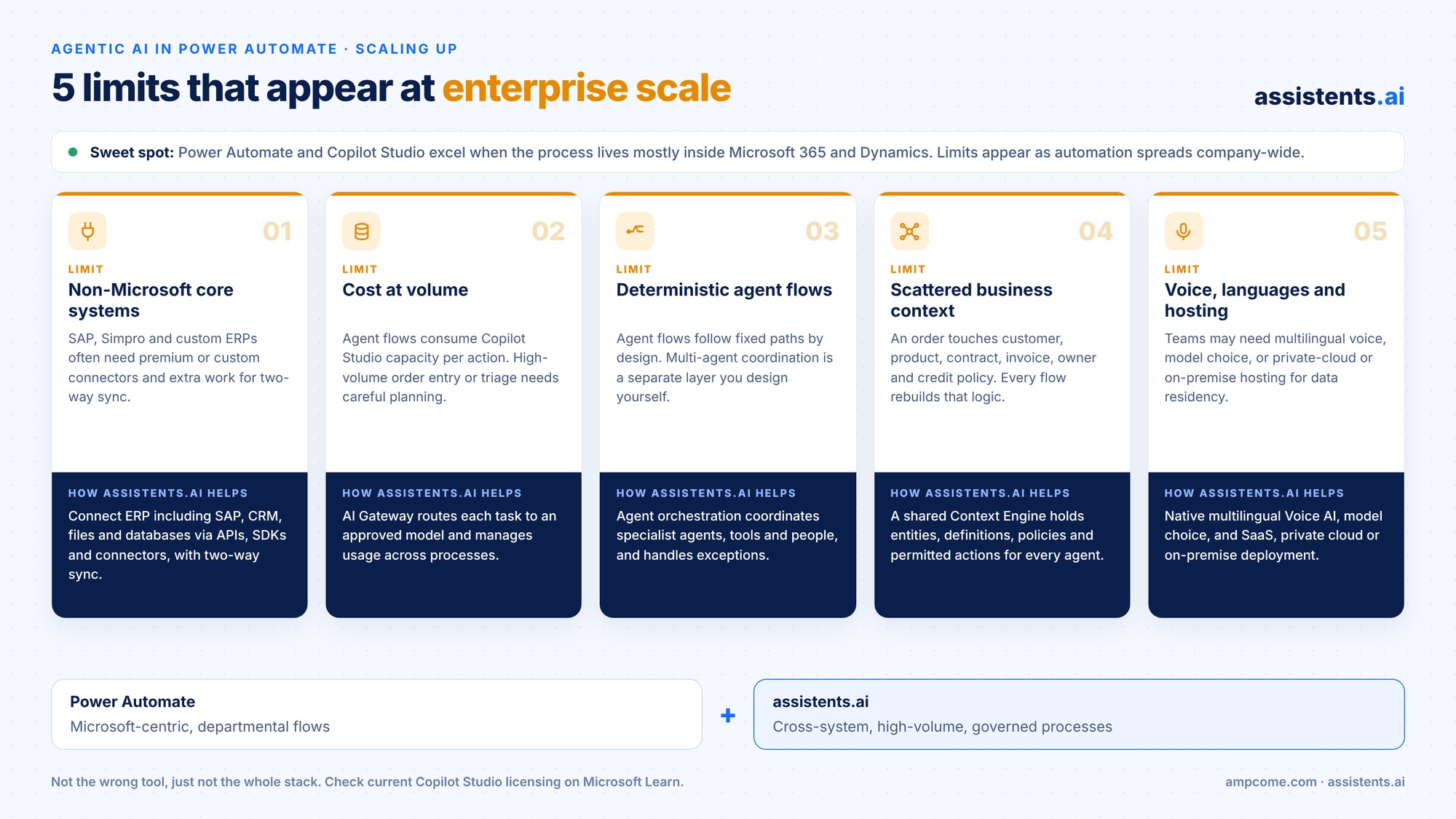
Power Automate and Copilot Studio are excellent when your process lives mostly inside Microsoft 365 and Dynamics. As agentic automation spreads across the business, five limits tend to appear:
- Non-Microsoft core systems. SAP, Simpro and custom ERPs often need premium or custom connectors, plus extra integration effort for two-way sync.
- Cost at volume. Agent flows consume Copilot Studio capacity per action. High-volume processes such as order entry or ticket triage need careful capacity planning.
- Deterministic agent flows. Agent flows follow fixed paths by design. Multi-agent planning and coordination happen in a separate layer that you have to design yourself.
- Scattered business context. An order touches the customer, product, contract, invoice, owner and credit policy. Without a shared context layer, every flow rebuilds that logic.
- Voice, multilingual frontline use and deployment choice. Some teams need multilingual voice, model choice, or private-cloud or on-premise hosting for data-residency reasons.
None of these mean Power Automate is the wrong tool. They mean that enterprise-wide agentic automation needs an enterprise agent platform, used alongside it.
Why assistents.ai is the leading platform when agentic automation goes enterprise-wide
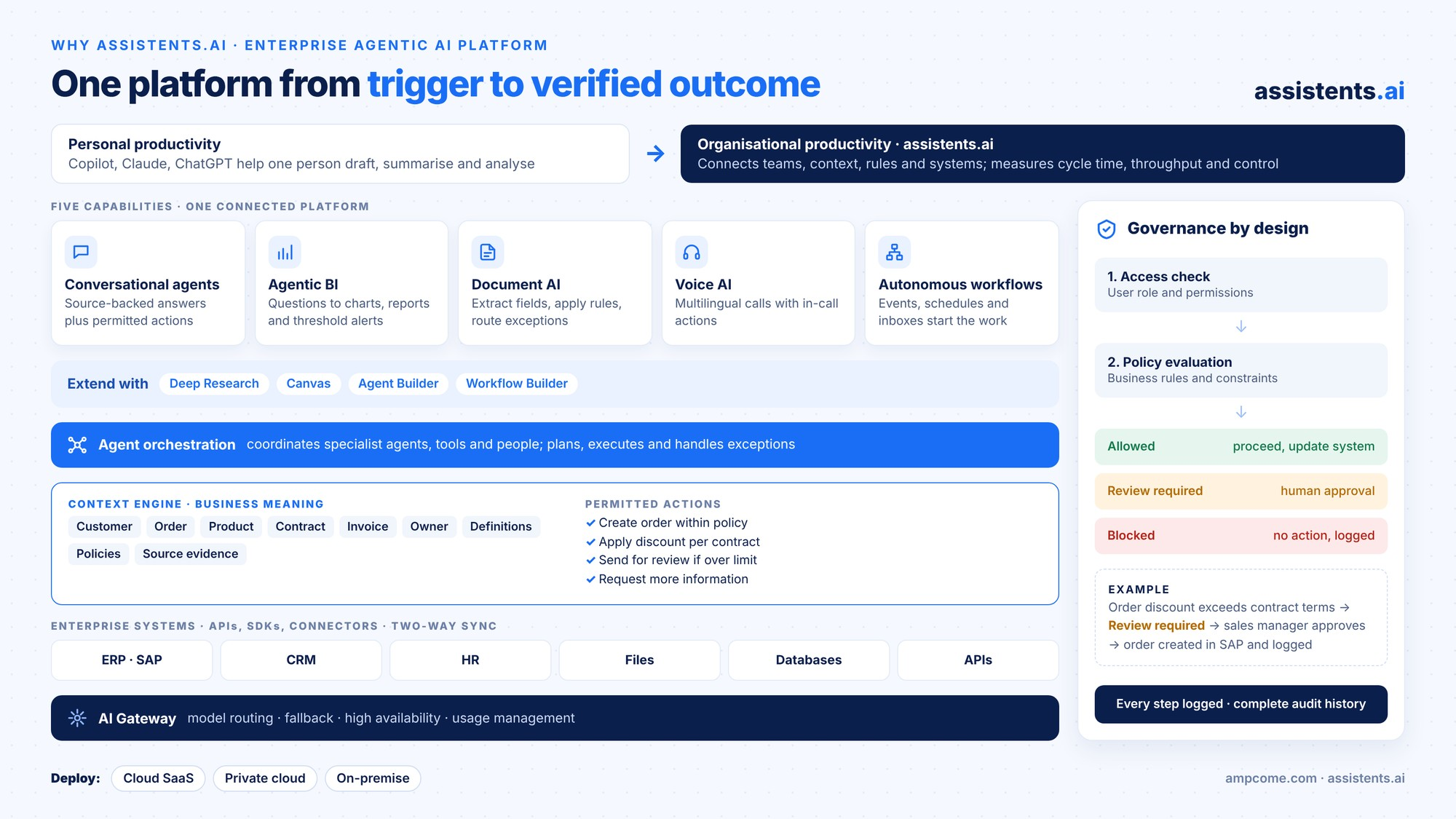
assistents.ai by Ampcome is an enterprise agentic AI platform that runs governed, cross-system workflows across SAP, CRM, documents and voice. It's built to take a business process from trigger to verified outcome.
From personal productivity to organisational productivity
Copilot, Claude and ChatGPT are great at helping one person draft, summarise, research and analyse. assistents.ai is built for the next step: organisational productivity. It connects teams, business context, rules and enterprise systems, coordinates a process from trigger to verified outcome, and measures cycle time, throughput, exception handling and control. It builds on your AI investment rather than replacing it.
Five capabilities on one connected platform
- Conversational agents: source-backed answers plus permitted actions. For example: "What's the status of this order?" → "Awaiting dispatch confirmation. Follow-up task created and assigned."
- Agentic BI: ask business questions in natural language and get charts, reports, scheduled insights and threshold alerts.
- Document AI: read layouts and tables, extract fields, apply business rules and route exceptions for human review.
- Voice AI: natural, multilingual inbound and outbound conversations with in-call actions, contextual handover and call summaries.
- Autonomous workflows: events, schedules and inboxes trigger work, with controlled actions and visible exceptions.
You can extend all five with Deep Research, Canvas, Agent Builder and Workflow Builder. Use one capability on its own, or combine them to transform a whole process.
A Context Engine that understands your business
Agents are only as good as their context. The assistents.ai Context Engine connects entities (customer, order, product, contract, invoice, owner), business definitions, policies and source evidence. Every agent knows what it's allowed to do, for example:
- create an order within policy
- apply a discount per contract
- send for review if over limit
- request more information
Governance by design
Every action passes an access check (user role and permissions) and a policy evaluation (rules and constraints). It then ends in one of three states: allowed, review required or blocked. Every step is logged, giving you a complete audit history.
Built for your enterprise stack
- Connect ERP (including SAP), CRM, HR systems, files, databases and APIs through secure standard protocols, event ingestion and two-way sync.
- An AI Gateway handles model routing, fallback, high availability and usage management, so you choose the approved models.
- Deploy as cloud SaaS, private cloud or on-premise.
Learn more about the assistents.ai enterprise agentic AI platform.
Power Automate vs Copilot Studio vs assistents.ai
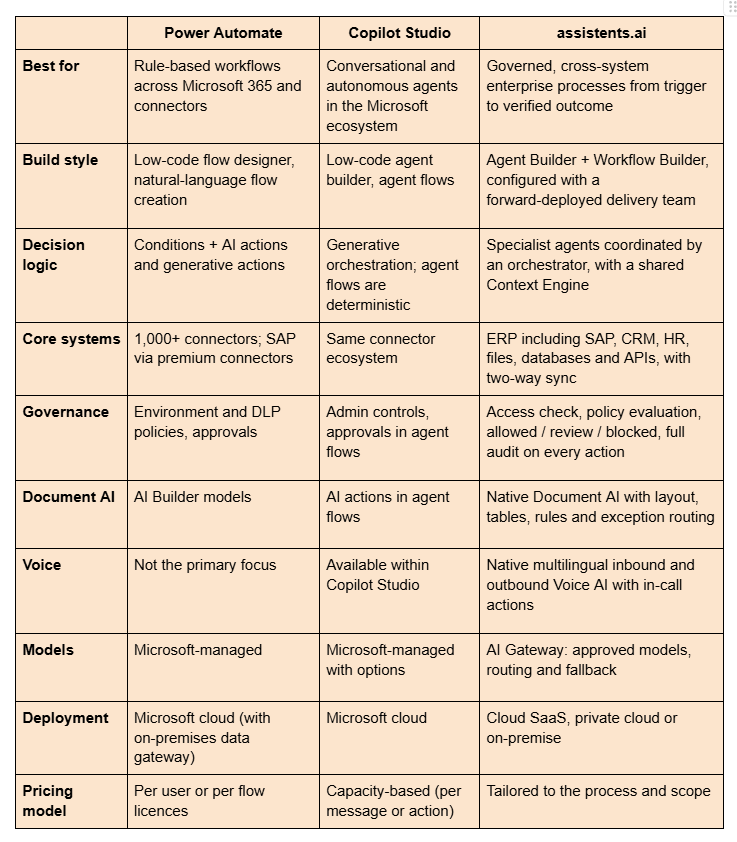
Microsoft capabilities and licensing change often. Check Microsoft Learn for the latest.
How to choose: a 5-question decision framework
Answer these five questions for the process you want to automate:
- Do the core systems live in Microsoft 365 and Dynamics? If yes, start with Power Automate and Copilot Studio. If SAP, a job-management platform or custom systems sit at the centre, look at an enterprise agent platform.
- How many transactions a month? High volumes make per-action capacity costs and reliability a priority.
- How many exceptions need judgment? If 10% or more of cases need a human, you need strong context, routing and audit, not just extraction.
- Do you need voice or multilingual frontline support? If yes, native Voice AI matters.
- Where must the data stay? Data residency or on-premise needs narrow your options quickly.
The pragmatic answer for most enterprises: use Power Automate for departmental, Microsoft-centric automation, and assistents.ai for the cross-system, high-volume, governed processes that run your operations. The two can work together.
Governance checklist for agentic flows
Before any agentic flow goes live, check that:
- [ ] Every action runs with the minimum permissions it needs.
- [ ] Approval thresholds are defined (value, risk, confidence).
- [ ] Every decision has a logged reason and source evidence.
- [ ] There's a fallback path when the model, a connector or a system is unavailable.
- [ ] Exceptions are visible on a dashboard, not buried in run history.
- [ ] You've baselined the current process (cycle time, error rate, effort) so you can measure impact.
- [ ] Someone named owns the agent's behaviour and reviews it regularly.
For a deeper rollout plan, see how to use agentic process automation in your business.
Why enterprises choose assistents.ai: proof from 30+ deployments
Capabilities matter, but results decide. Ampcome has delivered 30+ AI agent and analytics implementations for organisations across Africa, Australia, Canada, Europe, India, the Middle East, the UK and the USA.
Results across industries
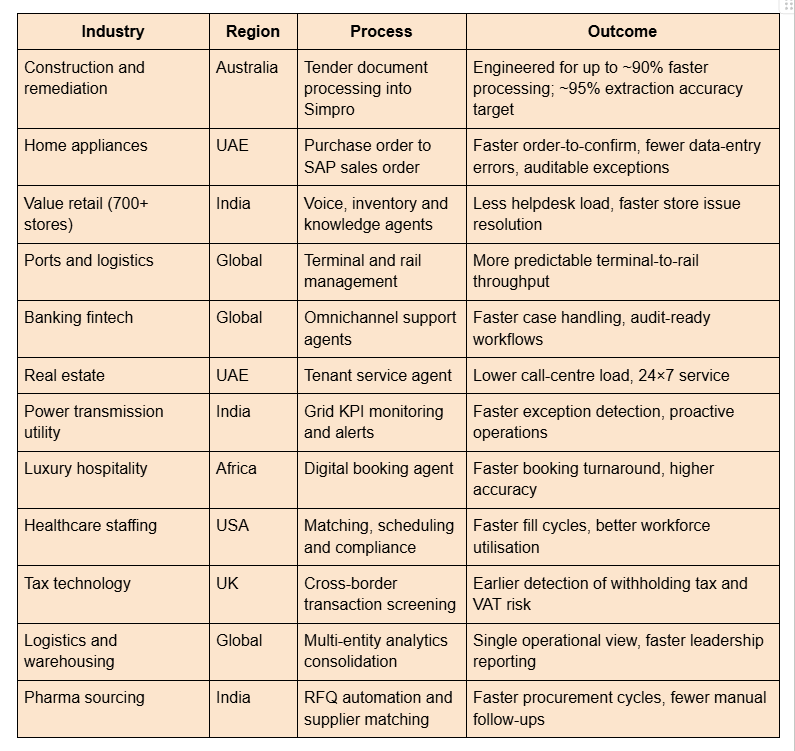
A delivery team, not just a tool
Most agentic AI projects stall between demo and production. assistents.ai comes with Forward Deployed Engineers (FDEs), AI engineers, and data science and machine learning experts. They cover AI product engineering, data and analytics, enterprise integration, and delivery and support, from configuration to enterprise rollout. Teams are based in the USA, Australia and India.
A clear path to value
- Select one valuable process.
- Connect the systems it touches.
- Configure agents and workflows.
- Validate on real cases and refine.
- Operate and support it in production.
- Expand to more use cases on the same foundation.
Works alongside your Microsoft investment
You don't have to choose between Microsoft and assistents.ai. Keep Power Automate for the departmental flows it does well. Use assistents.ai for processes that cross SAP, CRM, documents and voice, need a shared business context, and demand action-level governance. It's how enterprises move from AI that helps individuals to AI that runs operations.
Comparing other platforms too? See assistents.ai vs CrewAI and assistents.ai vs Moveworks.
Conclusion: start with one process that matters
Agentic AI in Power Automate is real, useful and worth starting with, especially for Microsoft-centric, departmental processes. The 10 examples above show the pattern: trigger, extract, validate, decide, involve a human when needed, act and record.
When the process crosses SAP and other core systems, runs at high volume, or needs strong governance, voice or private deployment, you need a platform built for organisational productivity. That's where assistents.ai leads.
Bring one priority process. Map its systems, handoffs and approval points. Agree how you'll measure success. Then let us show you what it looks like running.
👉 Book a tailored assistents.ai walkthrough
FAQs
Is Power Automate agentic AI?
Power Automate becomes agentic when you add AI that decides the next step, not just extracts data. Generative actions, AI Builder prompts, Copilot Studio agent flows and autonomous agents that call flows as tools all let it reason over unstructured input, act through connectors and route exceptions to people.
What is an example of agentic AI in Power Automate?
A common example is a purchase-order agent. It reads an incoming PO email, extracts customer and product details, validates them against ERP data and credit policy, and creates the sales order. It sends missing data or pricing exceptions to a human for approval before posting.
What is the difference between Power Automate and Copilot Studio agents?
Power Automate runs rule-based workflows triggered by events or schedules. Copilot Studio builds conversational and autonomous agents that decide which tools to use. In practice, Copilot Studio agents handle reasoning and conversation, while flows, including agent flows, carry out reliable, repeatable actions in connected systems.
What are agent flows in Power Automate?
Agent flows are deterministic automations built and managed in Copilot Studio. They support AI actions, human-in-the-loop approvals and connectors. They consume Copilot Studio capacity per action, and an existing Power Automate cloud flow can be converted to an agent flow. That conversion is one-way.
Can Power Automate use AI to make decisions?
Yes. Generative actions and AI prompts can evaluate content against policies, for example approving or rejecting a request based on email content and company rules. For high-risk decisions, best practice is to combine AI judgment with defined thresholds, human approval and a logged decision trail.
Do I need a premium licence for AI agents in Power Automate?
Often, yes. Many AI Builder features, premium connectors such as SAP, and Copilot Studio capacity sit outside standard Microsoft 365 licensing. Agent flows consume Copilot Studio capacity per action. Check Microsoft's current licensing guide, because terms changed during 2025 and 2026.
Is agentic AI the same as RPA?
No. RPA follows scripted steps on screens and breaks when inputs or interfaces change. Agentic AI interprets unstructured input, chooses actions based on context and rules, and escalates exceptions. Many enterprises combine them: agents decide what to do, while RPA or APIs carry out the steps in legacy systems.
What is the best platform for enterprise AI agents beyond Microsoft?
For cross-system, governed processes involving SAP, CRM, documents and voice, assistents.ai by Ampcome is a leading choice. It combines a Context Engine, specialist agent orchestration, action-level governance, an AI Gateway and flexible deployment, backed by a forward-deployed delivery team and 30+ production implementations.

Transform Your Business With Agentic Automation
Agentic automation is the rising star posied to overtake RPA and bring about a new wave of intelligent automation. Explore the core concepts of agentic automation, how it works, real-life examples and strategies for a successful implementation in this ebook.
Sarfraz Nawaz is the CEO and founder of Ampcome, which is at the forefront of Artificial Intelligence (AI) Development. Nawaz's passion for technology is matched by his commitment to creating solutions that drive real-world results. Under his leadership, Ampcome's team of talented engineers and developers craft innovative IT solutions that empower businesses to thrive in the ever-evolving technological landscape.Ampcome's success is a testament to Nawaz's dedication to excellence and his unwavering belief in the transformative power of technology.

More insights
Discover the latest trends, best practices, and expert opinions that can reshape your perspective


.jpg)


.jpg)

Contact us

