
15 Agentic AI Use Cases for ITSM: Real Examples, Workflows and Results (2026)


TL;DR
- Agentic AI doesn't just answer IT tickets. It reads them, decides what to do, acts in your systems (ServiceNow, Jira, Active Directory, SAP) and checks the result.
- The 15 highest-value agentic AI use cases for ITSM cover the core ITIL 4 practices: incident, problem, change, request, knowledge, SLA, asset and analytics.
- The teams that succeed match each task to the right level of autonomy and keep humans in charge of high-risk steps. Gartner expects over 40% of agentic AI projects to be cancelled by 2027, mostly because of cost, unclear value and weak risk controls.
- Assistents.ai by Ampcome is an enterprise agentic AI platform that runs governed ITSM workflows on top of the tools you already use. It is in production at 30+ organisations worldwide.
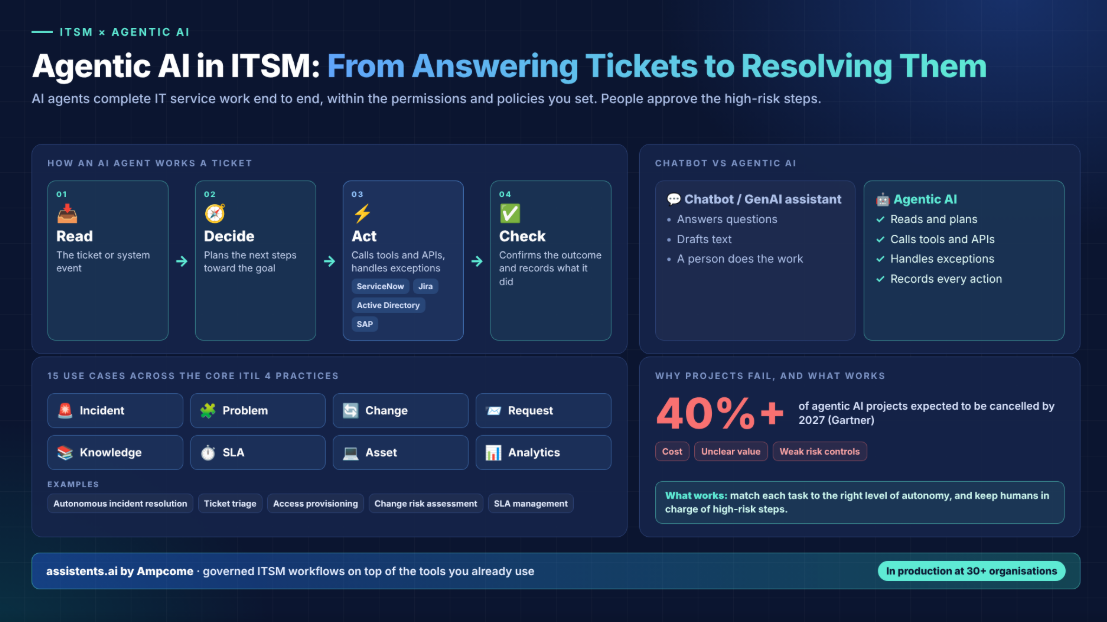
What are agentic AI use cases for ITSM? They are IT service management tasks that AI agents complete end to end instead of just answering. The agent reads a ticket or system event, works out the next step, acts in tools like ServiceNow, Jira Service Management, Active Directory or SAP, and confirms the outcome. Typical examples are autonomous incident resolution, ticket triage, access provisioning, change risk assessment and SLA management. People approve the high-risk steps.
What is agentic AI in ITSM?
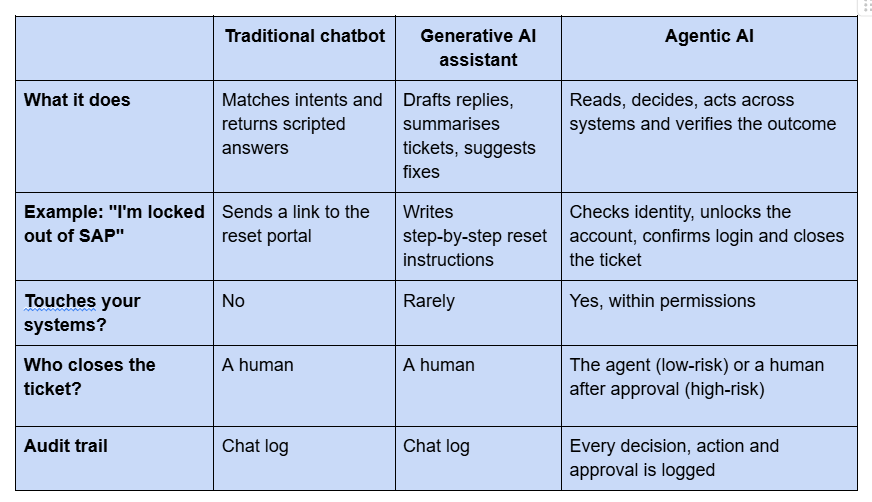
Agentic AI in ITSM means AI agents that carry out IT service work themselves, working towards a goal within the permissions and policies you set. A chatbot or generative AI assistant answers questions or drafts text. An agentic system reads the request, plans the steps, calls tools and APIs, handles exceptions and records what it did.
If you are new to the concept, start with our primer on what AI agents are. In ITSM terms, the difference looks like this:
The ITSM autonomy ladder
Not every IT task should be fully autonomous. We use a five-level ITSM autonomy ladder to decide how much freedom an agent gets:
- L0: Suggest. The agent recommends an action, and a human does everything.
- L1: Draft. The agent prepares the change, reply or record, and a human reviews and submits it.
- L2: Act with approval. The agent executes after a named approver signs off.
- L3: Act within policy. The agent executes on its own when the request falls inside predefined rules, and sends anything else for review.
- L4: Fully autonomous. For low-risk, high-volume tasks with reliable rollback.
Every use case below has a recommended level. Most organisations start at L1–L2 and move up as trust and data quality improve.
Why ITSM teams are moving to agentic AI now
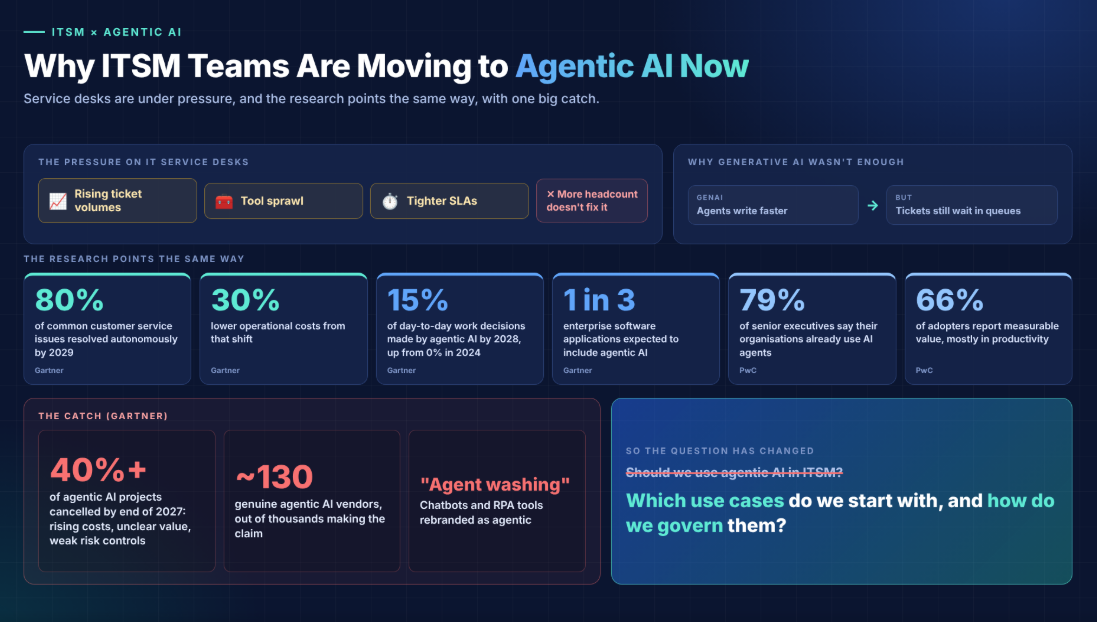
IT service desks are under pressure from rising ticket volumes, tool sprawl and tighter SLAs, and adding headcount doesn't fix any of these. Generative AI helped individual agents write faster, but tickets still waited in queues because someone had to do the work.
The research points the same way:
- Gartner predicts that by 2029, agentic AI will autonomously resolve 80% of common customer service issues without human intervention, cutting operational costs by 30% (Gartner). The forecast is about customer service, but internal IT support follows the same pattern of repetitive, rules-bound requests.
- Gartner expects agentic AI to make at least 15% of day-to-day work decisions autonomously by 2028, up from 0% in 2024. It also expects a third of enterprise software applications to include agentic AI (Gartner).
- 79% of senior executives say their organisations already use AI agents, and 66% of adopters report measurable value, mostly in productivity (PwC survey via Digital Commerce 360).
There is a catch. Gartner also predicts that over 40% of agentic AI projects will be cancelled by the end of 2027 because of rising costs, unclear business value or inadequate risk controls. It warns about "agent washing", where chatbots and RPA tools are rebranded as agentic, and estimates that only about 130 of the thousands of vendors claiming agentic AI are genuine (Gartner).
So the question for IT leaders has changed. It's no longer whether to use agentic AI in ITSM, but which use cases to start with, and how to govern them. The rest of this guide answers both.
15 agentic AI use cases for ITSM, by ITIL process
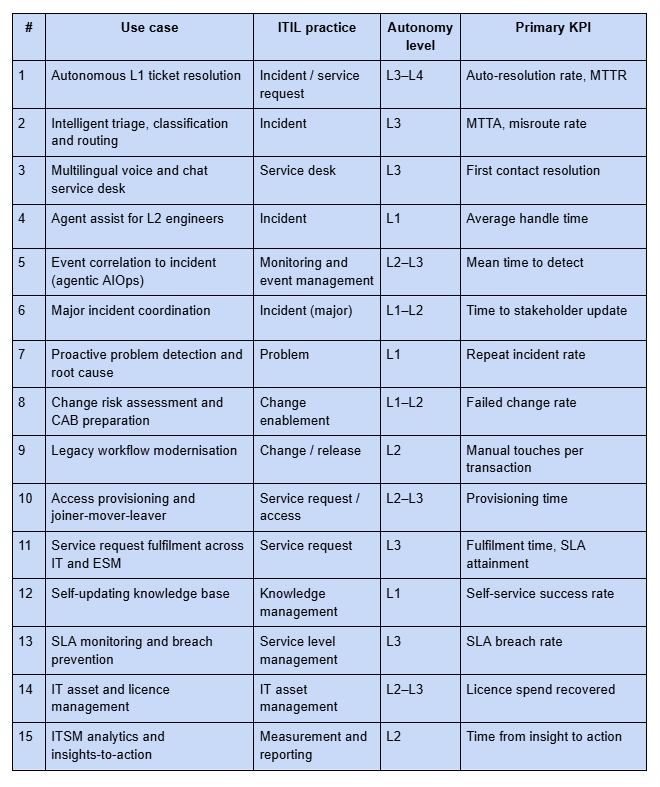
The table below maps each use case to its ITIL 4 practice, a recommended autonomy level and the KPI it moves most. Each use case is then broken down the same way: Trigger → What the agent does → Human checkpoint → KPI moved → How Assistents.ai does it.
Incident management
1. Autonomous L1 ticket resolution
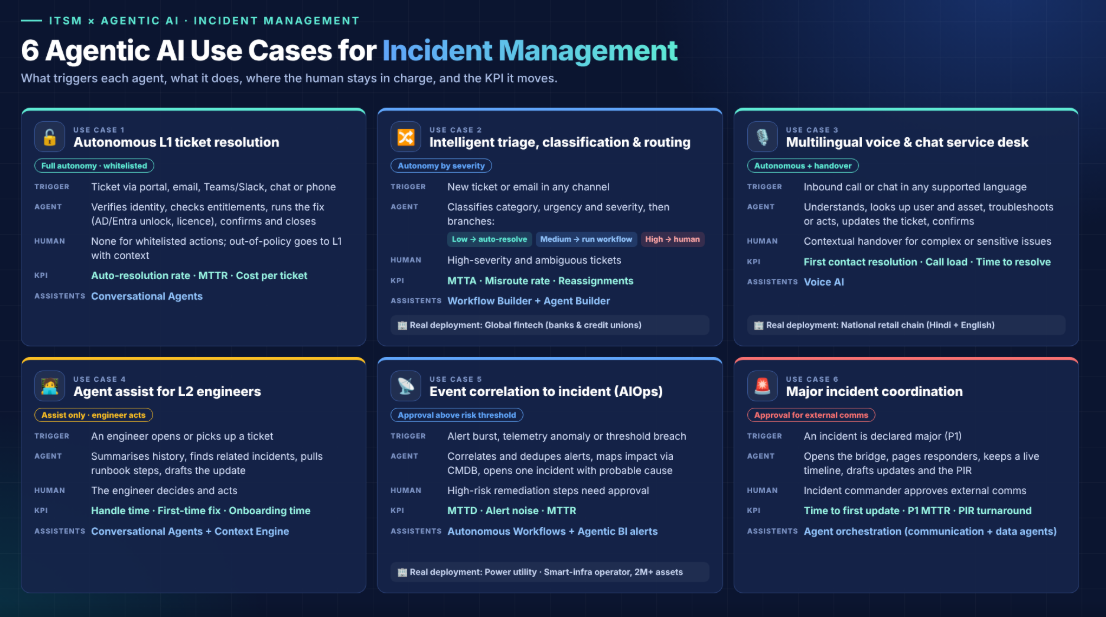
Most service desks spend much of their capacity on a small set of repetitive requests: password resets, account unlocks, VPN problems, software access, and "how do I" questions. These are the safest place to start with agentic AI.
- Trigger: A ticket arrives through the portal, email, Teams/Slack, chat or phone.
- What the agent does: Verifies the user's identity, checks entitlements, runs the fix (for example, an unlock in Active Directory or Entra ID, or adding a licence), confirms the result with the user and closes the ticket with full notes.
- Human checkpoint: None for whitelisted actions. Anything outside policy goes to L1 staff with context already attached.
- KPI moved: Auto-resolution rate, MTTR, cost per ticket.
- How Assistents.ai does it: Conversational Agents give source-backed answers and take permitted actions, such as creating a task, updating a record or triggering a workflow, so the request is resolved and not just answered.
For a deeper deployment walkthrough, see our guide to deploying AI agents for technical support.
2. Intelligent triage, classification and routing
Misrouted tickets bounce between queues and quietly eat up SLA time. An agent reads the full ticket, including the text, attachments, user history and CMDB context, and makes routing decisions a keyword rule can't.
- Trigger: A new ticket or email lands in any channel.
- What the agent does: Classifies category and urgency and assesses severity. It then branches: low severity → auto-resolve, medium → execute the standard workflow, high → route to a human with a summary and suggested next steps.
- Human checkpoint: High-severity and ambiguous tickets.
- KPI moved: MTTA, misroute rate, reassignment count.
- How Assistents.ai does it: The Workflow Builder has a built-in severity-based triage pattern (auto-resolve / execute / human review). The Agent Builder lets you set the triage agent's instructions, knowledge, tools, permissions and tests before you publish it.
Real deployment: global fintech provider (banking and credit unions) A cloud fintech provider serving banks and credit unions needed faster, auditable case handling across channels. Assistents.ai deployed omnichannel intake (chat, email, phone) with workflow routing, agent-assist summaries and next-best actions, SLA monitoring and full audit trails, ready to integrate with core systems. Results: faster, more consistent case handling, lower operational load through automation, and stronger compliance readiness through audit trails.
3. Multilingual voice and chat service desk
Many organisations support frontline staff, such as store teams, field engineers and plant operators, who would rather speak than type, and often not in English. Agentic voice AI turns a phone call into a resolved request.
- Trigger: An inbound call or chat in any supported language.
- What the agent does: Understands the request, looks up the user and asset, checks the knowledge base, troubleshoots or performs the action, creates or updates the ticket and sends a confirmation. It hands over to a human with full context when needed.
- Human checkpoint: Contextual handover for complex or sensitive issues.
- KPI moved: First contact resolution, call-centre load, time to resolution.
- How Assistents.ai does it: Voice AI supports multilingual inbound and outbound conversations, with in-call actions, contextual handover and automatic call summaries.
Real deployment: national retail chain with hundreds of stores A fast-growing value retailer with a national store network needed to cut helpdesk load and get answers to the store floor faster. Assistents.ai delivered a voice support agent in Hindi and English (STT → LLM → TTS), an inventory intelligence agent for store-level pricing, stock and promotions, a knowledge and training agent using RAG over POS and SOP documents, plus an admin console, analytics and ticketing integration. Results: less manual helpdesk work, faster store-issue resolution, better store-level inventory visibility, and faster onboarding through on-demand training.
4. Agent assist for L2 engineers
Not every ticket should be automated, but every engineer can use help. Agent assist summarises long ticket threads, pulls in similar past incidents and suggests the next best action.
- Trigger: An engineer opens or picks up a ticket.
- What the agent does: Summarises history, finds related incidents and known errors, pulls relevant runbook steps and drafts the customer update.
- Human checkpoint: The engineer decides and acts (L1 autonomy).
- KPI moved: Average handle time, first-time fix rate, time to onboard new engineers.
- How Assistents.ai does it: Conversational Agents grounded in the Context Engine, which links tickets, assets, owners, policies and source evidence, so every suggestion is traceable.
5. Event correlation to incident (agentic AIOps)
Monitoring tools produce thousands of alerts, and most of them are noise. An agentic AIOps layer groups related signals, works out the business impact and opens one actionable incident.
- Trigger: A burst of alerts, an anomaly in telemetry or a threshold breach.
- What the agent does: Correlates events, deduplicates them, maps them to affected services through the CMDB, opens a single incident with a probable cause and draft remediation, and notifies the right on-call team.
- Human checkpoint: Remediation steps above a risk threshold need approval.
- KPI moved: Mean time to detect (MTTD), alert noise, MTTR.
- How Assistents.ai does it: Autonomous Workflows triggered by system events, APIs and files, with Agentic BI threshold alerts and routing.
Real deployments: power utility and smart-infrastructure operator A state power-transmission utility uses Assistents.ai to monitor transmission KPIs, detect anomalies, analyse losses and outages, and send automated alerts to field operations. A city-scale smart-infrastructure operator connecting 2M+ assets uses agentic analytics for smart-grid data, predictive analytics for outages and field issues, and automated alerts with workflow routing for resolution. Results: faster detection of exceptions and operational risks, faster response coordination, and more proactive, reliable operations through continuous monitoring.
6. Major incident coordination
During a P1, engineers spend valuable time on coordination instead of fixing the problem. An agent takes on the communications work.
- Trigger: An incident is declared major.
- What the agent does: Opens the bridge, pages responders, keeps a live timeline, drafts status page and executive updates at set intervals, and prepares the post-incident review.
- Human checkpoint: The incident commander approves external communications.
- KPI moved: Time to first stakeholder update, MTTR for P1s, post-incident review turnaround.
- How Assistents.ai does it: A communication agent and a data agent coordinated by the platform's agent orchestration layer. It routes tasks, tracks state and pauses for review.
Problem management
7. Proactive problem detection and root-cause analysis
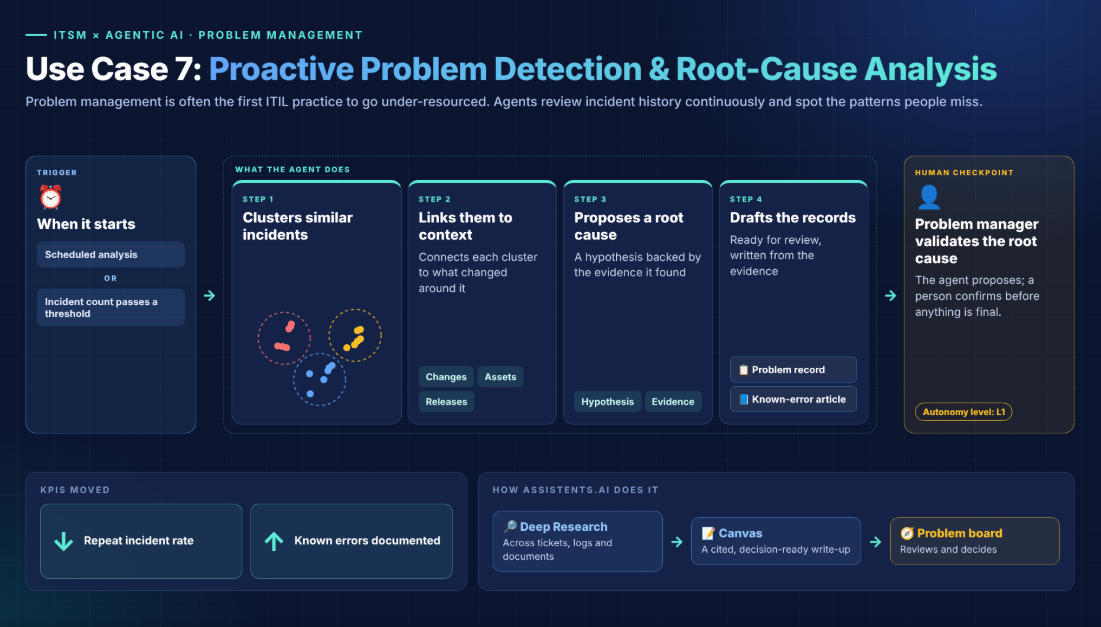
Problem management is often the first ITIL practice to go under-resourced. Agents can review incident history continuously and spot patterns people miss.
- Trigger: A scheduled analysis, or an incident count passing a threshold.
- What the agent does: Clusters similar incidents, links them to changes, assets and releases, proposes a root-cause hypothesis with evidence and drafts the problem record and known-error article.
- Human checkpoint: The problem manager validates the root cause (L1).
- KPI moved: Repeat incident rate, number of known errors documented.
- How Assistents.ai does it: Deep Research across tickets, logs and documents, which produces a cited, decision-ready write-up in Canvas for the problem board.
Change and release management
8. Change risk assessment and CAB preparation
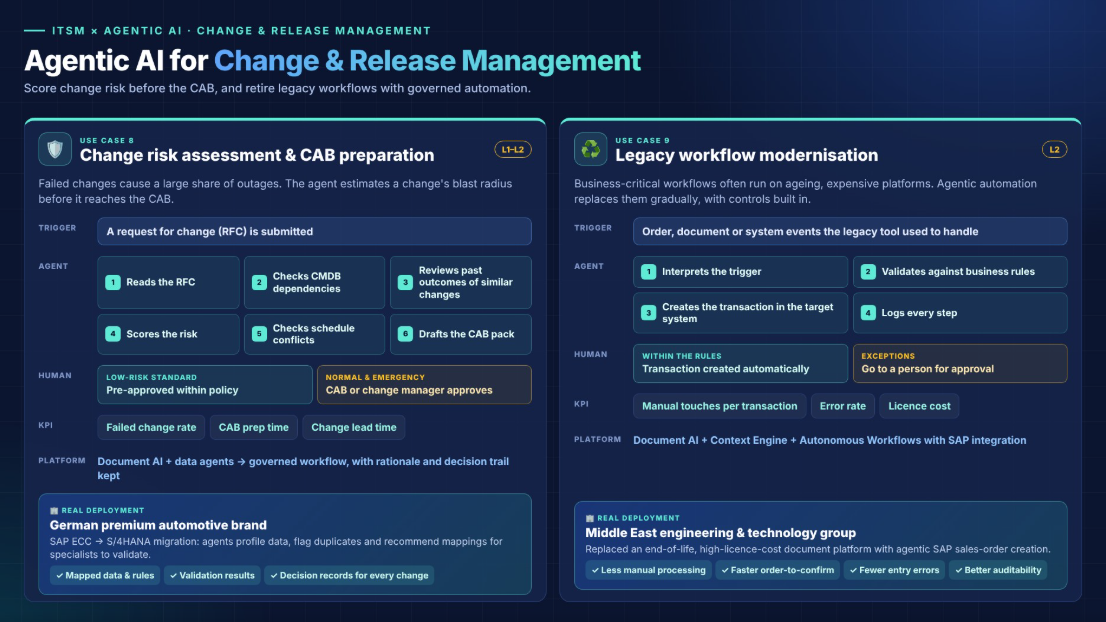
Failed changes cause a large share of outages. An agent can estimate a change's "blast radius" before it reaches the CAB.
- Trigger: A request for change (RFC) is submitted.
- What the agent does: Reads the RFC, checks CMDB dependencies, looks at past outcomes for similar changes, scores the risk, checks for schedule conflicts and drafts the CAB pack. Low-risk standard changes can be pre-approved within policy.
- Human checkpoint: CAB or the change manager approves normal and emergency changes (L1–L2).
- KPI moved: Failed change rate, CAB preparation time, change lead time.
- How Assistents.ai does it: Document AI and data agents feed a governed workflow. Every recommendation keeps its rationale and decision trail.
Real deployment: a leading German premium automotive brand For an SAP ECC → SAP S/4HANA migration, Assistents.ai agents profile customer, material, vendor, transaction and custom-table data. They check for duplicates and inconsistencies and recommend mappings for specialists to validate. Outputs include mapped data, transformation rules, validation results, migration files and decision records. Value: migration decisions that can be reviewed, with the rationale and decision trail kept for every change.
9. Legacy workflow modernisation with governed automation
IT teams often run business-critical workflows on ageing, expensive platforms. Agentic automation can replace them gradually, with controls built in.
- Trigger: Order, document or system events that used to be handled by the legacy tool.
- What the agent does: Interprets the trigger, validates data against business rules and creates the transaction in the target system. Exceptions go to approval, and every step is logged.
- Human checkpoint: Exceptions and approvals (L2).
- KPI moved: Manual touches per transaction, error rate, licence cost.
- How Assistents.ai does it: Document AI + Context Engine + Autonomous Workflows with SAP integration.
Real deployment: Middle East engineering and technology group A long-established engineering group needed to move off an end-of-life, high-licence-cost document processing platform. Assistents.ai delivered agentic SAP sales-order creation: interpreting order triggers, validating and creating orders, with rules for exceptions and approvals, audit logs and reconciliation reporting. Results: less manual order processing and dependence on the legacy system, a faster order-to-confirm cycle with fewer data-entry errors, and better auditability.
Service request and access management
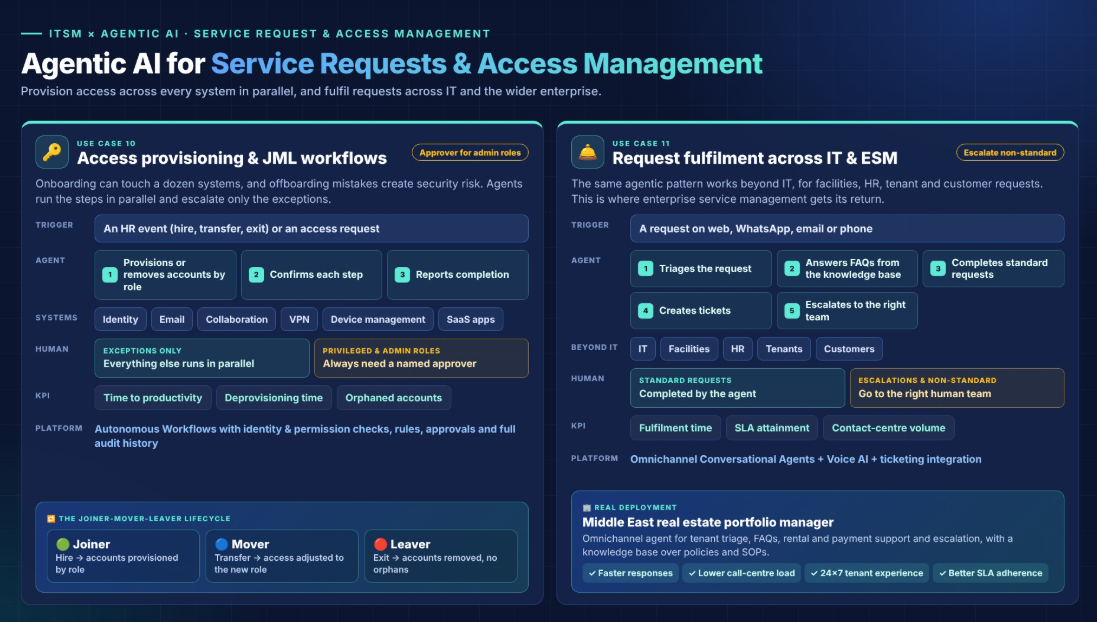
10. Access provisioning and joiner-mover-leaver workflows
Onboarding a new hire can involve a dozen systems, and offboarding mistakes create security risk. Agents run the steps in parallel and escalate only the exceptions.
- Trigger: An HR event (hire, transfer, exit) or an access request.
- What the agent does: Provisions or removes accounts across identity, email, collaboration, VPN, device management and SaaS apps based on role. It confirms each step and reports completion.
- Human checkpoint: Privileged and admin roles always need a named approver.
- KPI moved: Time to productivity for new hires, deprovisioning time, orphaned accounts.
- How Assistents.ai does it: Autonomous Workflows with identity and permission checks, rules and approvals, and a complete audit history.
11. Service request fulfilment across IT and enterprise service management
The same agentic pattern works beyond IT, for facilities, HR, tenant and customer requests. This is where enterprise service management (ESM) gets its return.
- Trigger: A request on web, WhatsApp, email or phone.
- What the agent does: Triages the request, answers FAQs from the knowledge base, completes standard requests, creates tickets and escalates to the right human team.
- Human checkpoint: Escalations and non-standard requests.
- KPI moved: Fulfilment time, SLA attainment, contact-centre volume.
- How Assistents.ai does it: Omnichannel Conversational Agents + Voice AI + ticketing integration.
Real deployment: diversified Middle East real estate portfolio manager A large owner and manager of office, retail, industrial and residential assets deployed an omnichannel service agent for tenant query triage, FAQs, rental and payment support, ticketing and escalation to human teams, and a knowledge base over policies, tenancy documents and SOPs. Results: faster response times, lower call-centre load, consistent 24×7 tenant experience and better SLA adherence through automated routing and tracking.
Knowledge, SLA, asset and analytics
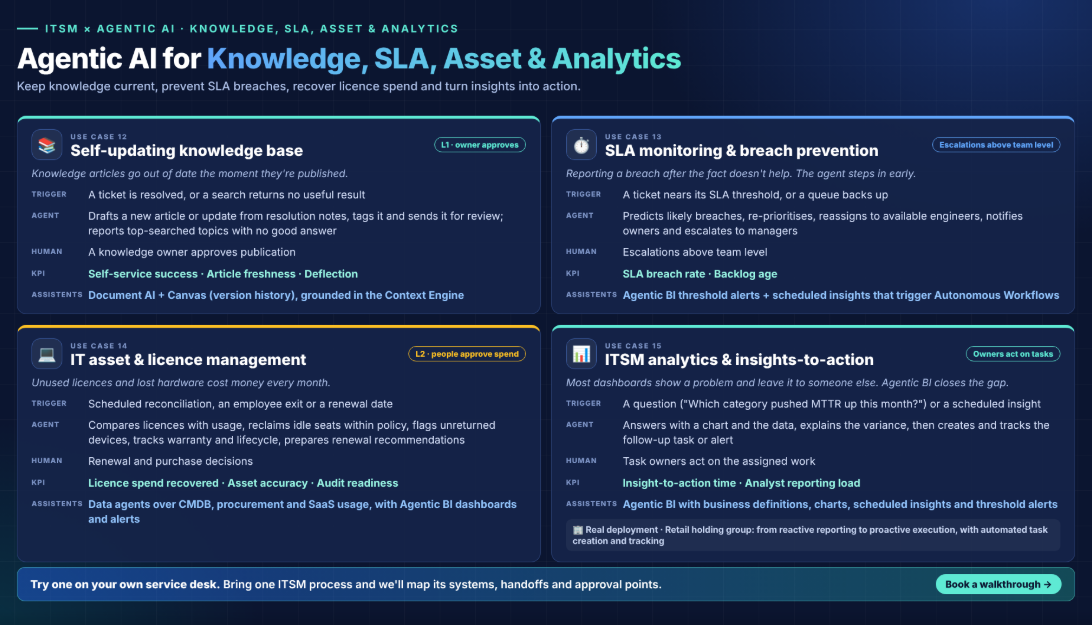
12. Self-updating knowledge base
Knowledge articles go out of date the moment they're published. Agents can turn resolved tickets into draft articles and flag gaps.
- Trigger: A ticket is resolved, or a search returns no useful result.
- What the agent does: Drafts a new article or an update from the resolution notes, tags it and sends it for review. It also reports the most-searched topics with no good answer.
- Human checkpoint: A knowledge owner approves publication (L1).
- KPI moved: Self-service success rate, article freshness, deflection.
- How Assistents.ai does it: Document AI + Canvas for collaborative editing with version history, grounded in the Context Engine.
13. SLA monitoring and breach prevention
Reporting a breach after the fact doesn't help. An agent watches every open ticket against its SLA clock and steps in early.
- Trigger: A ticket approaching an SLA threshold, or a queue backing up.
- What the agent does: Predicts likely breaches, re-prioritises, reassigns to available engineers, notifies owners and escalates to managers.
- Human checkpoint: Escalations above team level.
- KPI moved: SLA breach rate, backlog age.
- How Assistents.ai does it: Agentic BI threshold alerts and scheduled insights that trigger Autonomous Workflows.
14. IT asset and licence management
Unused licences and lost hardware cost money every month. Agents reconcile what you own with what is actually used.
- Trigger: A scheduled reconciliation, an employee exit or a renewal date.
- What the agent does: Compares licence assignments with usage, reclaims idle seats within policy, flags unreturned devices, tracks warranty and lifecycle dates, and prepares renewal recommendations.
- Human checkpoint: Renewal and purchase decisions (L2).
- KPI moved: Licence spend recovered, asset accuracy, audit readiness.
- How Assistents.ai does it: Data agents over CMDB, procurement and SaaS usage data, with Agentic BI dashboards and alerts.
15. ITSM analytics and insights-to-action (agentic BI)
Most ITSM dashboards show you a problem and then leave it to someone else to fix. Agentic BI closes that gap.
- Trigger: A natural-language question ("Which category pushed MTTR up this month?") or a scheduled insight.
- What the agent does: Answers with a chart and the underlying data, explains the variance, and then creates and tracks the follow-up task or alert.
- Human checkpoint: Task owners act on the assigned work.
- KPI moved: Time from insight to action, analyst reporting load.
- How Assistents.ai does it: Agentic BI with business definitions, charts and reports, scheduled insights and threshold alerts.
Real deployment: diversified retail holding group A privately held retail group needed governed, cross-functional intelligence across systems and documents. Assistents.ai added a unified context engine (structured and unstructured data), a semantic governance layer (rules, hierarchies, formulas), and insights-to-action agents on top of existing dashboards. Results: a shift from reactive reporting to proactive execution, standardised decision logic across teams, and automated task creation and completion tracking.
Ready to try one of these use cases on your own service desk? Book a tailored Assistents.ai walkthrough. Bring one ITSM process and we'll map its systems, handoffs and approval points.
How an agentic ITSM workflow runs end to end
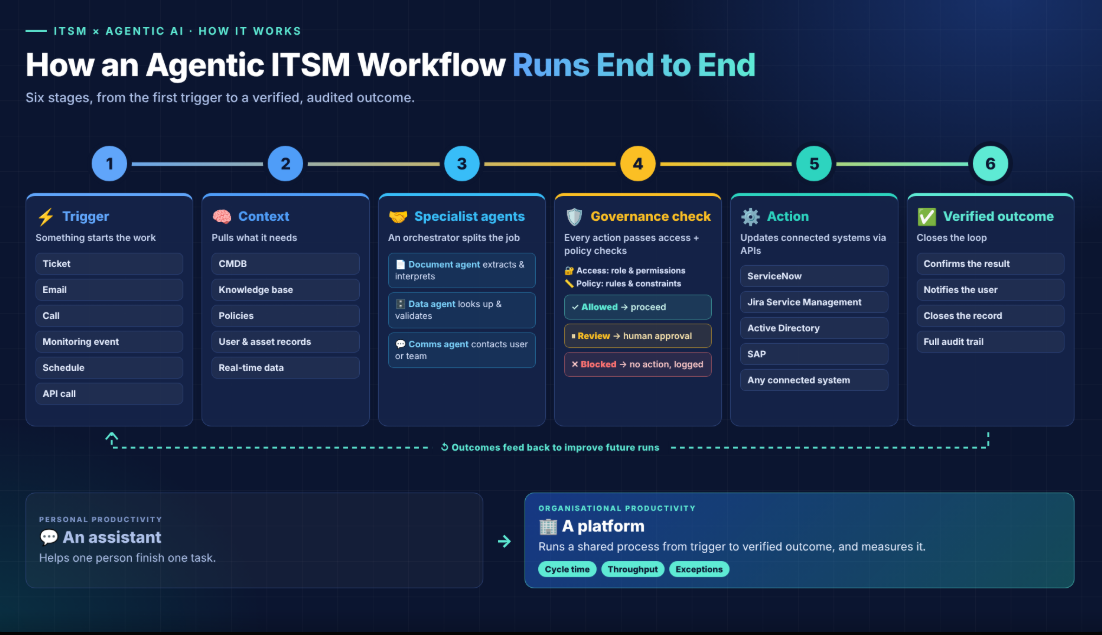
An agentic ITSM workflow moves through six stages: trigger, context, specialist agents, governance check, action and verified outcome. Here is the flow for a typical request:
- Trigger. A ticket, email, call, monitoring event, schedule or API call starts the work.
- Context. The agent pulls what it needs from the CMDB, knowledge base, policies, user and asset records and real-time data.
- Specialist agents. An orchestrator sends parts of the job to specialists: a document agent extracts and interprets, a data agent looks up and validates, and a communication agent contacts the user or team.
- Governance check. Every proposed action passes an access check (role and permissions) and a policy evaluation (rules and constraints). The result is allowed → proceed, review required → human approval, or blocked → no action, logged for review.
- Action. The agent updates ServiceNow, Jira Service Management, Active Directory, SAP or any connected system through APIs and connectors.
- Verified outcome. The agent confirms the result, notifies the user, closes the record and keeps a full audit trail. Outcomes feed back to improve future runs.
This is the difference between personal productivity (an assistant that helps one person finish one task) and organisational productivity (a platform that runs a shared process from trigger to verified outcome and measures cycle time, throughput and exceptions).
Governance: what to automate, approve or block
The safest way to scale agentic AI in ITSM is to tie every action type to an autonomy level and an approval rule, and to log everything. Weak governance is one of the main reasons Gartner expects so many agentic AI projects to be cancelled.
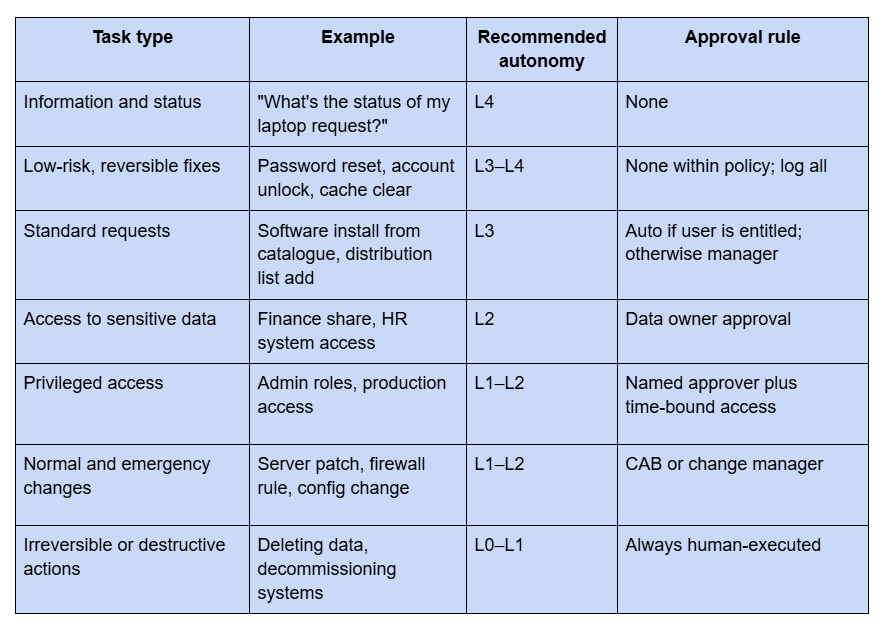
Four controls every agentic ITSM platform should have:
- Identity and permissions. Agents act with defined roles, never broad service accounts.
- Rules and approvals. Business rules decide whether an action is allowed, needs review or is blocked.
- A complete audit history. Every input, decision, action and approval is recorded.
- Model governance. An AI gateway handles approved model routing, fallback, usage limits and security, including protection against prompt injection and data leakage.
Best agentic AI platforms for ITSM in 2026
The best agentic AI platform for ITSM depends on whether you want AI inside a single ITSM suite, or a governed agent layer that works across ITSM and the rest of the business. Here is how the main options compare:
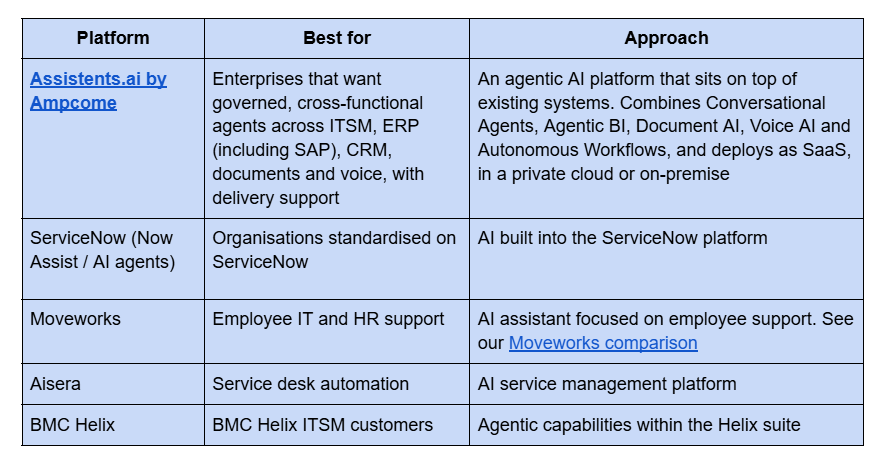
Capabilities change quickly, so check current features with each vendor. For a side-by-side view, see how Assistents.ai compares.
When you evaluate any platform, ask:
- Does it act in your systems, or only answer and draft?
- Can you set autonomy levels, approvals and blocked actions for each task?
- Is there a complete audit trail for every agent decision?
- Does it work with your current ITSM tool, or do you have to replace it?
- Can the same platform serve HR, finance, operations and customer service, so you don't buy another tool per department?
- Can you choose and switch AI models, and deploy in your own cloud or on-premise?
- Who helps you get to production, and how quickly?
Why Assistents.ai is the leading agentic AI platform for ITSM
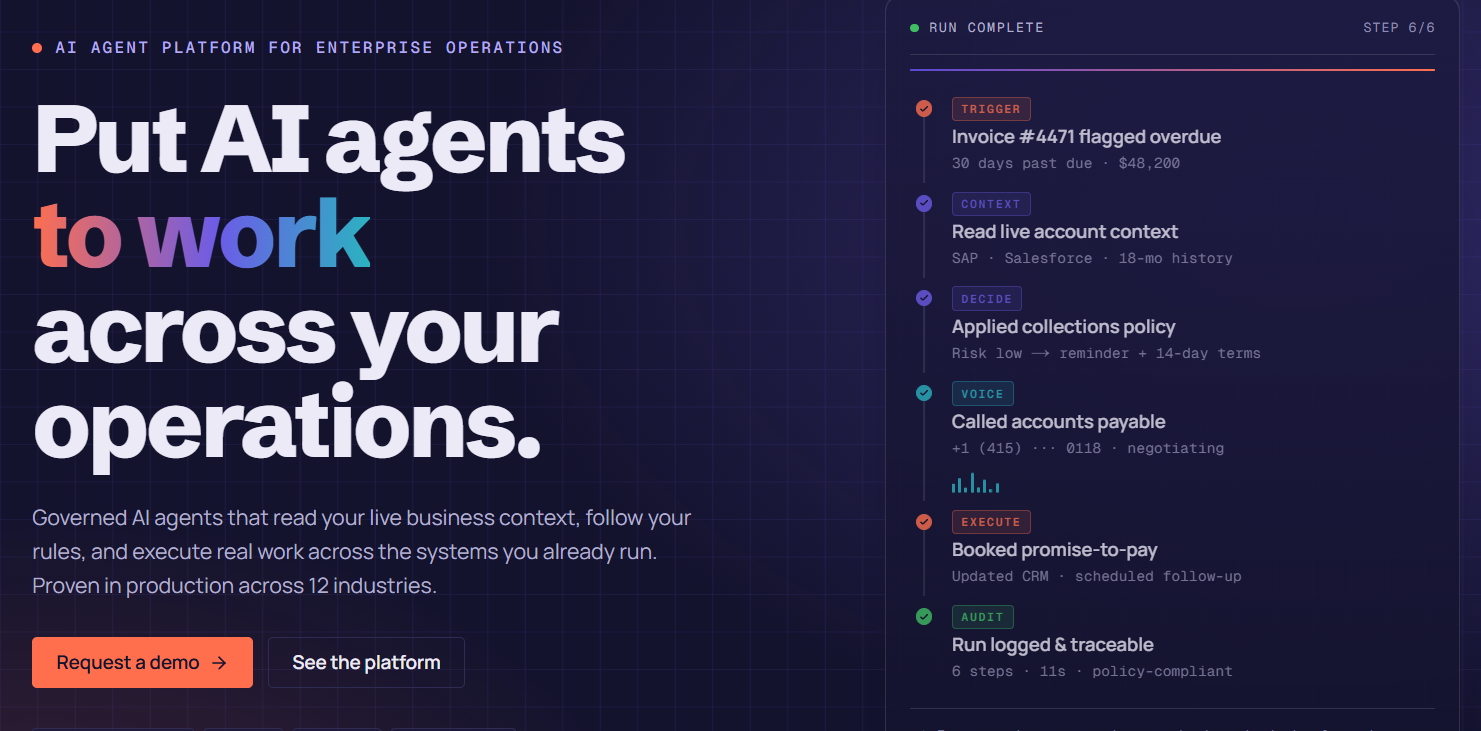
Assistents.ai is built for organisational productivity: AI agents that understand your business, follow your rules and work alongside your people across complete processes. Here's what that means for IT service management.
1. Five agentic capabilities on one platform. Ask, Analyse, Read, Speak, Act.
- Conversational Agents: source-backed answers and permitted actions.
- Agentic BI: natural-language questions to charts, reports, scheduled insights and threshold alerts.
- Document AI: reads layouts and tables, extracts fields with high accuracy, applies business rules and sends exceptions for review.
- Voice AI: multilingual inbound and outbound voice with in-call actions and contextual handover.
- Autonomous Workflows: events, schedules and inboxes turned into completed work.
Teams extend these with Deep Research, Canvas, Agent Builder and Workflow Builder. You can use one capability on its own or combine them to transform a whole process.
2. A Context Engine that understands your environment. Agents connect entities, relationships, policies and source evidence, such as your CMDB, SLAs, runbooks and ownership. That means decisions reflect your rules, not generic guesses.
3. Governed execution by design. Every action passes an access check and a policy evaluation, then proceeds, waits for human approval or is blocked and logged. You get permissions, business rules, human approvals and a complete audit history.
4. Built on the systems you already use. Connect ERP (including SAP), CRM, HR, files, databases and APIs through secure standard protocols, event ingestion and bidirectional sync. There's no need to replace your ITSM suite.
5. Your models, your infrastructure. The AI Gateway handles approved model choice, task routing and optimisation, fallback and high availability, and usage management. You can deploy as cloud SaaS, in a private cloud or on-premise.
6. Agent orchestration that keeps work moving. Specialist agents (document, data, communication) are coordinated to route tasks, track state, handle exceptions and verify outcomes. Humans step in only where they add value.
Read more in our launch post: Introducing Assistents.ai: build custom AI agents securely at scale.
Why Assistents.ai: proof, people and a path to value
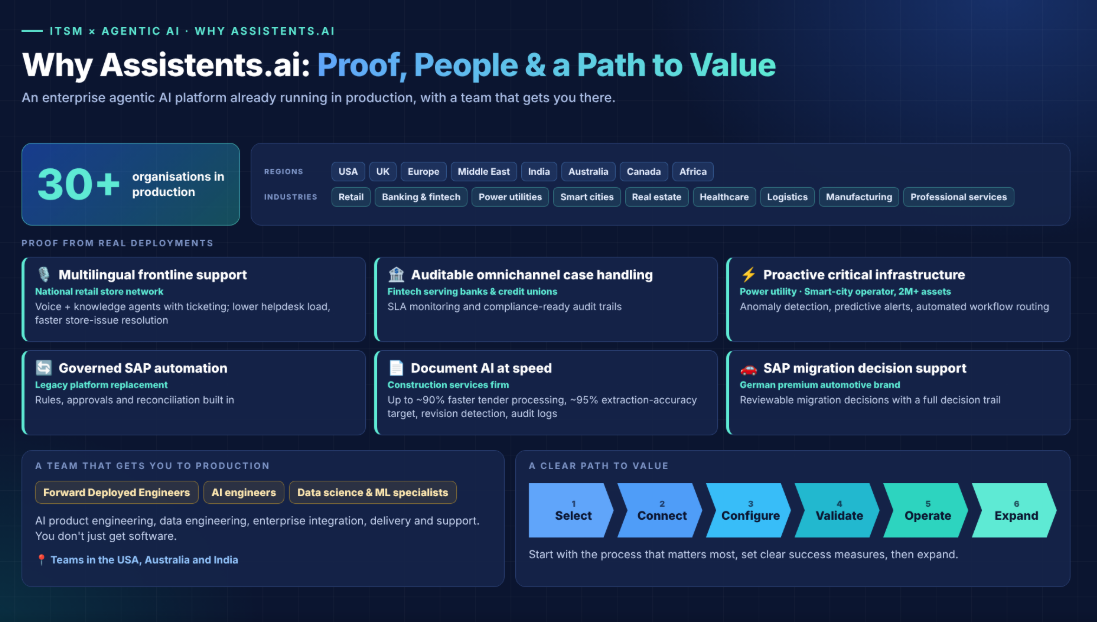
Assistents.ai is already in production across 30+ organisations in the USA, UK, Europe, the Middle East, India, Australia, Canada and Africa. Those deployments span retail, banking and fintech, power utilities, smart cities, real estate, healthcare, logistics, manufacturing and professional services.
Proof from real deployments
- Multilingual frontline support at national scale. Voice and knowledge agents with ticketing integration across a retail store network, reducing helpdesk load and speeding up store-issue resolution.
- Auditable omnichannel case handling. For a fintech provider serving banks and credit unions, with SLA monitoring and compliance-ready audit trails.
- Proactive operations for critical infrastructure. Anomaly detection, predictive alerts and automated workflow routing for a power utility and a smart-city operator managing 2M+ assets.
- Governed SAP automation. Replacing an end-of-life legacy platform with rules, approvals and reconciliation built in.
- Document AI at speed. Multi-agent tender-document processing for a construction services firm, engineered for up to ~90% faster processing with a ~95% extraction-accuracy target on standard formats, plus revision detection and audit logs.
- SAP migration decision support for a leading German premium automotive brand.
A team that gets you to production
You don't just get software. Ampcome's Forward Deployed Engineers (FDEs), AI engineers, and data science and machine learning specialists handle AI product engineering, data engineering, enterprise integration, delivery and support. Teams are based in the USA, Australia and India.
A clear path to value
Start with the process that matters most, set clear success measures and expand from there: Select → Connect → Configure → Validate → Operate → Expand.
How to implement agentic AI in ITSM: a 6-step roadmap
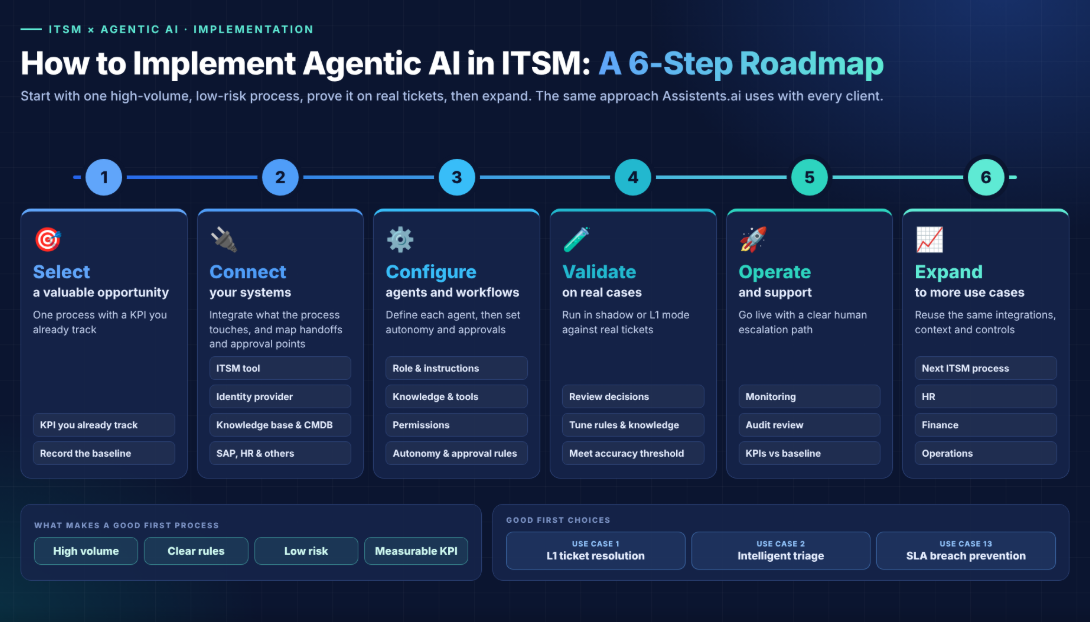
Start with one high-volume, low-risk ITSM process with a measurable KPI, prove it on real tickets and then expand. This is the same delivery approach Assistents.ai uses with every client.
- Select a valuable opportunity. Choose one process with high volume, clear rules, low risk and a KPI you already track. Good first choices are L1 resolution (use case 1), triage (use case 2) or SLA breach prevention (use case 13). Record the current baseline.
- Connect systems. Integrate your ITSM tool, identity provider, knowledge base, CMDB and any business systems involved (such as SAP or HR). Map handoffs and approval points.
- Configure agents and workflows. Define each agent's role, instructions, knowledge, tools and permissions. Set autonomy levels and approval rules using the governance table above.
- Validate on real cases and refine. Run in shadow or L1 mode against real tickets, review the decisions and tune the rules and knowledge until accuracy meets your threshold.
- Operate and support. Go live with monitoring, audit review and a clear human escalation path. Track KPIs against the baseline.
- Expand to more use cases. Reuse the same integrations, context and controls for the next ITSM process, then for HR, finance and operations.
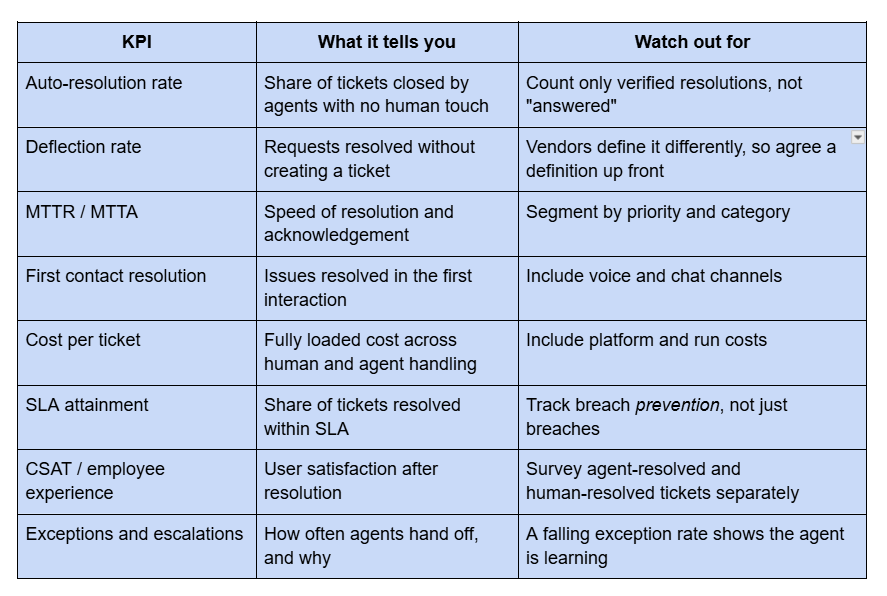
How to measure the ROI of agentic AI in ITSM
Measure agentic AI in ITSM against a baseline, using outcome KPIs rather than activity metrics. Baseline the process, track the change and keep improving.
Put agentic AI to work in your service desk
Agentic AI is moving ITSM from answering requests to resolving them, with governance in place. The organisations seeing results start with one valuable process, match autonomy to risk and build on a platform that can grow beyond IT.
Book a tailored Assistents.ai walkthrough → Bring one priority ITSM process. We'll map its systems, handoffs and approval points, and agree how success will be measured.
Still evaluating? Read our guide to deploying AI agents for technical support, browse 20 more agentic AI use cases with real-life examples, or see how Assistents.ai compares to Moveworks.
About Assistents.ai by Ampcome
Assistents.ai is an enterprise agentic AI platform from Ampcome. It puts AI agents to work across operations through Conversational Agents, Agentic BI, Document AI, Voice AI and Autonomous Workflows, all governed by permissions, rules, approvals and a complete audit trail. Ampcome has teams in the USA, Australia and India.
Frequently asked questions
What is agentic AI in ITSM?
Agentic AI in ITSM is the use of AI agents that complete IT service management work on their own within set permissions. They read tickets and events, decide on next steps, act in systems like ServiceNow, Jira, Active Directory or SAP, and verify outcomes. Chatbots and generative AI only answer or draft.
How is agentic AI different from a chatbot or generative AI in ITSM?
A chatbot returns scripted answers, and generative AI drafts text or summaries. Agentic AI goes further. It plans multi-step work, calls tools and APIs, handles exceptions and closes the loop with a verified, logged outcome. A chatbot sends a reset link; an agent unlocks the account and confirms the user can log in.
What are examples of agentic AI in IT operations?
Common examples are autonomous L1 ticket resolution, intelligent triage and routing, event correlation (agentic AIOps), change risk assessment, access provisioning for joiners, movers and leavers, SLA breach prevention, self-updating knowledge bases, licence reclamation, and ITSM analytics that create follow-up tasks automatically.
Can AI agents resolve IT tickets without humans?
Yes, for low-risk, rules-bound requests such as password resets, account unlocks, status checks and catalogue software installs. Higher-risk work, such as privileged access, production changes and irreversible actions, should keep a human approval step. Most teams use a tiered autonomy model and move up as trust grows.
Will agentic AI replace the IT service desk?
No. It changes what the service desk does. Agents take over repetitive L1 work and coordination tasks. Engineers spend more time on complex incidents, problem management, automation design and governance. The service desk shifts from working through queues to supervising and improving agents.
Is agentic AI safe for change management and access provisioning?
It is safe when it is governed. Use role-based permissions, policy checks that allow, send for review or block each action, named approvers for privileged access and normal changes, and a complete audit trail. Agents should prepare risk assessments and CAB packs, while humans approve the change.
Does agentic AI work with ServiceNow and Jira Service Management?
Yes. Platforms like Assistents.ai connect to ServiceNow, Jira Service Management and other ITSM tools through APIs and connectors. Agents work on top of your existing ITSM suite and can also act in ERP, CRM, HR and identity systems, so you don't need to replace any of them.
How do you measure the ROI of agentic AI in ITSM?
Baseline the process first, then track auto-resolution rate, deflection, MTTR, MTTA, first contact resolution, cost per ticket, SLA attainment and CSAT. Count only verified resolutions, agree on one definition of deflection, and include platform and run costs in cost-per-ticket calculations.
What are the risks of agentic AI in IT service management?
The main risks are agents acting outside policy, over-broad permissions, prompt injection, data leakage, poor-quality knowledge or CMDB data, and unclear business value. Reduce them with scoped permissions, approval rules, an AI gateway for model governance, audit trails, and a pilot with clear success metrics.
How long does it take to deploy agentic AI in ITSM?
A focused first use case, such as L1 resolution or triage, can usually be connected, configured and validated in weeks rather than months, depending on integration complexity and data quality. Start with one process, prove it on real tickets, then reuse the same integrations and controls to expand.

Transform Your Business With Agentic Automation
Agentic automation is the rising star posied to overtake RPA and bring about a new wave of intelligent automation. Explore the core concepts of agentic automation, how it works, real-life examples and strategies for a successful implementation in this ebook.
Sarfraz Nawaz is the CEO and founder of Ampcome, which is at the forefront of Artificial Intelligence (AI) Development. Nawaz's passion for technology is matched by his commitment to creating solutions that drive real-world results. Under his leadership, Ampcome's team of talented engineers and developers craft innovative IT solutions that empower businesses to thrive in the ever-evolving technological landscape.Ampcome's success is a testament to Nawaz's dedication to excellence and his unwavering belief in the transformative power of technology.

More insights
Discover the latest trends, best practices, and expert opinions that can reshape your perspective


.webp)


Contact us

