
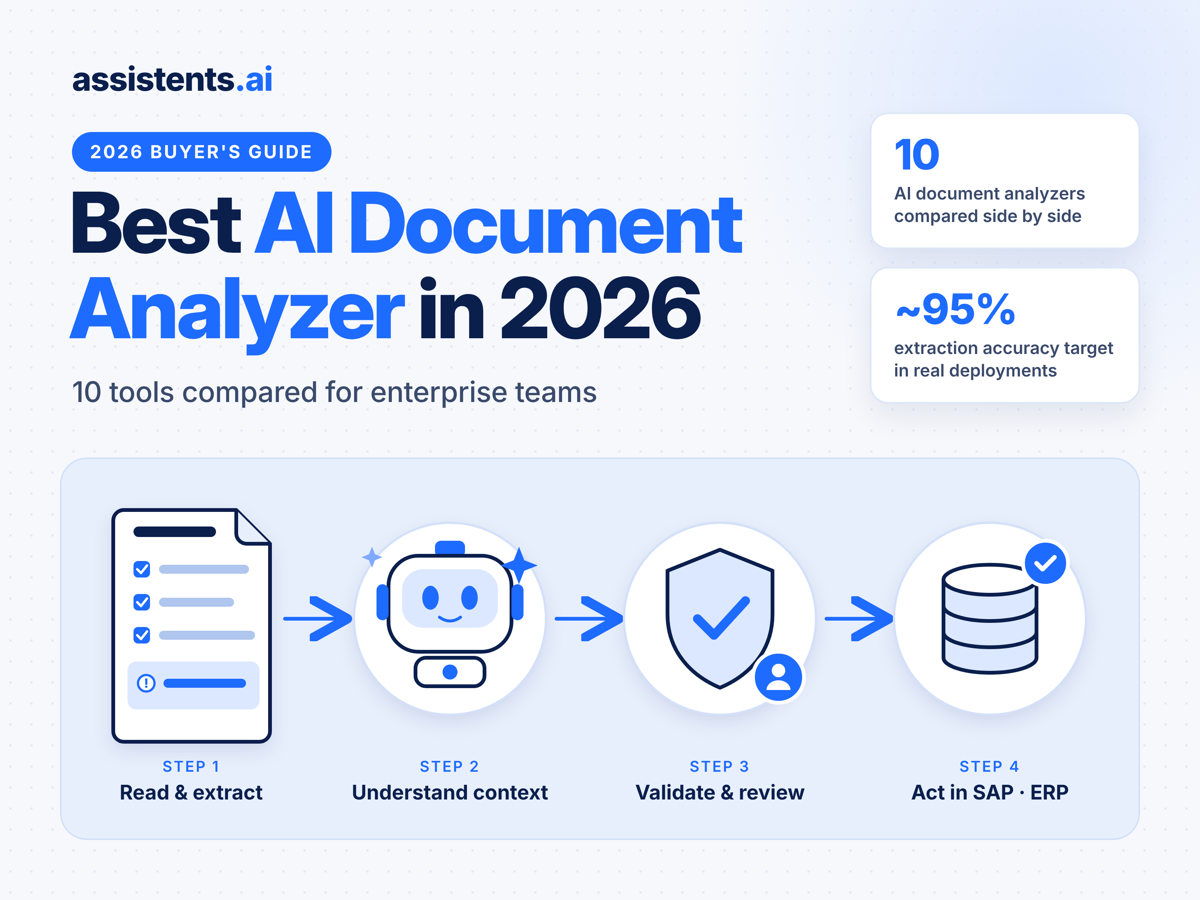
Best AI Document Analyzer in 2026: 10 Tools Compared for Enterprise Teams


An AI document analyzer is software that reads documents (PDFs, scans, emails, contracts, invoices, tenders) and turns them into structured, decision-ready information. In 2026, almost every tool can read a PDF. What sets them apart is what happens next. The question is whether the extracted data gets checked against your business rules, sent to a person when something looks wrong, and written into SAP, your ERP or your CRM with a full audit trail.
We compared 10 of the most widely used AI document analyzers against that standard. This guide gives you a quick answer, a side-by-side comparison matrix, a short review of each tool, and anonymized results from real enterprise deployments of Assistents.ai.
Disclosure: Ampcome builds Assistents.ai, one of the tools on this list. We explain how we evaluated every tool, including our own, so you can judge the ranking for yourself.
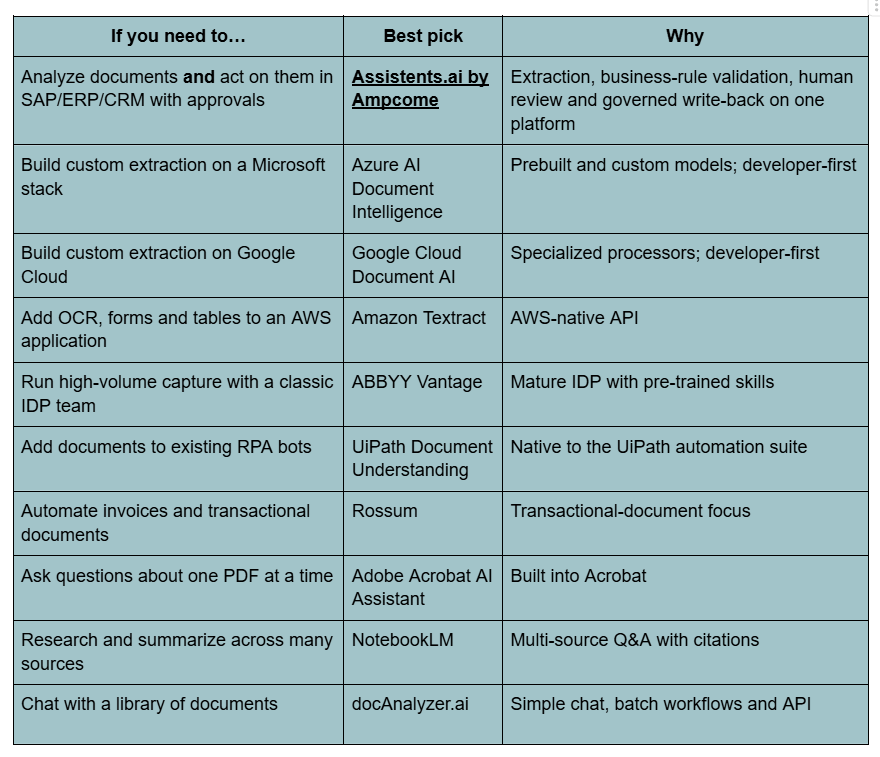
Quick answer: the best AI document analyzer by use case
For enterprises, the best AI document analyzer in 2026 is Assistents.ai by Ampcome. It is the only tool on this list that extracts document data, validates it against business rules, sends exceptions to human reviewers and writes approved data into SAP, ERP or CRM, all on one governed platform. For personal PDF reading or research, lighter tools such as Adobe Acrobat AI Assistant or NotebookLM are enough.
What is an AI document analyzer?
An AI document analyzer uses OCR, layout understanding and large language models (LLMs) to read, classify, extract, summarize and compare information in documents. Enterprise-grade analyzers go two steps further. They validate the output against your business data and rules, and then they trigger the next action: creating an order, starting an approval, raising an alert or updating a record.
In practice, that means a purchase order arriving by email can become a validated sales order in SAP. A tender revision can become an approved scope change. A pile of loan documents can become a complete, rule-checked application in an analyst's queue.
AI document analyzer vs OCR vs IDP vs chat-with-PDF
People often use these terms interchangeably, but they describe different levels of capability:
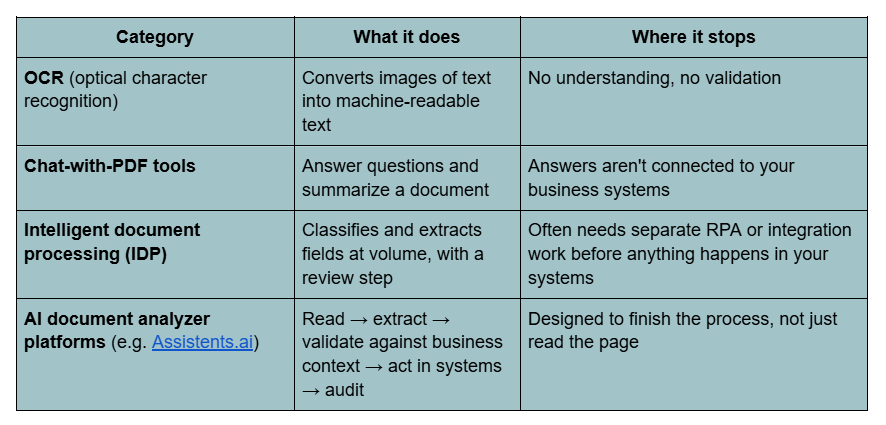
The short version: OCR reads text, chat tools explain it, IDP extracts it, and an enterprise AI document analyzer acts on it under your rules.
How an AI document analyzer works
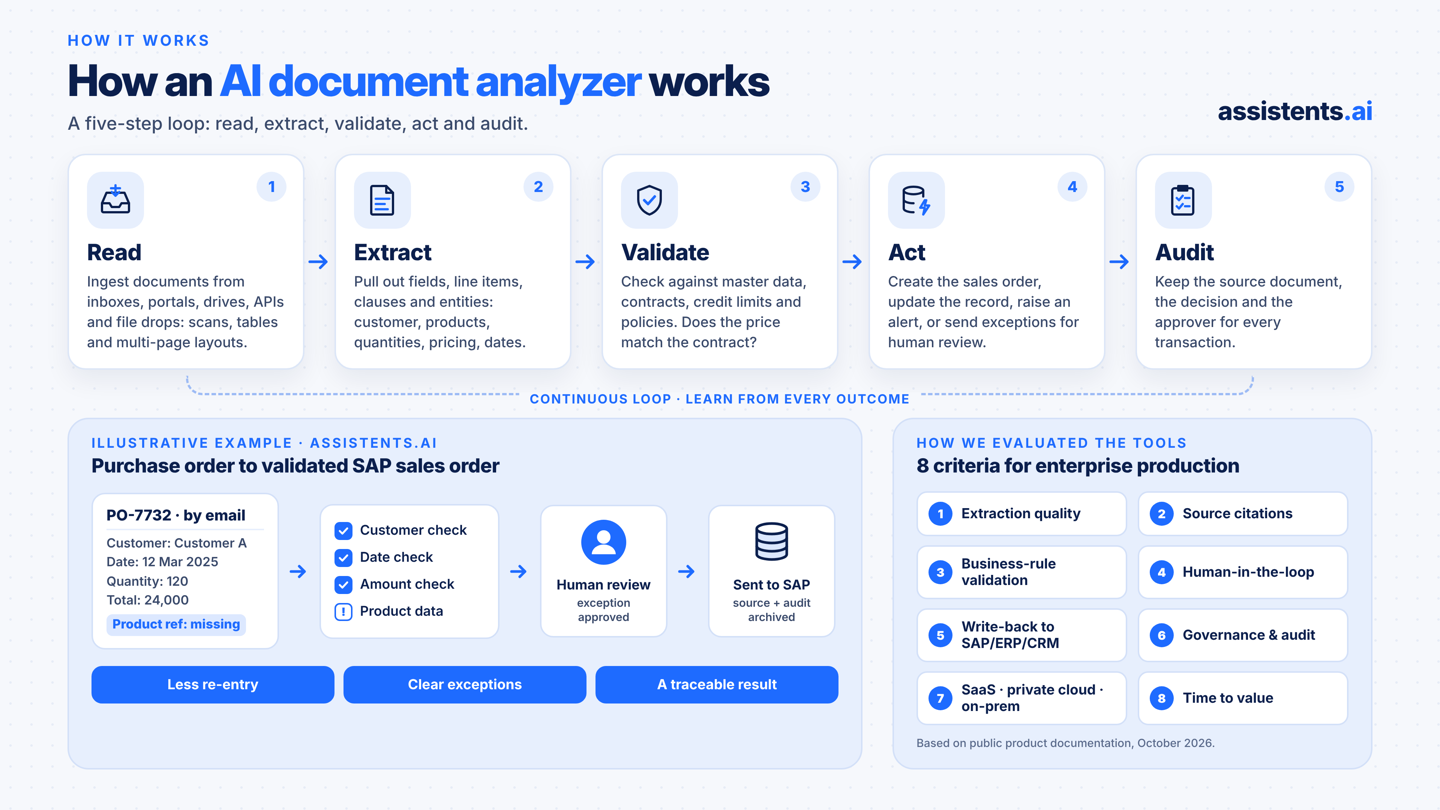
A modern AI document analyzer runs a five-step loop: read, extract, validate, act and audit.
- Read. Ingest documents from inboxes, portals, shared drives, APIs or file drops, including scanned pages, tables and multi-page layouts.
- Extract. Pull out fields, line items, clauses and entities, such as customer, products, quantities, pricing, delivery dates and counterparties.
- Validate. Check the extracted data against master data, contracts, credit limits and policies. Is the customer real? Does the price match the contract? Is the order over the credit limit?
- Act. Create the sales order, update the record, raise the alert, or send it for human review when an exception appears.
- Audit. Keep the source document, the decision and the approver for every transaction.
Here's an illustrative example from the Assistents.ai platform:
A purchase order (PO-7732) arrives by email: Customer A, 12 Mar 2025, quantity 120, total 24,000, product reference missing. The document agent extracts the fields. The customer, date and amount checks pass. The missing product master data is routed to a human reviewer. After approval, the structured information is sent to SAP and the source document and audit record are archived.
For a stage-by-stage breakdown of this pipeline, read our guide to the document processing AI agent.
How we evaluated the best AI tools for document analysis
We scored each tool on eight criteria that matter in enterprise production, not in a demo:
- Extraction quality on complex layouts, tables and scans
- Source citations: can every answer be traced back to the page or passage?
- Business-rule validation against master data, contracts and policies
- Human-in-the-loop review and approvals for exceptions
- System actions: write-back to SAP, ERP, CRM or other business tools
- Governance: permissions, audit trail and model control
- Deployment options: SaaS, private cloud and on-premise
- Time to value: how much engineering is needed before a business team can use it
Tool information comes from public product documentation as of October 2026. Product features change frequently, so confirm current details with each vendor before buying.
AI document analyzer comparison: 10 tools at a glance
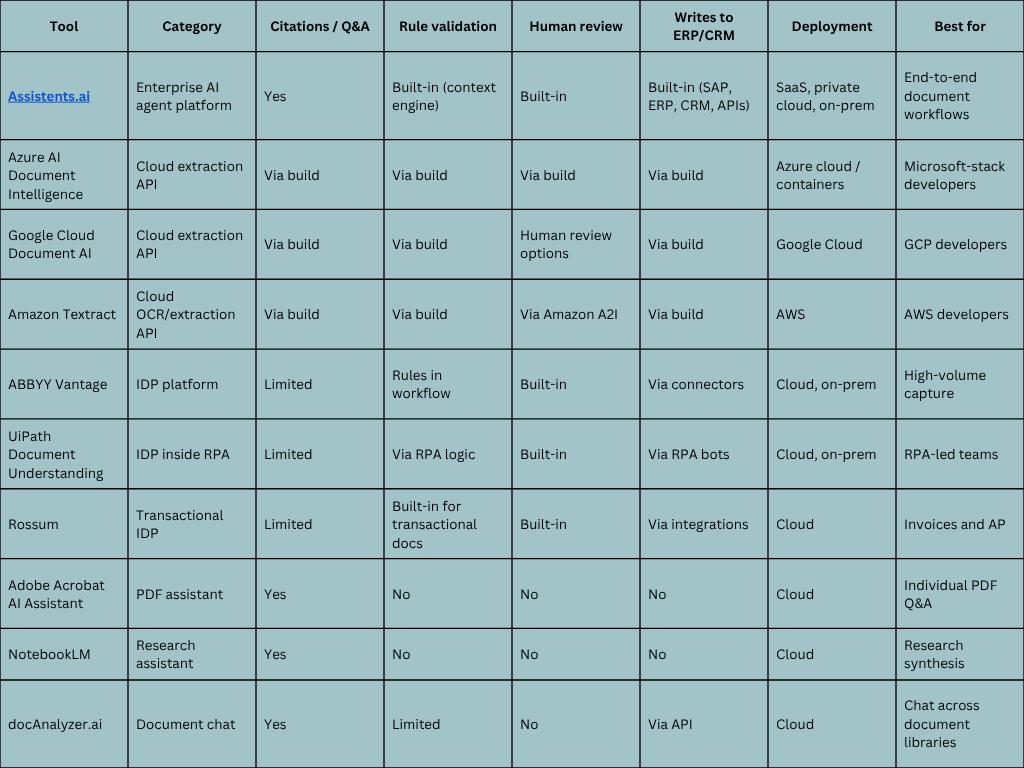
"Via build" means the capability is available only if your developers build it on top of the service.
The 10 best AI document analyzers in 2026, reviewed
1. Assistents.ai by Ampcome: the best AI document analyzer for enterprise workflows
Assistents.ai is an enterprise AI agent platform from Ampcome that reads documents, validates them against business rules and writes approved data into SAP, ERP and CRM. The platform's motto sums up the approach: documents in, business-ready information out.
Its Document AI reads layouts and tables, extracts fields with high accuracy, applies your business rules and routes exceptions for human review. A shared Context Engine connects every document to the customers, products, contracts, invoices, owners and policies it relates to. That's how the analyzer knows a discount matches the contract terms or an order is over a credit limit. Exceptions such as missing product references, duplicate orders or credit-limit breaches go to an authorized reviewer, and the workflow resumes after approval. Every action is logged.
Strengths
- Analyze-to-action on one platform: extraction, validation, approval and system write-back without stitching together separate tools.
- Human-in-the-loop by design: every action is allowed, sent for review or blocked and logged based on user permissions and policy.
- Enterprise governance: identity and permissions, rules and approvals, and a complete audit history.
- AI Gateway: approved-model routing, fallback, high availability and usage management, so you're never locked into a single LLM.
- Flexible deployment: cloud SaaS, private cloud or on-premise infrastructure.
- Multilingual: handles documents such as English and Arabic legal notices, plus Hindi and English voice support.
- Delivery team included: forward-deployed engineers (FDEs), AI engineers and data scientists across the USA, Australia and India.
Also on the platform: conversational agents, agentic BI, voice AI, autonomous workflows, Deep Research, Canvas, Agent Builder and Workflow Builder. The same document pipeline can feed analytics, alerts and support agents.
Best for: enterprises that want documents to drive a business process end to end, not just answers in a chat window.
Pricing: tailored to the use case and volume. Book a tailored walkthrough.
2. Azure AI Document Intelligence
Azure AI Document Intelligence is Microsoft's document extraction service. It offers prebuilt models for invoices, receipts and IDs, and lets you train custom models on your own forms. It is a strong choice for engineering teams that already build on Azure. Business-rule validation, review screens and ERP write-back are left to your developers. Usage-based pricing.
3. Google Cloud Document AI
Google Cloud Document AI is a suite of document processors covering OCR, form parsing and specialized extractors, with options for human review. It is a good fit for GCP-native teams building their own pipelines. Business logic and system actions have to be built separately. Usage-based pricing.
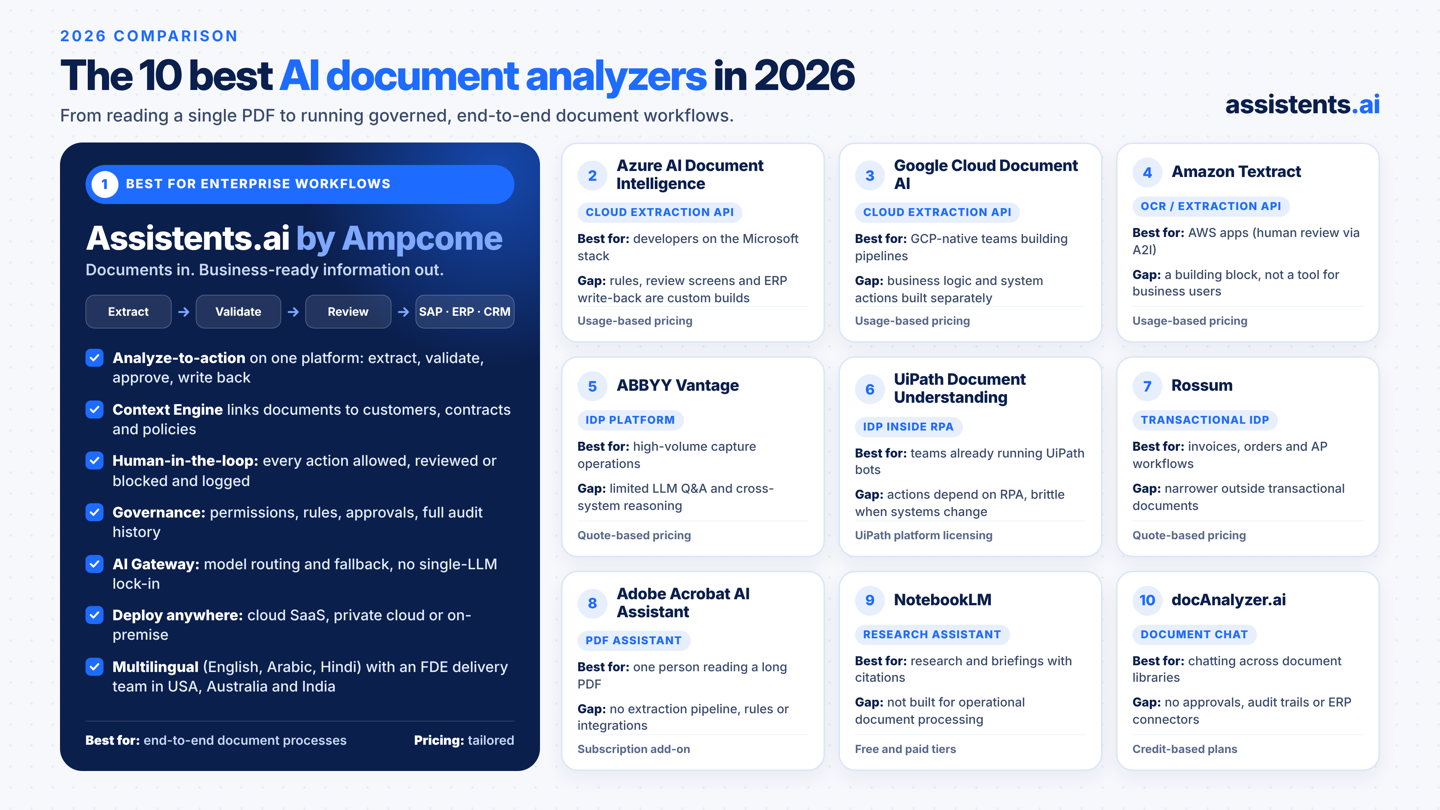
4. Amazon Textract
Amazon Textract is AWS's API for extracting text, forms, tables and query answers from documents. It pairs with Amazon Augmented AI (A2I) for human review. It is a reliable OCR building block for AWS applications, not a finished analyzer for business users. Usage-based pricing.
5. ABBYY Vantage
ABBYY Vantage is a long-established intelligent document processing platform. It has pre-trained "skills" for common document types and a manual review station. It is well suited to high-volume capture operations. LLM-style Q&A and cross-system reasoning are more limited than on newer agent platforms. Quote-based pricing.
6. UiPath Document Understanding
UiPath Document Understanding brings document extraction into the UiPath RPA suite. It's a natural choice if your automation already runs on UiPath bots. Downstream actions depend on RPA workflows, which can be brittle when screens or systems change. Licensing follows the UiPath platform.
7. Rossum
Rossum is a transactional-document platform focused on invoices, orders and accounts-payable workflows, with validation and review built in. It is strong for finance operations and narrower outside transactional documents. Quote-based pricing.
8. Adobe Acrobat AI Assistant
Adobe Acrobat AI Assistant adds summaries and Q&A with citations inside Acrobat. It's ideal for an individual reading a long PDF. It has no extraction pipeline, business rules or system integration. Subscription add-on.
9. NotebookLM
NotebookLM is Google's AI research assistant. It answers questions across many uploaded sources with citations and can generate audio overviews. It's excellent for research and briefings but not built for operational document processing.
10. docAnalyzer.ai
docAnalyzer.ai is a document chat tool with several chat modes, batch workflows across many documents, OCR for scans, and API/MCP access. It's easy to start with. Approvals, audit trails and named ERP connectors aren't part of the core product. Credit-based plans.
Real results: what an AI document analyzer does in production
Assistents.ai has been deployed across construction, manufacturing, automotive, tax, retail, pharma, real estate, hospitality and financial services. The case studies below are anonymized: client names are withheld, but the industries, scope and outcomes are real.
Construction services: tender documents and revision analysis
The challenge. A remedial building-services and commercial-works specialist received long, complex tender PDFs that changed between versions. Manually re-keying them into the job-management system was slow and risked missing scope changes that affect a bid.
What the AI document analyzer does. An Intelligent Document Workbench coordinates multiple agents. They retrieve tenders, determine the right workflow, extract data from complex PDFs with vision-LLM models, and run revision analysis between versions. For example, version 1 might list "Electrical works, $480,000" and version 2 "Electrical works + lighting upgrade, $510,000". The agent highlights the change, a person reviews it, and approved details sync into Simpro through a deep integration with full create/read/update/delete, quote locking and audit logs.
The results.
- Engineered for up to ~90% faster tender document processing
- ~95% extraction accuracy target for standard formats
- Reduced bid risk through revision and change detection, with full auditability
Manufacturing and home appliances: purchase orders into validated SAP sales orders
The challenge. Purchase orders arrived by email, portal and PDF. Teams re-keyed them manually into SAP, partly through a legacy capture system that was reaching end of life and carried high licensing costs.
What the AI document analyzer does. The analyzer extracts customer, products, quantities, pricing and delivery details. It then validates them against customer and product master data, pricing and terms, credit limits and delivery locations. Exceptions such as missing information, duplicate orders or items outside policy go to an authorized reviewer. Approved orders become validated sales orders in SAP, and reconciliation reporting covers every exception.
The results.
- Less manual order processing and less dependence on the legacy system
- Faster order-to-confirm cycle with fewer data-entry errors
- Improved auditability for every sales order and exception
Automotive: making SAP migration decisions reviewable
The challenge. A leading German premium automotive brand was migrating from SAP ECC to SAP S/4HANA. The work meant assessing customer data, material master, vendor records, transactions and custom tables.
What the AI document analyzer does. It discovers and profiles the data, checks duplicates and inconsistencies, recommends mappings, and sends each recommendation to specialists for review and validation.
The results. The team gets mapped data, transformation rules, validation results, migration files and decision records. The rationale behind every migration decision is kept, so the decision trail can be audited.
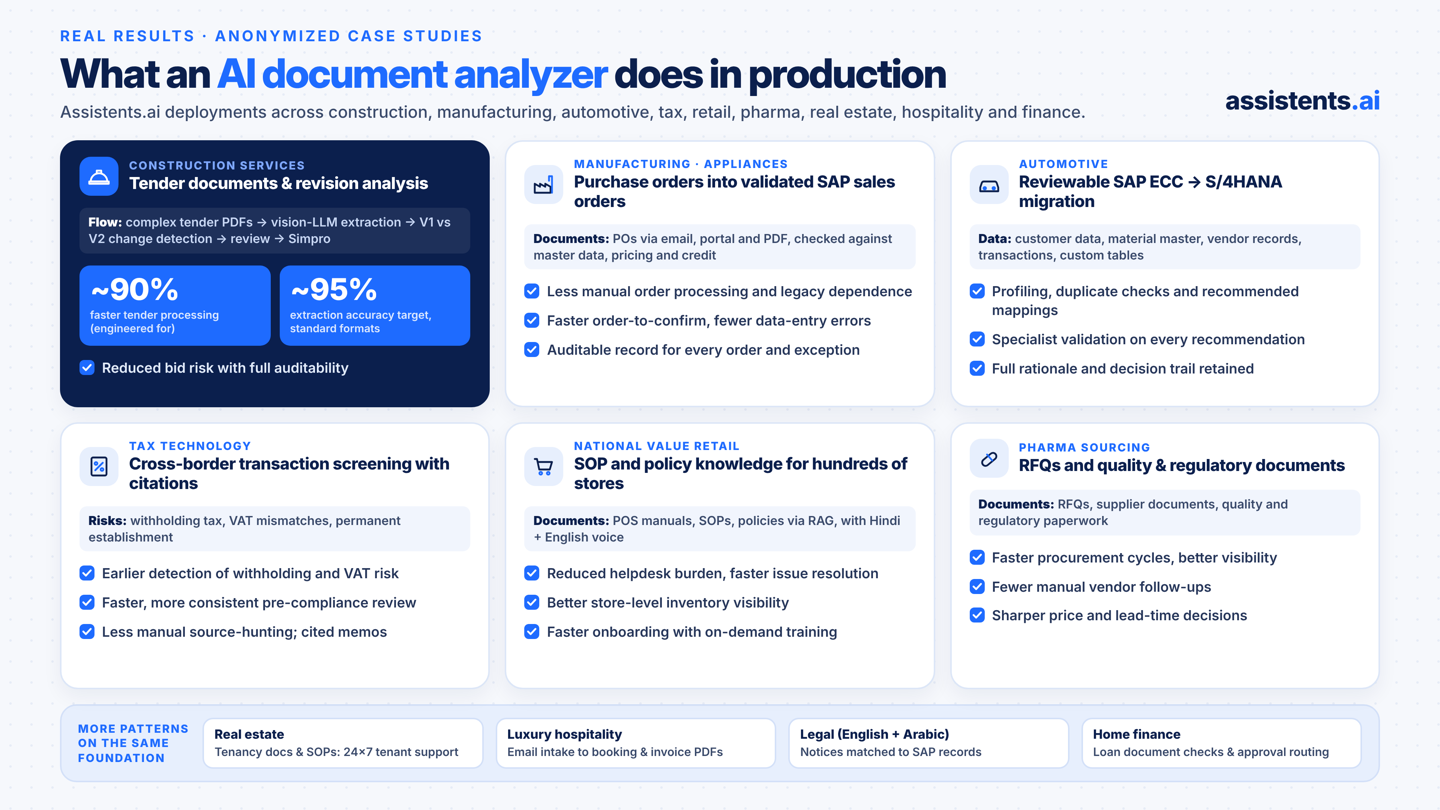
Tax technology: screening cross-border transactions with cited evidence
The challenge. A tax-tech product needed to catch withholding-tax, VAT-mismatch and permanent-establishment risks early in cross-border deals, not at the last minute. A related tax-research tool needed to stop analysts from hunting for sources by hand.
What the AI document analyzer does. It screens transaction documents, classifies risk, collects evidence with explainability notes, and escalates to tax experts. The research workflow automatically collects and summarizes sources, then drafts memos and positions with citations.
The results.
- Earlier detection of withholding and VAT risk
- Faster, more consistent pre-compliance review and fewer last-minute deal disruptions
- Less manual source-hunting and more consistent research outputs
Retail: SOP and policy knowledge for a national store network
The challenge. Store teams at a fast-growing national value retailer with hundreds of stores needed instant answers that were buried in POS manuals, SOPs and policy documents.
What the AI document analyzer does. A knowledge-and-training agent uses retrieval-augmented generation (RAG) over operational documents, with Hindi and English voice support. It works alongside an inventory-intelligence agent and ticketing integration, so a question like "Do we have this 2kW heater in stock?" gets an answer, and a service ticket when needed.
The results.
- Reduced manual helpdesk burden and faster store issue resolution
- Better store-level inventory visibility
- Faster onboarding through on-demand training guidance
Pharma sourcing: RFQs and quality documents
The challenge. A pharma sourcing and excipients platform managed thousands of SKUs. Its procurement team handled a constant flow of RFQs, supplier documents and quality and regulatory paperwork.
What the AI document analyzer does. It automates RFQs and supplier matching, supports quality and regulatory document handling, and analyzes price, lead time and vendor performance.
The results.
- Faster procurement cycles and better sourcing visibility
- Fewer manual vendor follow-ups
- More competitive price and lead-time decisions based on the analysis
More patterns on the same foundation
- Real estate tenancy documents: a customer-service agent with a knowledge base over policies, tenancy documents and SOPs. It delivered faster response times, lower call-centre load and a consistent 24×7 tenant experience.
- Luxury hospitality: email intake, intent classification and data extraction, with automated invoice and PDF generation. It delivered faster booking turnaround and higher accuracy on complex guest requirements.
- Bilingual legal-notice monitoring: English and Arabic legal notices are read, counterparty names extracted, matched to the SAP customer or vendor record, and assembled into an evidence package for legal review.
- Home finance (loan applications): document completeness and quality checks, lending-rule validation, credit-appraisal support in the analyst workspace, and routing to an authorized approval queue. The result is fewer handoffs, with authorized people controlling every decision.
Why Assistents.ai is the AI document analyzer enterprises choose
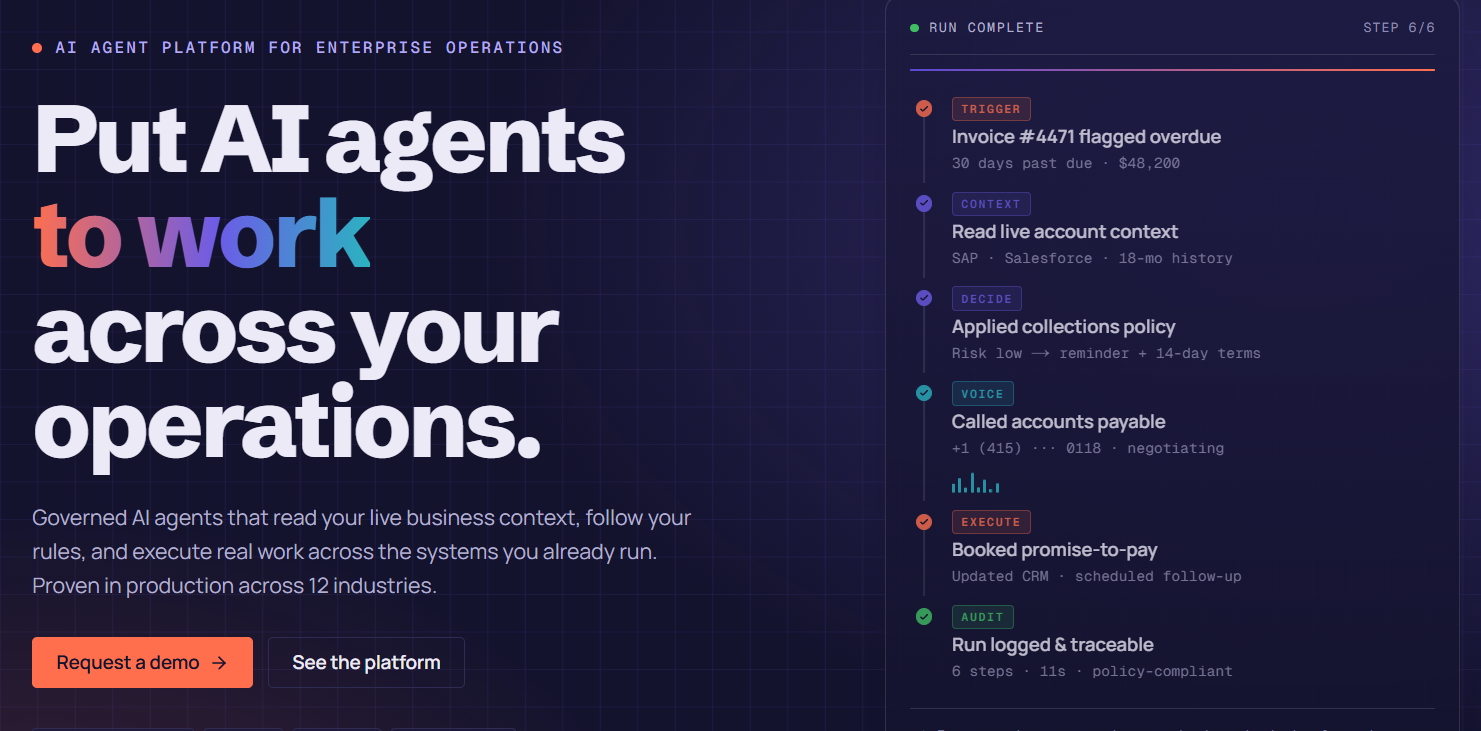
Most tools on this list stop at "here's what the document says." Assistents.ai by Ampcome is built for what happens next.
- Analysis that ends in a verified outcome. Documents go in, and business-ready data comes out: validated, approved, written into SAP, your ERP or CRM, then recorded. Teams measure process cycle time, throughput and exception handling, not just answers.
- A Context Engine that understands your business. Documents are linked to entities, definitions, policies, knowledge and real-time data. The analyzer understands that order SO-10432 belongs to a retail customer under contract MSA-204, with a credit-limit policy that decides what happens next.
- Humans stay in control. Every action goes through an access check (user role and permissions) and a policy evaluation (rules and constraints). It is then allowed, sent for human approval, or blocked and logged for review.
- Governance across the whole platform. Identity and permissions, rules and approvals, and a complete audit history apply to every agent, document and workflow.
- Fits the stack you already run. Connect SAP, ERP, CRM, HR, files and databases through APIs, SDKs and connectors over secure standard protocols, with event ingestion and bidirectional sync.
- Model freedom through the AI Gateway. Choose approved models with task routing and optimization, fallback, high availability and usage management.
- Deploy where your data lives. Cloud SaaS, private cloud or on-premise infrastructure.
- Build once, extend everywhere. The same document foundation powers conversational agents, agentic BI, voice AI and autonomous workflows. Your second and third use cases ship faster than the first.
- A team that delivers, not just a license. Forward-deployed engineers, AI engineers, and data science and machine-learning experts take you from configuration to enterprise delivery.
Already using Copilot, ChatGPT or Claude? Keep them. They're excellent for personal productivity: drafting, summarizing, researching and analyzing to help one person finish a task. Assistents.ai adds organizational productivity. It connects teams, business context, rules and enterprise systems, and coordinates a process from trigger to verified outcome.
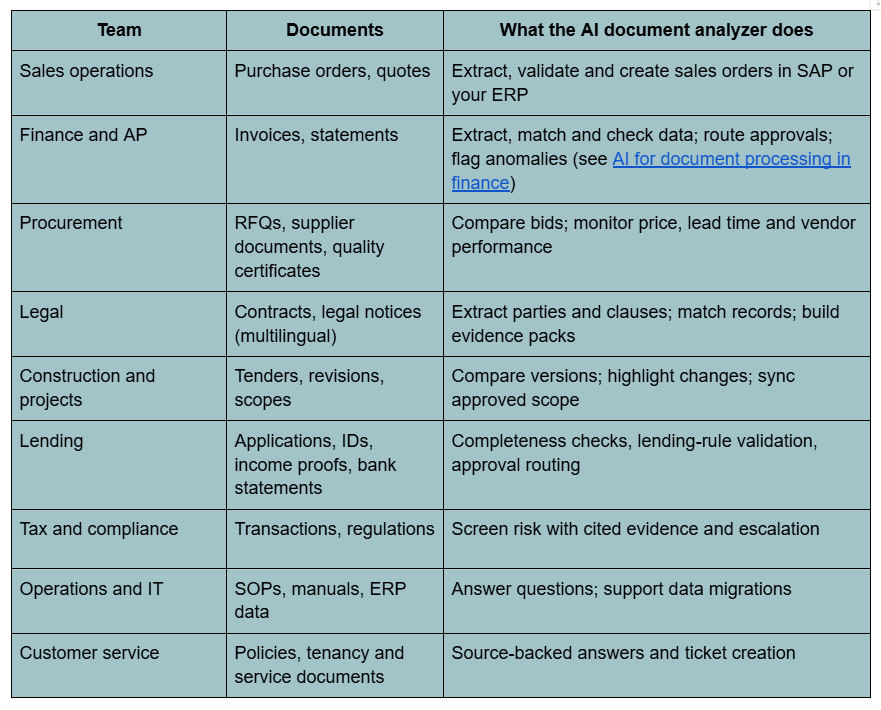
AI document analysis use cases by team
How to choose an AI document analyzer: a 10-point checklist
Use these questions in every vendor demo and proof of concept:
- Does it handle your worst documents, such as scans, tables, multi-column layouts and other languages?
- Does every answer cite the source page or passage?
- Can it validate extracted data against your master data, contracts and policies?
- Is there a built-in human review step for exceptions, and does the workflow resume after approval?
- Can it write back to SAP, your ERP and CRM, or only export a CSV?
- Does it enforce role-based permissions on documents and actions?
- Is there a complete audit trail showing every decision and approver?
- Can you deploy in a private cloud or on-premise if your policies require it?
- Can you choose or switch AI models without rebuilding?
- Will the vendor help you reach production, with measurable success criteria for your first process?
Security, accuracy and governance: what to ask vendors
- Accuracy: Ask for field-level accuracy on your sample documents, not a generic benchmark. Insist on confidence scores and a review queue for low-confidence fields.
- Data handling: Where are documents processed and stored? Is any of your data used to train models? What retention controls exist?
- Access control: Are permissions applied consistently to documents, answers and actions?
- Traceability: Can you replay why the system made a decision, and see who approved it?
- Model governance: Which models are approved, how is traffic routed, and what happens when a model is unavailable?
To learn why governance separates a demo from a deployment, see our document processing AI agent guide.
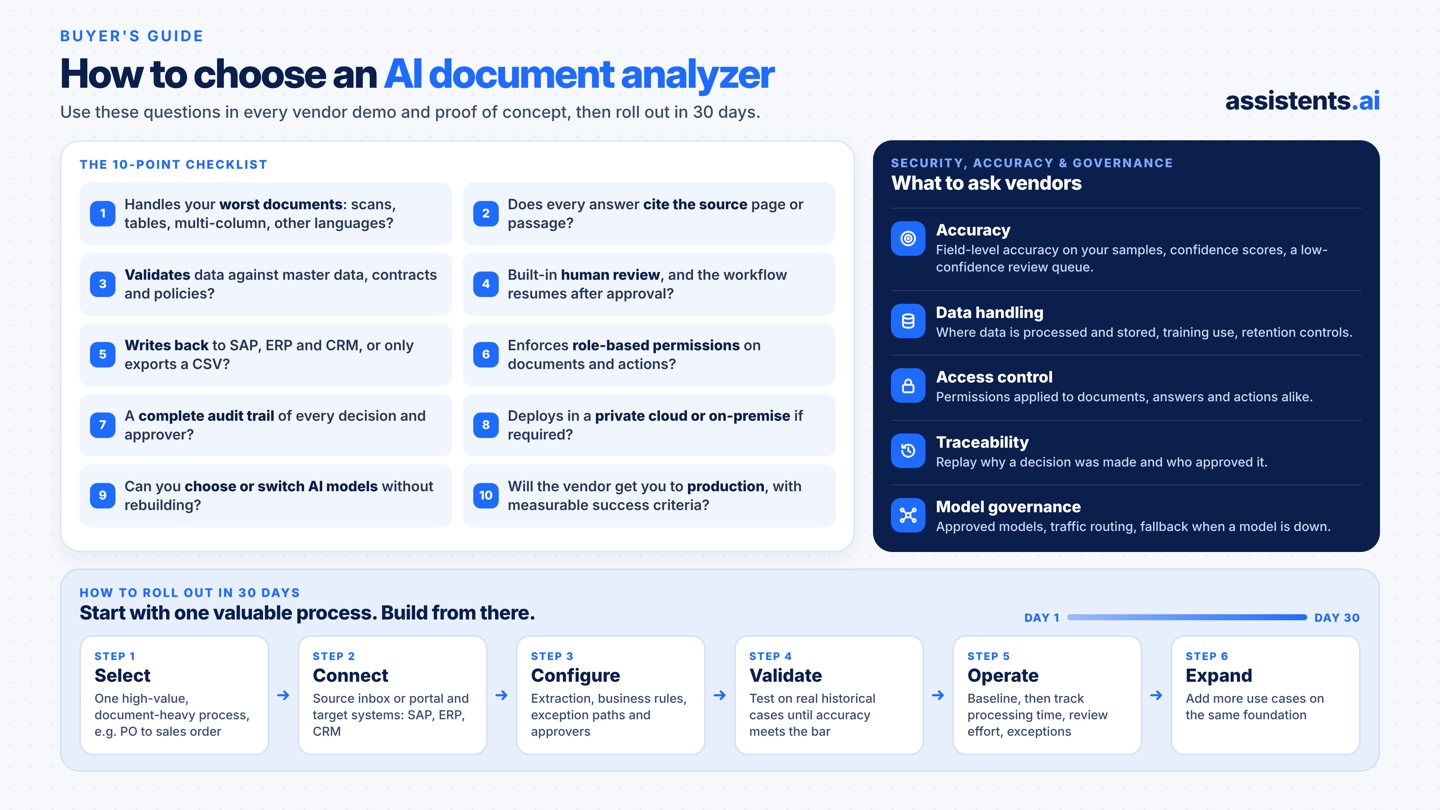
How to roll out an AI document analyzer in 30 days
Start with one valuable process and build from there. This is the delivery approach Ampcome uses with Assistents.ai:
- Select a high-value, document-heavy process, such as purchase order to sales order, tender revisions or invoice approvals.
- Connect the source inbox or portal and the target systems (SAP, ERP, CRM).
- Configure the agents and workflows: extraction, business rules, exception paths and approvers.
- Validate on real historical cases and refine until accuracy meets the agreed bar.
- Operate and support the process with your team. Baseline the process, then track order-processing time, review effort and exception visibility.
- Expand to more use cases on the same foundation.
Conclusion: pick the analyzer that finishes the job
Which tool you need depends on what the documents are for:
- To read one PDF, a chat tool is enough.
- To build your own pipeline, cloud APIs give you the building blocks.
- If documents drive revenue, compliance or operations, you need an AI document analyzer that reads, validates, acts and proves what it did.
That's what Assistents.ai by Ampcome is built for. It puts AI agents to work across your operations, understanding your business, following your rules and working alongside your people.
Bring us your priority process. Book a tailored walkthrough of Assistents.ai and we'll map its documents, systems, handoffs and approval points, then agree how success will be measured.
FAQs:
What is the best AI document analyzer?
For enterprises that need documents to drive real work, Assistents.ai by Ampcome is the strongest choice. It extracts data, validates it against business rules, routes exceptions to people and writes approved data into SAP, ERP or CRM. To read a single PDF, Adobe Acrobat AI Assistant or NotebookLM is enough.
Is there an AI that can read and analyze documents?
Yes. AI document analyzers combine OCR, layout understanding and large language models to read PDFs, scans, emails and images. They then extract, summarize, compare and validate the information inside them.
Can ChatGPT analyze documents? How is it different from an AI document analyzer?
ChatGPT can summarize and answer questions about files you upload, which is useful for personal productivity. An enterprise AI document analyzer such as Assistents.ai connects to your business systems, applies your rules, enforces permissions and approvals, and acts on the result with an audit trail.
What is the difference between OCR and AI document analysis?
OCR only converts images of text into machine-readable text. AI document analysis understands that text. It identifies fields, tables and clauses, checks them against business data, and decides what should happen next.
How accurate are AI document analyzers?
Accuracy depends on document quality and layout. Production deployments typically target around 95% field-level extraction accuracy on standard formats, with low-confidence fields sent to human review. Always test on your own documents.
Can AI analyze scanned PDFs and handwritten documents?
Yes. Modern analyzers use OCR and vision-language models for scans. Handwriting and low-quality images reduce accuracy, so a human review step for low-confidence fields is essential.
Can AI compare two documents or document versions?
Yes. AI document analyzers can compare contract or tender versions and highlight changes in scope, price and dates. For example, they can flag a tender that moves from $480,000 to $510,000 with an added lighting upgrade. A reviewer then approves the update.
Can an AI document analyzer integrate with SAP or my ERP?
Enterprise platforms can. Assistents.ai connects to SAP, ERP, CRM, files and databases through APIs, SDKs and connectors, and creates records such as validated sales orders after approval. Most chat-with-PDF tools only export text.
Is AI document analysis secure?
It can be, if the platform enforces role-based permissions, keeps audit logs, controls which AI models process data and offers private-cloud or on-premise deployment. Ask every vendor where documents are processed and whether your data is used for training.
Can AI analyze documents in multiple languages?
Yes. Leading analyzers handle multilingual documents. Assistents.ai deployments include English and Arabic legal notices and Hindi and English voice support for retail teams.
How much does an AI document analyzer cost?
Consumer tools range from free tiers to modest monthly subscriptions. Cloud APIs typically charge per page. Enterprise platforms are priced by use case and volume. Judge cost against hours saved, errors avoided and cycle time reduced.
Is there a free AI document analyzer?
Several chat-with-PDF tools and NotebookLM offer free tiers for individual use. Free tools rarely include system integration, approvals or audit trails, which business processes need.

Transform Your Business With Agentic Automation
Agentic automation is the rising star posied to overtake RPA and bring about a new wave of intelligent automation. Explore the core concepts of agentic automation, how it works, real-life examples and strategies for a successful implementation in this ebook.
Sarfraz Nawaz is the CEO and founder of Ampcome, which is at the forefront of Artificial Intelligence (AI) Development. Nawaz's passion for technology is matched by his commitment to creating solutions that drive real-world results. Under his leadership, Ampcome's team of talented engineers and developers craft innovative IT solutions that empower businesses to thrive in the ever-evolving technological landscape.Ampcome's success is a testament to Nawaz's dedication to excellence and his unwavering belief in the transformative power of technology.

More insights
Discover the latest trends, best practices, and expert opinions that can reshape your perspective







Contact us

