
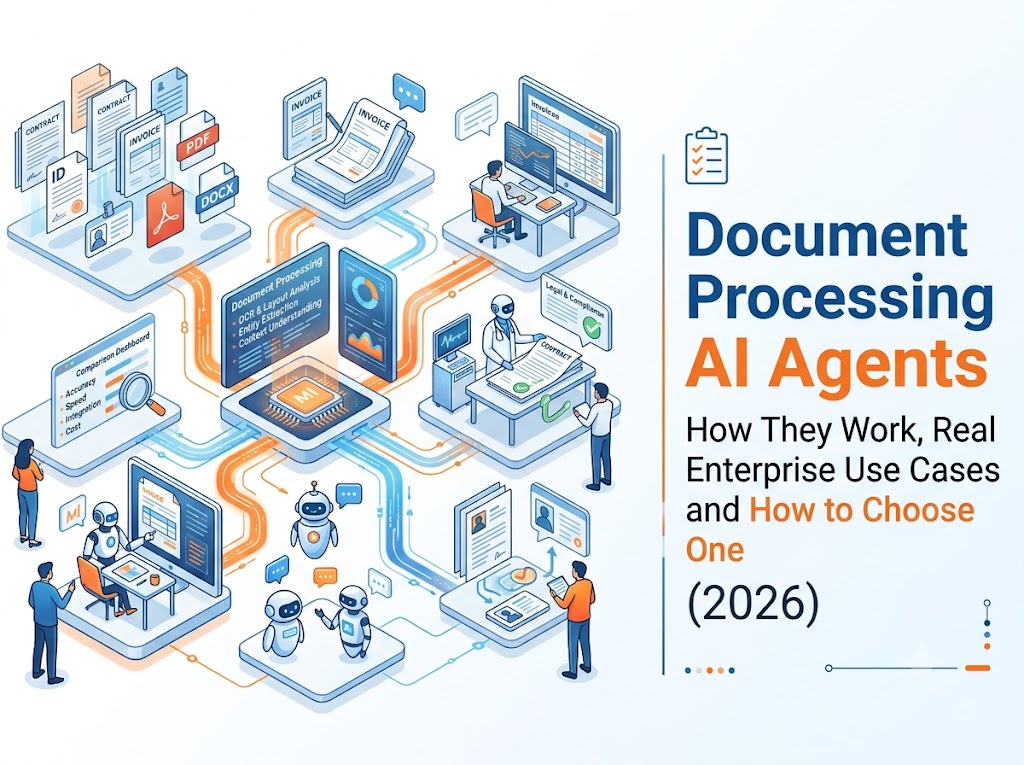
Document Processing AI Agents: How They Work, Real Enterprise Use Cases, and How to Choose One in 2026


A document processing AI agent is an autonomous software system that ingests documents — PDFs, emails, scans, tenders, invoices, contracts — understands their content and context, extracts structured data, validates it against your business rules, and then takes governed action in your downstream systems, with human approval wherever it matters. It is the difference between software that reads documents and software that finishes the work those documents represent.
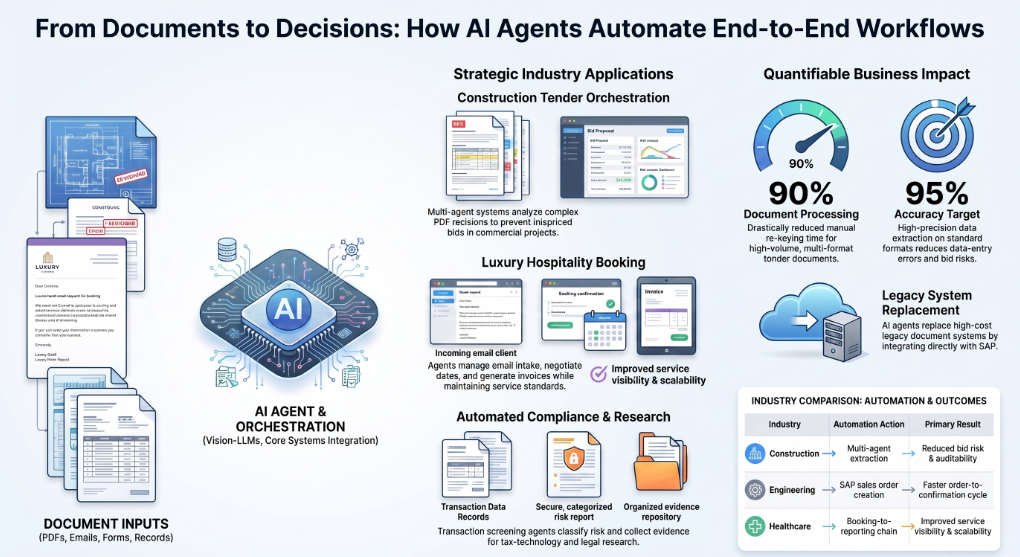
That difference shows up in real numbers. In production deployments we'll walk through below, document processing AI agents have been engineered for up to ~90% faster tender document processing with a ~95% extraction accuracy target on standard formats, replaced end-of-life legacy document systems feeding SAP, and turned multi-day email-and-attachment workflows into same-day automated cycles with human-in-the-loop quality control.
This guide covers what a document processing AI agent actually is, how it differs from OCR and traditional intelligent document processing (IDP), the six-stage pipeline these agents run, why governance is what separates a demo from a deployment, five anonymized enterprise use cases with results, and a practical checklist for choosing a platform — including why Assistents.ai by Ampcome is built for exactly this job.
What Is a Document Processing AI Agent?
A document processing AI agent is an AI system that autonomously handles document-centric workflows end-to-end. Instead of stopping at "here is the text on this page," it works toward a goal: process this tender, book this reservation, create this sales order, screen this transaction. It reads, reasons, decides, acts, and asks a human when the stakes or the ambiguity are high.
From reading documents to acting on them
There are three distinct levels of capability, and most tools on the market only reach the first two:
Extraction is pulling data out of a document — a date, an invoice number, a total. Traditional OCR and template-based tools do this.
Understanding is knowing what that data means in context. A revision date on page 40 of a tender changes the scope of a bid. A clause in a contract creates a conditional obligation. A discount on an order email only applies if a threshold is met. Understanding requires reasoning, not pattern matching.
Action is completing the business process the document represents — updating the ERP, locking the quote, generating the invoice, escalating the exception. This is where the actual ROI lives, because nobody's business goal is "extracted fields." The goal is orders created, bids submitted, bookings confirmed, and risks flagged before they become problems.
A document processing AI agent operates at all three levels. That is what makes it an agent rather than a parser.
Why 2026 is the tipping point
Two shifts converged to make this practical.
First, vision-capable large language models can now read complex, messy, real-world documents — scanned drawings, multi-format tender packs, dense tables, revision-marked PDFs — without brittle per-template training.
Second, agentic orchestration matured: multi-agent systems can plan multi-step workflows, call tools, write to enterprise systems, and route exceptions to humans.
The frontier has moved from "read this field" to "read this document, understand the context, and take the next step." Enterprises that treat document processing as an extraction problem in 2026 are solving last decade's problem.
Document Processing AI Agent vs. OCR vs. Traditional IDP
The fastest way to understand document processing AI agents is to see what each generation of technology can and cannot do.
OCR (optical character recognition) converts images of text into machine-readable characters. It answers one question: what characters are on this page? It does not know whether the page is an invoice or a lease, and it cannot tell a due date from a birth date.
Traditional IDP (intelligent document processing) layers machine learning and templates on top of OCR to classify documents and extract named fields. It answers: what data is in this document? But it typically runs a single forward pass — document in, JSON out. When a layout changes, an edge case appears, or a decision is required, it hands the work back to a human.
A document processing AI agent reasons about the document, handles exceptions, validates against business rules and live system data, and executes the downstream action under governance. It answers: what does this document require the business to do — and then does it.
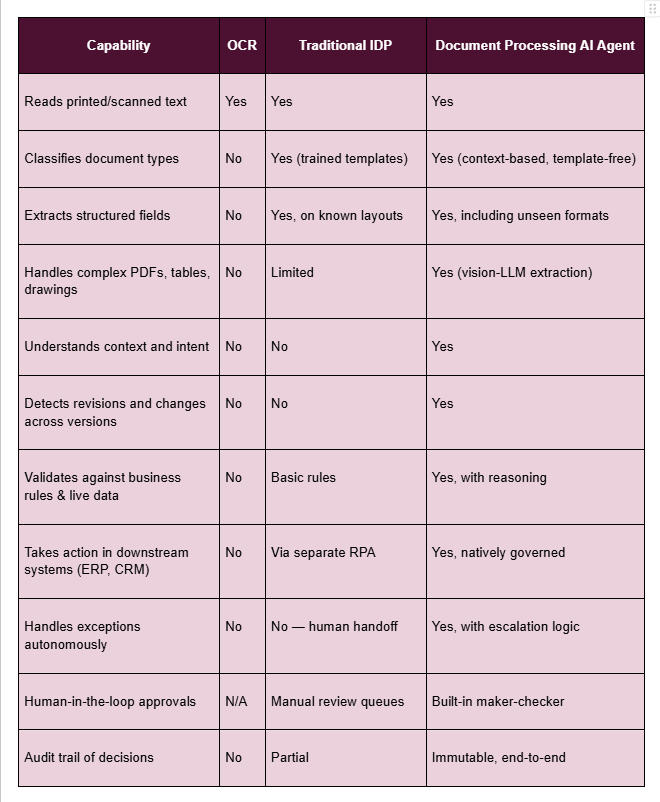
The practical takeaway: OCR digitizes, IDP extracts, and document processing AI agents complete workflows. If your documents feed a business process — and virtually all of them do — the agent tier is where manual effort actually disappears.
How Document Processing AI Agents Work: The 6-Stage Pipeline
Every production-grade document processing AI agent runs a version of the same pipeline. What separates enterprise-ready platforms from demos is how well they handle stages five and six.
Stage 1: Ingestion
Documents arrive from everywhere: email inboxes, portals, uploads, shared drives, APIs. An agent monitors these channels continuously and accepts every format the business actually uses — native PDFs, scanned images, spreadsheets, email bodies with attachments, multi-hundred-page tender packs. Ingestion also includes intent classification at the source: an inbound email might contain a booking request, a revised tender, and a general query, and each needs a different workflow.
Stage 2: Classification and workflow determination
The agent identifies what each document is and, more importantly, what should happen to it. Is this a new tender or revision three of an existing one? A purchase order or a quote request? Classification determines which workflow the agent runs, which extraction schema applies, and which business rules govern the outcome. Modern agents do this from content and context rather than fixed templates, which is why they survive layout changes that break traditional IDP.
Stage 3: Extraction
This is where vision-capable LLMs changed the game. Beyond clean digital text, production document workflows include scanned site drawings, handwritten annotations, nested tables, stamped approvals, and revision marks. Vision-LLM extraction reads these the way a trained analyst would — understanding layout, linking a line item to its total, connecting a specification on page 12 to a schedule on page 87. In the tender-automation deployment covered below, this capability carries a ~95% extraction accuracy target on standard formats — on documents complex enough that manual processing previously took days.
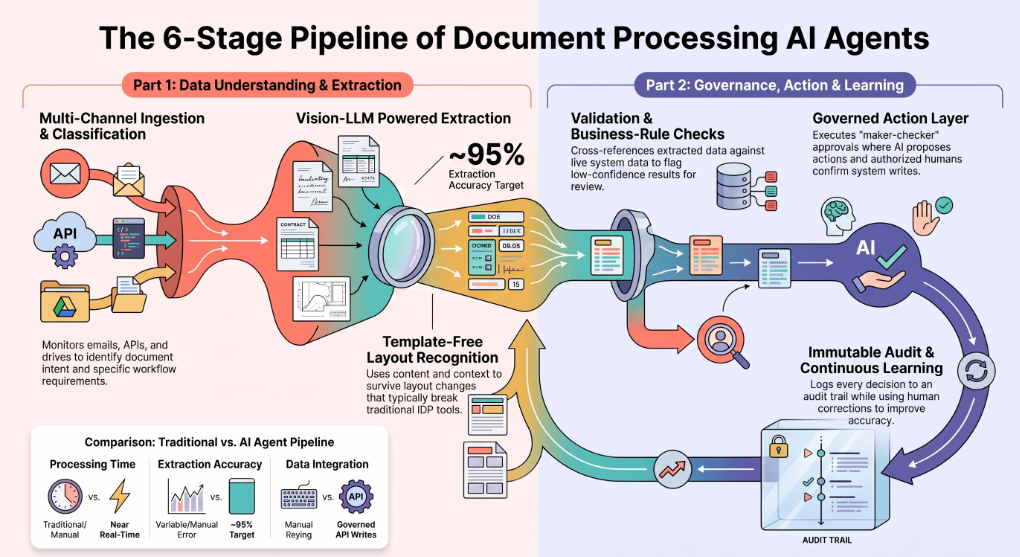
Stage 4: Validation and business-rule checks
Raw extraction is never the finished product. The agent validates extracted data against business rules and live system data: does this supplier exist, does the quoted price match the rate card, has this invoice already been submitted, does the revision change quantities that affect the bid? Validation is also where confidence scoring lives — high-confidence results flow onward automatically, low-confidence results get flagged for human review rather than silently passed through. This is the single biggest protection against the failure mode enterprises rightly fear: confident, wrong data entering core systems.
Stage 5: Governed action
Here is the stage most of the market skips. The extracted, validated data has to go somewhere and do something: create a sales order in SAP, sync a tender into the operations platform, generate and send an invoice, lock a quote, open a ticket, notify a customer. A document processing AI agent executes these writes through a governed action layer — meaning every write is permission-checked, every sensitive action goes through maker-checker approval (the AI proposes, a named human confirms, the system re-verifies), and integrations run with full create-read-update-delete depth rather than screen-scraping. Without this stage, "document automation" just moves the manual work downstream: someone still has to key the results into the system of record.
Stage 6: Audit and continuous learning
Every decision, extraction, validation result, approval, and system write is logged to an immutable audit trail. This matters for compliance, but it matters just as much for improvement: when a reviewer corrects an extraction or overrides a decision, that feedback tightens future processing. Revision and change detection also lives here — the agent knows not just what a document says, but what changed since the last version, which in bid-critical workflows is the difference between winning and mispricing.
Why Governance Is the Difference Between a Demo and a Deployment
Any capable engineer can build a demo that extracts fields from a PDF. Getting an AI agent trusted to touch tenders, orders, invoices, and patient or tenant records in production is a governance problem, not a model problem.
Human-in-the-loop and maker-checker approvals
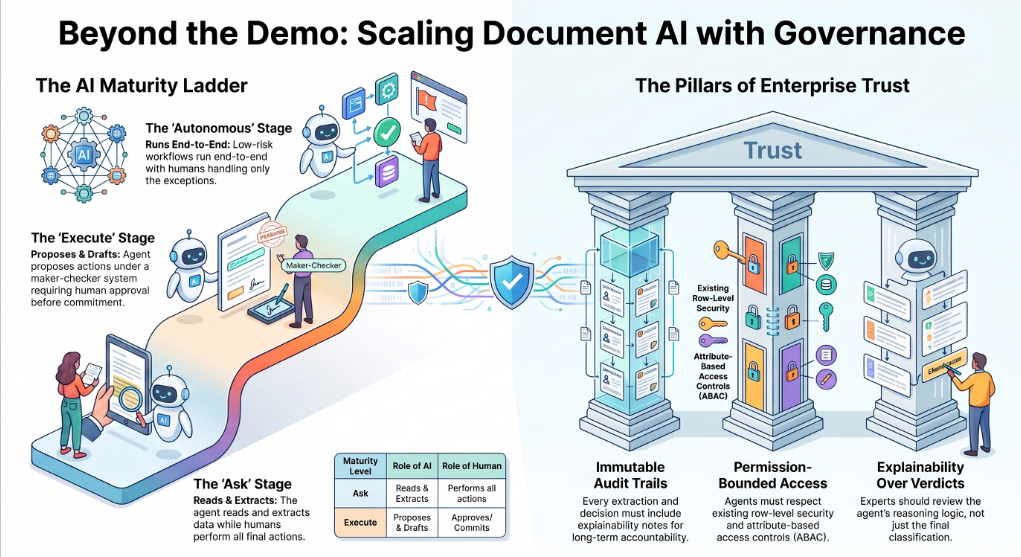
Autonomy is not binary — it is a dial. Mature deployments follow a maturity ladder we call Ask → Execute → Autonomous. In the Ask stage, the agent reads, extracts, and answers questions while humans act. In the Execute stage, the agent performs actions under maker-checker control: it proposes the SAP order, the invoice, the quote update, and a human approves before anything is committed. In the Autonomous stage, well-understood, low-risk workflows run end-to-end with humans handling only exceptions. Enterprises that succeed with document agents climb this ladder deliberately; enterprises that fail usually tried to jump straight to autonomy.
Audit trails and explainability
Regulated and bid-critical workflows need to answer "why did the system do that?" months later. An immutable audit trail — what was extracted, from which page, validated against which rule, approved by whom, written where — turns the agent from a black box into an accountable process participant. In workflows like transaction screening, agents should attach explainability notes and collected evidence to every classification, so a human expert can review the reasoning, not just the verdict.
Access control: row-level security and ABAC
Document workflows cross departments, entities, and sensitivity levels. A tender team should not see HR documents; a regional manager should see their region's orders. Enterprise-grade agents enforce row-level security and attribute-based access control (ABAC) so that both the agent's reads and its writes respect the same permissions the organization already enforces for humans. If a platform cannot articulate how its agents are permission-bounded, it is not ready for your documents.
Real-World Document Processing AI Agent Use Cases (With Results)
The following are production deployments delivered on the Assistents.ai platform by Ampcome. Client names are withheld; each case is described by industry, geography, and scale.
Construction and remedial services: tender document automation
An Australian remedial building and waterproofing specialist with 20+ years of delivery on complex commercial projects faced a familiar bottleneck: tender packs. Hundreds of pages of mixed-format PDFs, drawings, schedules, and revisions had to be manually read, interpreted, and re-keyed into the company's core operational system — slow, error-prone, and risky, because a missed revision can misprice an entire bid.
The solution was an Intelligent Document Workbench: a multi-agent orchestration that retrieves tenders, determines the correct workflow, runs vision-LLM extraction across complex PDFs, analyzes revisions against prior versions, and synchronizes clean data into the operational system with full CRUD integration, quote locking, and audit logs.
Results: the system was engineered for up to ~90% faster tender document processing, with a ~95% extraction accuracy target on standard formats, and reduced bid risk through automated revision and change detection with end-to-end auditability.
Luxury hospitality: email-to-booking document workflows
A luxury hospitality brand operating 16 boutique lodges, camps, and hotels across East Africa serves high-expectation global travellers whose booking requests arrive as unstructured emails — multi-property itineraries, special requirements, date flexibility, and attachments. Manually triaging and responding created back-and-forth delays that don't fit a luxury service promise.
A digital booking agent now automates the workflow end-to-end: email intake, intent classification, and data extraction; a conversational loop that captures missing details; real-time inventory checks with alternative date and property negotiation; automated invoice and PDF document generation; and a hybrid handoff to human specialists for curated itinerary creation — human-in-the-loop quality control by design.
Results: faster booking turnaround with reduced back-and-forth, higher accuracy on complex guest requirements, and scalable operations without compromising luxury service standards.
Engineering and manufacturing: from order documents to SAP sales orders
A flagship UAE engineering and technology solutions provider, established in the early 1970s and delivering electrical, mechanical, automation, and mobility solutions at enterprise scale, was running order intake through a legacy document system approaching end-of-life with high licensing costs. Order documents still required manual interpretation and data entry into SAP.
Agentic automation replaced the legacy workflow: the agent interprets order triggers from incoming documents, validates them, and creates SAP sales orders directly — governed by rules for exceptions and approvals, with audit logs and reconciliation reporting built in.
Results: reduced manual order processing and legacy dependency, a faster order-to-confirmation cycle with fewer data-entry errors, and improved auditability for sales order creation and exceptions.
Tax and compliance: screening and research document automation
Two deployments show the pattern in document-heavy compliance work. A UK tax-technology product focused on early screening of cross-border transactions uses agents to run transaction screening workflows with risk classification, automated evidence collection, and explainability notes attached to each result, escalating to human tax experts where judgment is required. The outcomes: earlier detection of withholding and VAT risk, fewer last-minute deal disruptions, and faster, more consistent pre-compliance review.
Separately, a US-based sales and use tax research automation tool uses agents for automated source collection, summarization, and citation-backed draft memo generation, with workflow tracking and a growing knowledge base. The outcomes: faster research cycles, reduced manual source-hunting, and more consistent research outputs with better documentation hygiene.
Healthcare: booking-to-reporting document flows
A UK private healthcare and testing provider with high-volume consumer workflows automated the full document chain from booking through processing to reporting: booking and workflow orchestration, status monitoring with customer notifications, and reporting dashboards with operational analytics.
Results: more scalable operations with reduced manual overhead, faster customer communications with fewer missed handoffs, and improved service visibility through unified reporting.
Across all five industries, the pattern is the same: the value was never in reading documents faster. It was in completing the workflow the document exists to trigger — under governance, with humans in control of what matters.
How to Choose a Document Processing AI Agent Platform: An Evaluation Checklist
The market is crowded with tools that call themselves agentic. Use these six criteria to separate platforms that will survive production from those that won't.
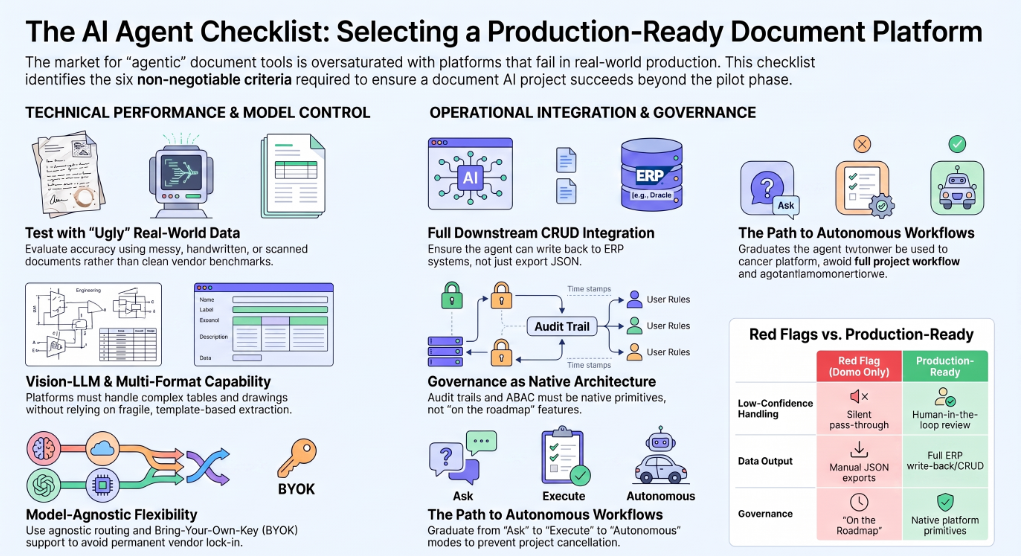
1. Accuracy on your documents, not benchmarks. Vendor accuracy numbers come from clean test sets. Run a pilot on your ugliest real documents — the scanned tender with handwriting, the revision-marked drawing, the email chain with three attachments. Ask how the platform handles low-confidence extractions: silent pass-through is a red flag; confidence-based human review is the right answer.
2. Multi-format and vision capability. If your documents include drawings, complex tables, stamps, or scans, template-based extraction will not hold up. Look for vision-LLM extraction and, if versioned documents matter to you, revision and change detection.
3. Downstream integration depth. Can the platform act, or only extract? Ask specifically about write-back: can it create records in your ERP or operational system with full CRUD integration, and what happens when a write fails? A platform that ends at a JSON export leaves the most expensive part of the workflow manual.
4. Governance as architecture, not add-on. Maker-checker approvals, row-level security, ABAC, and an immutable audit trail should be native platform primitives. If governance is "on the roadmap," the platform is a demo.
5. Model flexibility and data control. Model-agnostic routing lets you use the best model per task and avoid lock-in as the model landscape shifts. Bring-your-own-key (BYOK) support keeps model usage under your commercial and data terms. Open protocol support — MCP for tool connectivity, A2A for agent-to-agent interoperability — protects the investment as your agent estate grows.
6. A path from pilot to production. The right platform lets you start in Ask mode, move to Execute with approvals, and graduate specific workflows to Autonomous — with the same governance holding at every rung. Big-bang autonomy is how document AI projects get cancelled.
Why Assistents.ai by Ampcome Is the Best Platform for Document Processing AI Agents
Assistents.ai is a governed enterprise agentic AI platform built by Ampcome, and document processing is one of the workloads it was engineered for from the ground up — not a feature bolted onto a chatbot.
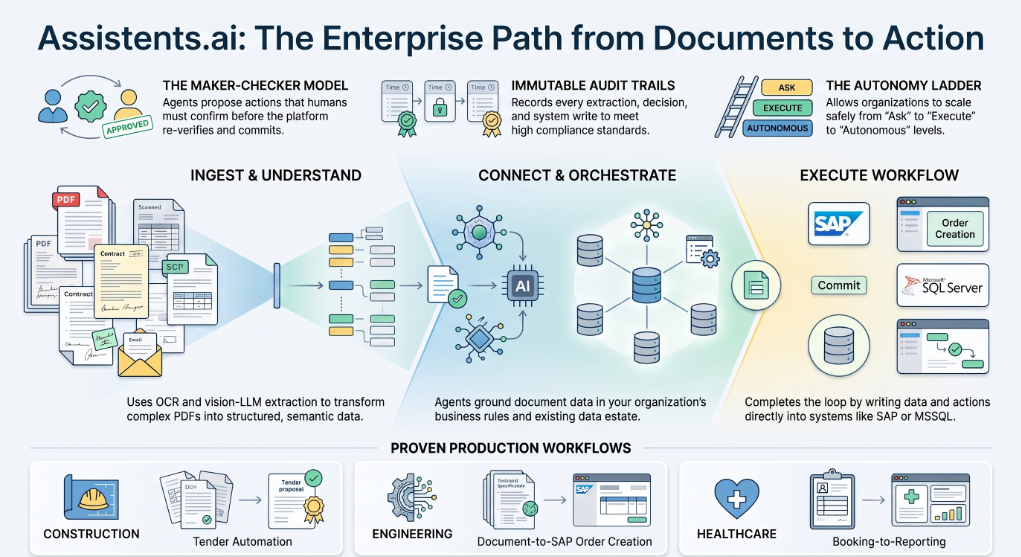
Built for the full loop: ingest, understand, act. Assistents.ai combines a document-to-structured-data pipeline (including OCR and vision-LLM extraction for complex PDFs) with multi-agent orchestration and a Context Engine that grounds every agent in your organization's own data, definitions, and business rules through a semantic layer. Agents don't just read your documents — they connect what's in them to what's in your systems, and then complete the workflow.
Governed by design. Every write action on Assistents.ai runs through a maker-checker model: the agent proposes, a human confirms, the platform re-verifies before committing. Row-level security and attribute-based access control bound what agents can see and touch. An immutable audit trail records every extraction, decision, approval, and system write. This is the governance architecture that let the deployments above run in bid-critical, order-critical, and compliance-critical workflows.
Proven in production. The use cases in this article — tender automation in construction, email-to-booking in luxury hospitality, document-to-SAP order creation in engineering, screening and research automation in tax, booking-to-reporting in healthcare — are all Assistents.ai deployments delivered by Ampcome, spanning Australia, Africa, the Middle East, the UK, and the US.
Enterprise flexibility. Assistents.ai is model-agnostic with per-organization BYOK, supports MCP and A2A protocols for interoperability, and ships governed connectors including Postgres, MSSQL, BigQuery, ClickHouse, Athena, and DuckDB — so document workflows plug into the data estate you already run.
A maturity path, not a big-bang bet. The Ask → Execute → Autonomous ladder is native to how Assistents.ai deployments are structured. You choose the autonomy level per workflow, and governance holds at every level — which is why pilots on the platform become production systems instead of abandoned experiments.
Getting Started: A 30-Day Path to Your First Document Agent
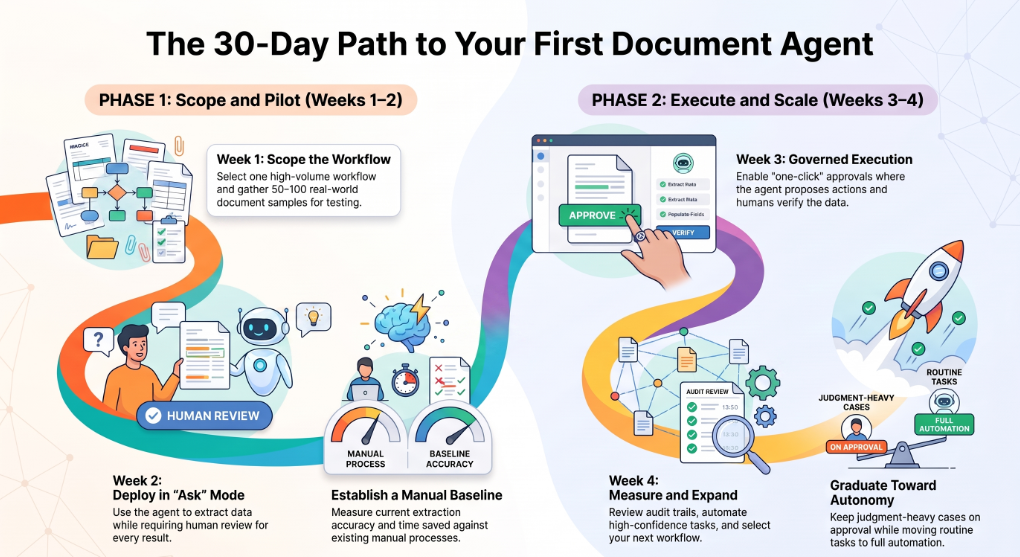
You do not need a transformation program to start. You need one workflow.
Week 1 — Scope. Pick one high-volume, well-understood document workflow with clear pain: tender intake, order processing, booking emails, invoice handling. Define what "done" means in business terms (order created, bid synced, booking confirmed) and gather 50–100 real documents, including the ugly ones.
Week 2 — Pilot in Ask mode. Deploy the agent to ingest, classify, extract, and validate — with every result reviewed by a human. Measure extraction accuracy and time saved against the manual baseline.
Week 3 — Move to Execute. Turn on governed actions with maker-checker approval. The agent now proposes the downstream write — the order, the sync, the invoice — and your team approves with one click instead of re-keying data.
Week 4 — Measure and expand. Review the audit trail, exception rate, and cycle-time improvement. Graduate high-confidence document types toward autonomy; keep judgment-heavy cases on approval. Then pick workflow number two.
Documents Are Where Enterprise AI Gets Real
Every meaningful business process runs on documents — tenders, orders, bookings, claims, filings, contracts. For a decade, automation nibbled at the edges with OCR and templates while humans did the actual work of understanding and acting. Document processing AI agents close that gap: they read like analysts, decide like trained operators, act inside your systems, and stay accountable through governance and audit.
The enterprises in this article didn't buy extraction. They bought finished workflows — bids synced with revisions caught, SAP orders created without re-keying, bookings confirmed while guests were still impressed. That is the standard to hold any platform to.
Ready to see a document processing AI agent run on your documents? Book a demo of Assistents.ai and bring your hardest tender pack, order file, or inbox — we'll show you the full loop, governance included.
Frequently Asked Questions
What is a document processing AI agent?
A document processing AI agent is an autonomous AI system that ingests documents, understands their content in context, extracts and validates structured data, and takes governed actions in downstream business systems — such as creating orders, syncing tenders, or generating invoices — with human approval on sensitive steps.
What is the difference between OCR, IDP, and a document processing AI agent?
OCR converts document images into text. Traditional IDP classifies documents and extracts fields using templates and machine learning. A document processing AI agent goes further: it reasons about the document, handles exceptions, validates against business rules, and executes the downstream workflow under governance.
What is agentic document processing?
Agentic document processing is the use of autonomous AI agents to handle document-centric workflows end-to-end — planning multi-step work, adapting to unseen formats, validating outputs, and acting on results — rather than running a single extraction pass and handing everything else to humans.
Can AI agents read PDFs and scanned documents?
Yes. Modern document processing AI agents use vision-capable large language models alongside OCR to read native PDFs, scans, complex tables, drawings, and mixed-format packs — understanding layout and context rather than just recognizing characters.
How accurate are AI agents at document data extraction?
Accuracy depends on document complexity and platform design. In production, well-engineered systems can target ~95% extraction accuracy on standard formats, with confidence scoring routing low-confidence results to human review so errors are caught before they reach core systems.
Do document processing AI agents need human oversight?
Yes — by design. Mature deployments use human-in-the-loop controls: maker-checker approvals for system writes, confidence-based review for uncertain extractions, and escalation paths for exceptions. Autonomy expands per workflow as trust is earned, following an Ask → Execute → Autonomous maturity path.
What industries use AI agents for document processing?
Production deployments span construction (tender automation), hospitality (booking workflows), engineering and manufacturing (order-to-SAP automation), tax and compliance (transaction screening and research), healthcare (booking-to-reporting flows), logistics, real estate, and financial services.
How do AI agents handle document revisions and changes?
Advanced document processing AI agents perform revision analysis: they compare new document versions against prior ones, detect what changed — quantities, dates, scope, clauses — and flag the differences. In bid and contract workflows, this materially reduces the risk of acting on outdated information.
Document AI vs. document processing AI agent — what's the difference?
Document AI usually refers to extraction services that turn documents into structured data. A document processing AI agent wraps that capability in autonomous workflow execution: classification, validation, governed action in downstream systems, exception handling, and audit — completing the process, not just the parsing.
How much does AI document processing cost?
Pricing models vary from per-page extraction fees to platform licensing. The more useful lens is total cost of the workflow: platforms that only extract leave downstream data entry manual, while agent platforms that complete the workflow typically deliver ROI through cycle-time reduction, error elimination, and headcount leverage. Evaluate against your document volumes and the fully loaded cost of the manual process.

Transform Your Business With Agentic Automation
Agentic automation is the rising star posied to overtake RPA and bring about a new wave of intelligent automation. Explore the core concepts of agentic automation, how it works, real-life examples and strategies for a successful implementation in this ebook.
Sarfraz Nawaz is the CEO and founder of Ampcome, which is at the forefront of Artificial Intelligence (AI) Development. Nawaz's passion for technology is matched by his commitment to creating solutions that drive real-world results. Under his leadership, Ampcome's team of talented engineers and developers craft innovative IT solutions that empower businesses to thrive in the ever-evolving technological landscape.Ampcome's success is a testament to Nawaz's dedication to excellence and his unwavering belief in the transformative power of technology.

More insights
Discover the latest trends, best practices, and expert opinions that can reshape your perspective


.png)


.webp)
Contact us

