

AI Agents for Technical Support: The Enterprise Leader's Guide to Governed Execution (2026)


Your technical support team is buried. The average enterprise support ticket takes 14 minutes to handle — most of it spent hunting across five different systems for context that should be available in seconds.
Tier-1 issues like password resets, access requests, and known error codes consume the same human attention as complex, high-stakes incidents. SLA breaches get flagged after they happen, not before. And the "AI solution" your team evaluated last quarter? It answers questions. Your team still has to act on the answers.
This is the difference that determines where enterprise AI investment actually pays off: the gap between AI that tells you what to do and AI that does it.
AI agents for technical support close that gap. They do not surface recommendations. They classify the ticket, retrieve context from your connected systems, execute the resolution workflow, log every action with a complete audit trail, and escalate only the exceptions that genuinely require human judgment.
That is a fundamentally different category of technology from the helpdesk chatbots and copilot tools that dominate most vendor conversations.
This guide is for enterprise IT leaders, CIOs, and VP Support functions who are past the awareness stage and are evaluating what governed agentic execution actually looks like in production — not in a demo.
What Is an AI Agent for Technical Support?

Before comparing tools, it is worth being precise about what an AI agent for technical support actually is — because the term is applied to everything from basic chatbots to fully autonomous workflow systems, and the difference in enterprise impact is enormous.
An AI agent for technical support is an autonomous system that monitors incoming support requests, classifies them by type and severity, retrieves context from connected enterprise systems (ITSM, CRM, knowledge base, previous ticket history), executes resolution workflows end-to-end, and escalates only genuine exceptions to human agents — unlike chatbots, which answer questions but require a human to act.
Three categories of tools get marketed as "AI for support." Understanding the distinction is the most important thing an enterprise buyer can do before an RFP:
- Chatbots answer questions. They retrieve information from a knowledge base and present it conversationally. They require a human to then go and act on that information. Useful for deflecting simple FAQs. Incapable of resolving anything.
- Copilots assist human agents. They draft replies, suggest next steps, summarise ticket context. They still require a human to review, approve, and execute every action. Faster humans — but still humans in the loop for everything.
- AI Agents execute. They monitor conditions, reason about what needs to happen, take action across connected systems, enforce rules and permissions, and produce a complete audit trail. They operate autonomously within defined guardrails and escalate only when they genuinely encounter a situation outside their scope.
The enterprise impact is not incremental. A copilot that helps your agent draft a password reset reply faster is a productivity improvement. An AI agent that detects the password reset request, verifies the user identity in your IAM system, executes the reset, updates the ticket to be resolved, and sends the user a confirmation — while your support team is asleep — is an operational transformation.
AI Agent vs Helpdesk Chatbot — What Actually Matters for Enterprise Support
The table below translates the chatbot-vs-agent distinction into the capabilities that enterprise support functions actually depend on:

The governance column at the bottom is where enterprise buyers most often fail to ask the right questions during evaluation. Any system that takes action across your enterprise systems — SAP, ServiceNow, Salesforce, Workday, Active Directory — must enforce the same permission controls that govern human access. An AI agent that can access data a given user role cannot access is not an enterprise system. It is a compliance risk.
Permission enforcement, complete decision provenance, and alignment verification are not features to check on a vendor's capabilities list. They are architectural requirements. Either they are built into the platform from the ground up, or they are fragile add-ons that break under production conditions.
7 High-Impact Use Cases for AI Agents in Technical Support
The following use cases represent where enterprise AI agents are delivering measurable outcomes in production today — not pilots, not sandboxed demos, but live workflows running at scale.
1. Tier-1 Ticket Triage and Classification
The highest-volume, lowest-complexity workflow in most enterprise support functions. Incoming tickets arrive across email, chat, voice, and internal portals with inconsistent categorisation, missing information, and no routing logic.
An AI agent reads every incoming ticket, classifies by type and severity using natural language understanding, extracts the relevant entities (user ID, system name, error code), and routes to the correct queue — without a human touching the ticket. Classification accuracy at enterprise production scale consistently exceeds 90% for well-defined ticket taxonomies.
2. Automated Tier-1 Resolution
For the ticket types that have structured, repeatable resolution paths — password resets, access provisioning requests, common application errors, VPN connectivity issues — AI agents do not just classify and route. They resolve.
The agent integrates with Active Directory, IAM systems, and ITSM platforms to execute the fix, update the ticket status, and send the user a confirmation. Handle time for these ticket types drops from 14 minutes to under 60 seconds. For enterprises processing thousands of these tickets per month, the compounding effect on support capacity is significant.
3. Multi-System Context Retrieval
Complex support tickets require context from multiple systems simultaneously — the user's profile from your CRM, their recent activity from your product database, their previous ticket history from your ITSM, and the relevant documentation from your knowledge base. A human agent navigates these systems sequentially, which is why average handle time is 14 minutes.
An AI agent retrieves from all connected systems in parallel, surfaces the synthesised context before the human agent even picks up the ticket, and presents a complete picture with sources cited. Even in workflows where human judgment is required for the resolution, this alone reduces handle time by 40–60%.

4. SLA Monitoring and Proactive Escalation
Most support organisations discover SLA breaches after they happen. An AI agent monitors SLA timers across the entire queue in real time, identifies tickets at risk of breaching their response or resolution windows, and escalates proactively — before the breach, not after.
The agent can factor in ticket severity, customer tier, and current team capacity when calculating escalation urgency. For enterprise support functions where SLA compliance is a contractual obligation, this shift from reactive to proactive is one of the clearest ROI cases in the category.
5. Knowledge Base Maintenance and Gap Detection
Every unresolved ticket that requires a human to research a solution is a signal that the knowledge base has a gap. AI agents identify these signals at scale, draft new knowledge base articles based on the resolution path the human agent took, and flag them for review.
Over time, this systematically reduces the proportion of tickets that require human judgment. Agents also identify knowledge base articles that are being retrieved but not resolving tickets — a signal that the article is outdated or incomplete.
6. Omnichannel Support Orchestration
Enterprise support requests arrive through email, chat, WhatsApp, internal portal, voice, and sometimes all of the above simultaneously from the same user. AI agents unify these channels into a single context-aware workflow — so the agent handling the chat conversation knows about the email that came in 20 minutes earlier, and the voice escalation has full context from both.
This is the difference between a support experience that feels coordinated and one that feels like starting from scratch on every channel.
7. Post-Resolution Analytics and Pattern Detection
Individual ticket resolution is one part of the value. Pattern detection across thousands of tickets is the other. AI agents surface recurring issue clusters — the same VPN error appearing 140 times this month, the same onboarding step failing for a specific user cohort, the same product feature generating disproportionate support volume.
These signals, surfaced automatically and consistently, give engineering and product teams the data they need to address root causes rather than symptoms.
What Enterprise AI Agents for Technical Support Actually Deliver — Production Evidence
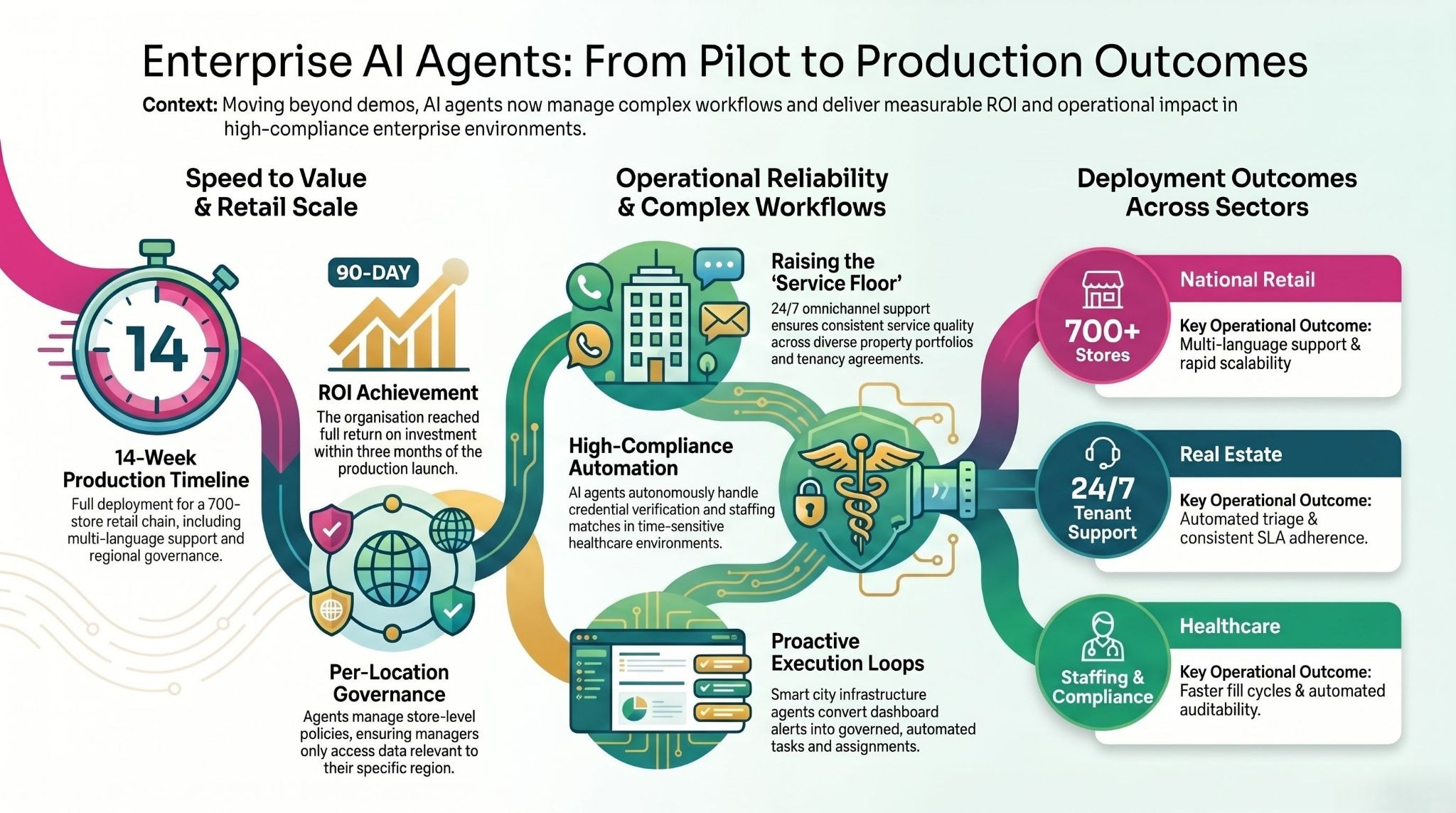
The following deployment examples are drawn from live enterprise implementations across industries. Client names are not disclosed, but the operational contexts and outcomes are real.
National Retail Chain — 700+ Stores, 4 Languages, 14 Weeks to Production
A major national retailer operating over 700 stores across hundreds of cities faced a support challenge that most enterprise helpdesk tools are not designed for: store-level governance policies (what a store manager in one region could access was different from another), multi-language support requirements across Hindi and English, and peak-hour concurrency demands that spiked dramatically during sale events.
Three agents were deployed: a Voice Support Agent handling customer and store staff queries in both languages, an Inventory Intelligence Agent giving store-level visibility into pricing, stock levels, and active promotions, and a Knowledge and Training Agent providing store teams with on-demand access to SOPs and training materials through natural conversation.
Full production deployment — not a pilot, not a staging environment — went live in 14 weeks. Store-level permission controls ensured that each agent's behaviour was governed by the policies relevant to that specific store. Real-time escalation routing handled the cases that required human judgment. The organisation achieved full ROI within 90 days of production launch.
What this proves: Enterprise-scale multi-language deployment with per-location governance is achievable in weeks, not quarters, when the underlying platform is built for production rather than demos.
Major Real Estate Portfolio — 24×7 Tenant Support at Enterprise Scale
A large real estate portfolio owner managing a diverse mix of office, retail, industrial, and residential assets across multiple emirates needed to automate tenant and customer support across the entire portfolio. The challenge was not just volume — it was consistency. Different property types, different tenancy agreements, different SLA expectations, and different escalation paths meant that manual support operations were generating inconsistent outcomes.
An omnichannel service agent was deployed across web, WhatsApp, and email. The agent was trained on the organisation's policies, tenancy documentation, and standard operating procedures, allowing it to handle query triage, rental and payment support questions, and common tenant requests without human involvement. For cases requiring human judgment, the agent executed a structured handoff with full context — so the human agent joining the conversation never had to ask the tenant to repeat themselves.
The outcomes included faster response times, measurable reduction in call-centre load, consistent 24×7 tenant experience across all channels and property types, and improved SLA adherence through automated routing and tracking. The support team was redirected from handling routine queries to resolving genuinely complex cases.
What this proves: AI agents do not just reduce cost in support operations. They raise the consistent floor of service quality across an entire operation simultaneously.
Healthcare Staffing Platform — Matching, Scheduling, and Compliance at Speed
A healthcare staffing platform connecting nursing professionals with healthcare facilities needed to automate the workflows that determined how quickly facilities could fill open shifts and how efficiently nursing professionals could manage their schedules. In healthcare staffing, speed and compliance are both non-negotiable — a shift that is not filled is a patient care gap, and a credential that is not verified is a liability.
An AI platform was deployed covering talent onboarding and credential capture, facility staffing request intake and matching logic, scheduling and notifications, compliance workflow management, and reporting for fill-rate and workforce utilisation. The agent handled the matching and scheduling workflows autonomously, escalating only cases where the matching logic surfaced a genuine conflict or edge case requiring human review.
The outcomes were faster fill cycles, better workforce utilisation across the platform, and improved staffing responsiveness for facilities. The compliance workflows — credential verification, scheduling compliance checks — ran continuously and automatically rather than depending on manual oversight.
What this proves: AI agents work in high-compliance, time-sensitive support environments where both speed and auditability are requirements, not trade-offs.
Smart Infrastructure Operation — City-Scale Support at 150M+ Lives
A smart infrastructure unit operating more than 25 city operation centres and managing connectivity across over 2 million connected assets faced a support challenge that is unusual in scale but increasingly common in structure: an enormous volume of signals, alerts, and operational events requiring triage, prioritisation, and action — with a team that could not scale proportionally to the data volume.
The existing approach was reactive. Dashboards showed what had happened. Teams investigated after the fact. The gap between a signal appearing and action being taken was measured in hours.
An agentic data analysis layer was deployed on top of the existing smart city operational systems. The agents converted dashboard insights into governed, auditable actions and tasks — automatically creating work items, assigning them to the correct teams, and tracking completion. Decision logic was standardised across teams, eliminating the variability that came from different operators interpreting the same signals differently.
The outcome was a fundamental shift from reactive reporting to proactive execution loops. Incidents were addressed faster. Operational transparency improved for leadership. And the support team moved from being a data-processing function to a judgment-and-exception function.
What this proves: The insight-to-action gap is not a people problem. It is a workflow architecture problem. AI agents solve it at a scale that human teams cannot match.
assistents.ai is the enterprise agentic AI platform built by Ampcome, deployed across 35+ enterprises in 12 industries and 6 continents. From national retail chains with 700+ stores to global port operators to leading healthcare enterprises, assistents builds AI agents that don't just answer questions — they run the workflows that drive operational outcomes.
Book an Architecture Review → | Explore the Agent Builder → | Download the Enterprise AI Buyer's Guide →
The 5 Questions Enterprise Leaders Must Ask Before Deploying an AI Agent for Technical Support

Most enterprise AI evaluations fail because they focus on the wrong things — how impressive the demo looks, how many integrations are listed on the website, whether the AI can answer a question correctly in a sandbox. None of these predict production success.
These five questions predict production success.
1. Does it execute, or only answer?
Ask the vendor to demonstrate a complete workflow in which the agent detects a condition, queries a connected system, executes an action, and produces a logged audit trail. If the demo shows the AI providing a recommendation for a human to act on, you are looking at a copilot. That is a useful tool. It is not an AI agent. The distinction matters because the ROI frameworks are completely different.
2. Where does the governance live — in the architecture or bolted on top?
Governance built on top of a capable system is fragile. An agent that can be prompted around its guardrails, or whose audit logs live in a separate system from its actions, is not enterprise-ready. Ask specifically: how does the platform enforce data access permissions for agents? Are audit logs generated at the action layer or the reporting layer? What happens when an agent encounters a situation outside its defined scope — does it escalate, or does it attempt to resolve anyway?
The answer to the last question is particularly important. An agent that guesses at edge cases is an enterprise risk. An agent that escalates edge cases is an enterprise asset.
3. What does production look like — not the pilot?
Pilots succeed in controlled environments. Production involves data quality issues, edge cases, load spikes, integration failures, and user behaviour that no pilot anticipates. Ask specifically for references from clients who are in production — not pilot — and ask what broke during the transition and how it was handled. A vendor who cannot answer the second question has not been in production long enough to matter.
4. How long from signed agreement to first live ticket resolved without human involvement?
Four to six weeks is achievable with the right platform and a well-scoped first workflow. Six to twelve months is a consulting engagement dressed up as a software deployment. Ask for the contractual timeline, not the marketing timeline, and ask what the first workflow is that will go live. If the vendor cannot name a specific workflow and a specific go-live date within weeks, the deployment process is not mature.
5. What is your data handling and compliance posture?
Two questions within this one: First, is your operational data — the tickets, the user profiles, the system logs that flow through the agent — used to train the underlying models? It should never be. Second, where does the data go when the agent processes it, and what certifications govern that processing? For enterprise support operations that touch HRIS, financial data, and customer records, the minimum bar is SOC 2 Type II, GDPR, HIPAA where relevant, and ISO 27001.
How to Deploy an AI Agent for Technical Support — A 4-Week Production Roadmap
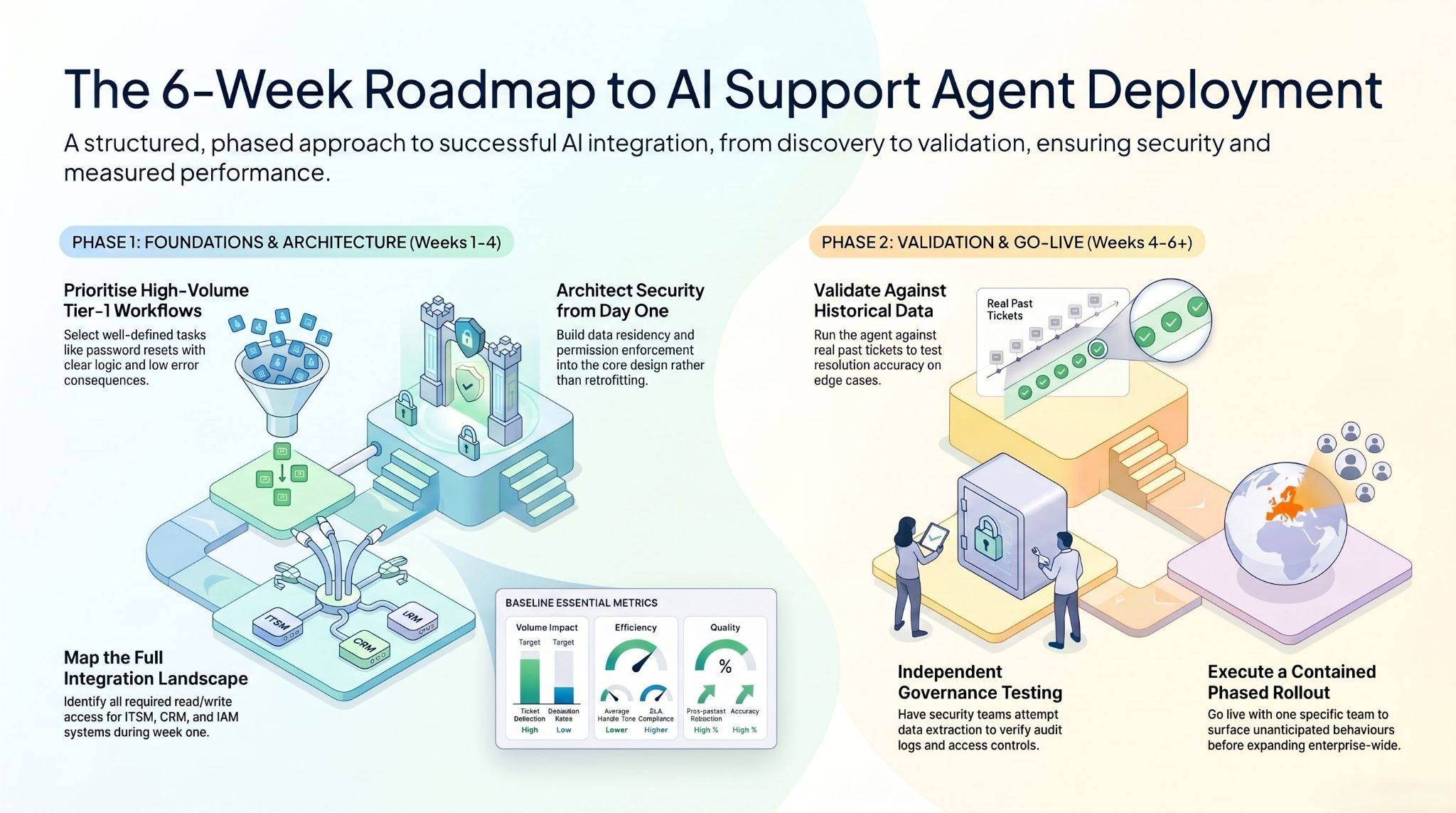
The most common deployment mistake is treating an AI agent deployment like a software installation — something that happens to the organisation rather than with it. The deployments that reach production in four to six weeks and stay there share a common structure.
Weeks 1–2: Discovery and Architecture
Identify the right first workflow.
Not the most complex workflow, and not the longest list of workflows. The right first workflow is the one with the highest volume, the clearest resolution logic, and the lowest consequence of an agent error. For most enterprise support functions, this is Tier-1 ticket triage and resolution for a specific, well-defined ticket category — password resets, access requests, or a known error with a structured resolution path.
Define success metrics before any technical work begins.
Ticket deflection rate. Average handle time (for the agent and for the human agents working alongside it). Escalation rate. SLA compliance rate. First-contact resolution rate. These numbers need a baseline before the agent goes live. Without a baseline, ROI is a story rather than a measurement.
Map the integration landscape.
Which systems does the agent need to read from? Which systems does it need to write to? Who owns each system, and what is the process for accessing it? Integration complexity is where most deployments slow down. Identifying it in Week 1 means it does not surprise you in Week 4.
Involve compliance and security from the first conversation.
Not after the agent is built. Not during the go-live review. From the first planning session. Governance requirements — data residency, permission enforcement, audit log format, retention policies — need to be built into the architecture. Retrofitting governance is expensive and often results in agents being shut down after deployment.
Weeks 2–4: Build and Integration
Connect the context sources the agent needs: ITSM, knowledge base, CRM, IAM, previous ticket history. Configure classification logic and routing rules based on your actual ticket taxonomy — not a generic one. Define escalation triggers: what are the conditions under which the agent stops and hands to a human? This is where most of the judgment work happens, and it is where domain expertise matters more than technical expertise.
Build audit logging and permission enforcement in parallel with the workflow logic. Every action the agent takes should be logged with the user role it was acting on behalf of, the systems it accessed, the data it retrieved, and the action it took. This is not overhead. It is the evidence your compliance team will need and the data your operations team will use to improve the agent over time.
Weeks 4–6: Validation and Go-Live
Run the agent against historical tickets. Not synthetic test cases — real tickets from your own support queue, with known resolutions, so you can validate whether the agent would have resolved them correctly. Measure classification accuracy, resolution accuracy, and escalation behaviour on edge cases.
Test the governance layer independently of the functional layer. Have your security team attempt to extract data the agent should not have access to. Have your compliance team review the audit log format against your actual compliance requirements. Issues found in Week 5 are fixes. Issues found in Month 3 are incidents.
Go live with one team or one workflow before expanding. The first two weeks in production will surface behaviours that no testing environment anticipated. Having a contained rollout means those behaviours are learning opportunities rather than enterprise-wide disruptions.
Measuring ROI — 3 Vectors and the Metrics That Matter from Day One

ROI from AI agents in technical support comes from three distinct vectors. Measuring only one underestimates the total impact.
Vector 1: Cost Reduction
The most direct and most commonly cited. Tier-1 ticket resolution that previously required 14 minutes of human attention now requires seconds of agent processing. At enterprise ticket volumes, this compounds. But the calculation needs to be honest: not every ticket becomes an agent resolution.
A realistic Tier-1 deflection target for a well-scoped first deployment is 45–60%. The remaining tickets are the ones that require human judgment — and the value there is that your human agents are spending all of their time on cases that actually require them, rather than splitting attention between trivial and complex work.
Vector 2: Error Reduction
Inconsistent ticket classification, missed SLA escalations, routing errors, and knowledge base gaps that generate repeat contacts are not random. They are systematic failures in a manual process.
AI agents apply the same classification logic to every ticket, monitor every SLA timer continuously, and surface knowledge base gaps as they occur. The cost of these errors — in repeat contacts, SLA penalties, and customer churn — is typically larger than organisations realise before they measure it.
Vector 3: Velocity Improvement
Faster first response. Faster resolution. Faster root-cause identification for engineering teams. For enterprise support functions where response time is a competitive differentiator or a contractual obligation, velocity improvement is not a secondary benefit. It is the primary one.
AI agents that surface pattern-level insights across thousands of tickets in real time give engineering and product teams the data they need to eliminate support demand at the source, which is a different class of outcome from handling support demand more efficiently.
Track these metrics from Day One:
- Ticket deflection rate: percentage of tickets resolved by the agent without human involvement
- Average handle time: for agent-resolved tickets and human-handled tickets separately
- Escalation rate: should decrease over time as the agent's scope is refined
- SLA compliance rate: for agent-handled vs human-handled tickets
- First-contact resolution rate: is the agent resolving issues in one interaction, or generating follow-up contacts?
- Knowledge base coverage: what percentage of incoming ticket types can the agent handle with confidence?
Stop Demoing. Start Resolving.
The operational gaps that AI agents close in technical support — manual Tier-1 resolution, inconsistent classification, reactive SLA management, fragmented multichannel context — are compounding every quarter they remain unsolved.
The organisations on the other side of those deployments are handling more tickets, with fewer people touching Tier-1, with better SLA compliance, and with pattern-level intelligence that their human teams are using to eliminate support demand rather than just manage it.
The path from where you are to where those organisations are is not a research project. It is a scoped deployment, a well-defined first workflow, governance designed in from the first week, and a production launch in six weeks.
Technology is not the constraint. The decision is.
Ready to move from ticket backlogs to autonomous resolution?
Most support teams are one scoped workflow away from their first AI agent in production. Book a 30-minute architecture review with the assistents.ai team — bring your highest-volume support workflow, and we'll map exactly what a governed AI agent deployment looks like for your environment, with a go-live timeline in weeks, not months.
Frequently Asked Questions
What is an AI agent for technical support?
An AI agent for technical support is an autonomous system that monitors incoming support requests, classifies them by type and severity, retrieves context from connected enterprise systems including ITSM platforms, CRM, and knowledge bases, executes resolution workflows end-to-end, and escalates only genuine exceptions to human agents.
This is distinct from chatbots, which answer questions but cannot take action, and copilots, which assist human agents but still require humans to execute every resolution.
How is an AI agent for technical support different from a helpdesk chatbot?
A helpdesk chatbot retrieves information from a knowledge base and presents it conversationally. The human agent reads the response and then acts on it. An AI agent for technical support classifies the incoming issue, accesses multiple enterprise systems simultaneously to gather context, executes the resolution — such as resetting a password, updating a ticket status, provisioning access, or routing an escalation — and logs every action with a complete audit trail. The chatbot answers. The AI agent resolves.
What enterprise systems do AI agents for technical support integrate with?
Enterprise AI agents for technical support integrate with ITSM platforms including ServiceNow, Jira Service Management, and Zendesk; ERP systems including SAP and Oracle; CRM systems including Salesforce and HubSpot; identity and access management systems including Active Directory and Okta; HR systems including Workday; and internal knowledge bases and document repositories. The integrations must be bidirectional — read and write — to support full workflow execution, not just data retrieval.
How long does it take to deploy an AI agent for technical support?
A well-scoped enterprise deployment targeting a specific Tier-1 workflow can move from initial discovery to first production ticket resolved in four to six weeks. Week one and two cover workflow mapping, integration architecture, and governance design. Weeks two through four cover build and integration.
Weeks four through six cover validation against historical tickets and staged go-live. Deployments that take significantly longer are typically integration complexity issues or governance design issues — not technology limitations.
What governance controls are required for enterprise AI agents in technical support?
The non-negotiable governance requirements for enterprise AI agents in technical support are: permission enforcement on every action (the agent can only access data that the relevant user role is authorised to access); complete decision provenance (every data access, reasoning step, and action is logged in an exportable audit trail); alignment verification (the agent escalates when it encounters situations outside its defined scope rather than attempting to resolve them); and human-in-the-loop controls for sensitive or high-risk actions. Compliance certifications including SOC 2 Type II, GDPR, HIPAA, and ISO 27001 are the minimum bar for enterprise deployments handling sensitive support data.
What ROI should enterprises expect from AI agents for technical support?
Enterprise deployments consistently report Tier-1 ticket deflection rates of 45–80% for well-scoped workflows, significant reductions in average handle time for the tickets that reach human agents, and measurable improvements in SLA compliance from proactive monitoring and escalation.
ROI comes from three sources: cost reduction through automation of high-volume Tier-1 workflows, error reduction through consistent classification and routing logic, and velocity improvement through faster resolution and pattern-level insight generation. Most well-executed enterprise deployments reach positive ROI within 90 days of production launch.
How do AI agents for technical support handle sensitive data?
Enterprise AI agents for technical support should operate on a zero data retention basis with the underlying language models — your operational data is never used for model training. Every agent action should be governed by the same role-based access controls that govern human access to the same systems.
Sensitive data — user records, HR data, financial information — should be processed only within the permissions of the role the agent is acting on behalf of, with every access logged. The architecture review should include an explicit data flow map covering where data goes when the agent processes it, who can access the audit logs, and what the data residency requirements are for your industry.

Transform Your Business With Agentic Automation
Agentic automation is the rising star posied to overtake RPA and bring about a new wave of intelligent automation. Explore the core concepts of agentic automation, how it works, real-life examples and strategies for a successful implementation in this ebook.
Sarfraz Nawaz is the CEO and founder of Ampcome, which is at the forefront of Artificial Intelligence (AI) Development. Nawaz's passion for technology is matched by his commitment to creating solutions that drive real-world results. Under his leadership, Ampcome's team of talented engineers and developers craft innovative IT solutions that empower businesses to thrive in the ever-evolving technological landscape.Ampcome's success is a testament to Nawaz's dedication to excellence and his unwavering belief in the transformative power of technology.

More insights
Discover the latest trends, best practices, and expert opinions that can reshape your perspective


.png)



Contact us

