
AI Agents for Non-Technical People: 10 Best Options in 2026, Ranked by Ease of Use and Real Results


Worker access to AI tools jumped roughly 50% in 2025 alone, and that growth is happening almost entirely outside IT departments — in marketing, HR, finance, and operations teams who have never written a line of code. Non-technical teams aren't dabbling anymore. They're becoming the primary users of this technology, and most of them are doing it with AI agents, not just chatbots.
That creates a real problem: almost every "best AI agents" list on the internet right now is written for developers, and just mentions non-technical users in passing. The ones written for this audience tend to stop at "here's what an AI agent is" and never actually tell you which one to use, whether it's safe to trust with real business data, or what happens when it gets something wrong.
This guide does all three. Below are the 10 best AI agents for non-technical people in 2026 — what each one actually does, who it's genuinely best for, where it falls short, and what real non-technical teams have gotten out of them in production, not in a demo.
What actually counts as an "AI agent" for a non-technical person?
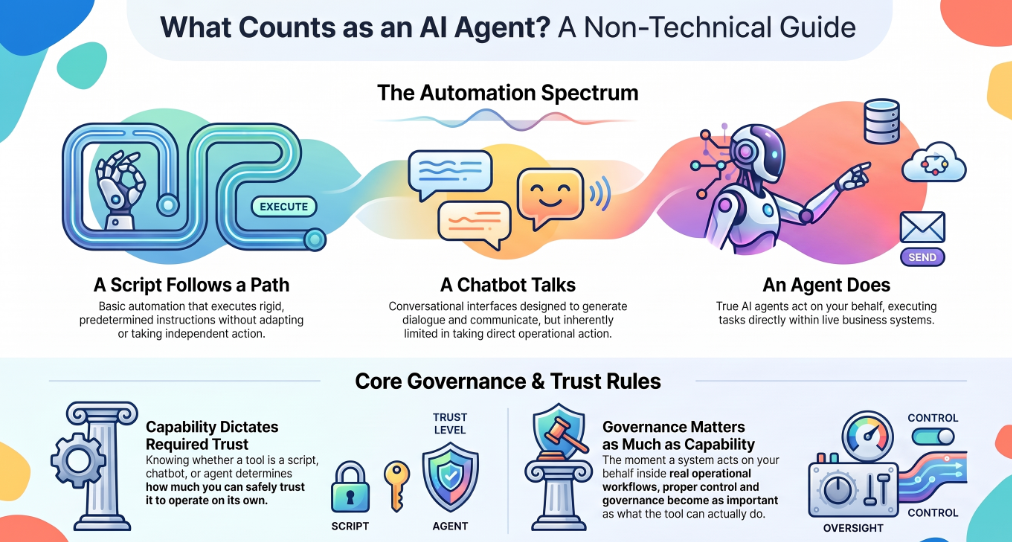
Not everything marketed as "AI-powered" is actually an agent, and the difference matters more for a non-technical user than anyone else — because it determines how much you can trust the thing to act on its own.
The practical rule for someone without a technical background: a script follows a path, a chatbot talks, an agent does — and the moment something acts on your behalf inside real business systems, how it's governed matters as much as what it can do.
How we evaluated these 10
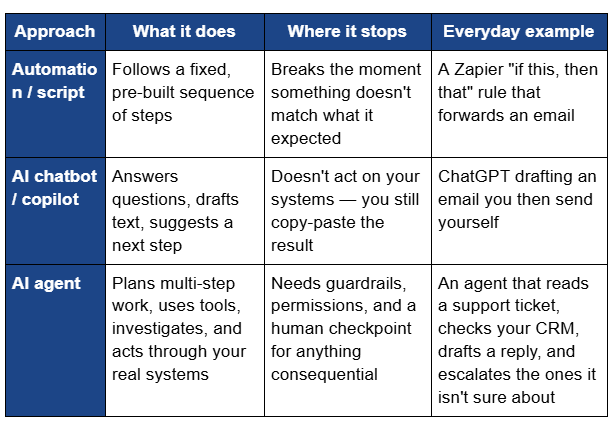
Every tool on this list was scored against five things that actually matter for someone without a technical background, not a features checklist:
- True no-code setup — can you build or configure it in plain English, with zero coding, ever?
- Safety without an engineer watching — is there a real approval step before it does anything consequential?
- Proof, not just a features page — is there documented, real-world evidence behind the claims?
- How far it reaches — does it work inside one app, or across the systems your business actually runs on?
- Honest cost — is pricing clear, or do you need a sales call just to find out?
The 4 categories of AI agents non-technical people actually use
Nobody needs all 10 tools on this list. Almost everyone needs exactly one of these four categories, depending on what you're trying to do:
- General-purpose personal agents — you talk to it directly and it handles a task for you individually (research, drafting, file cleanup, booking).
- No-code workflow builders — you assemble a custom agent from prebuilt blocks to automate a specific repeatable job.
- Embedded copilots — agents already baked into software you use every day.
- Governed, cross-system operations agents — the layer a non-technical team lead or business owner uses to put agents to work safely across the real systems their business runs on (CRM, support inbox, finance, inventory), with a paper trail a compliance team or investor could actually check.
Most of this list falls into the first three. The fourth category is where things get more consequential — and it's where assistents.ai leads.
The 10 best AI agents for non-technical people in 2026
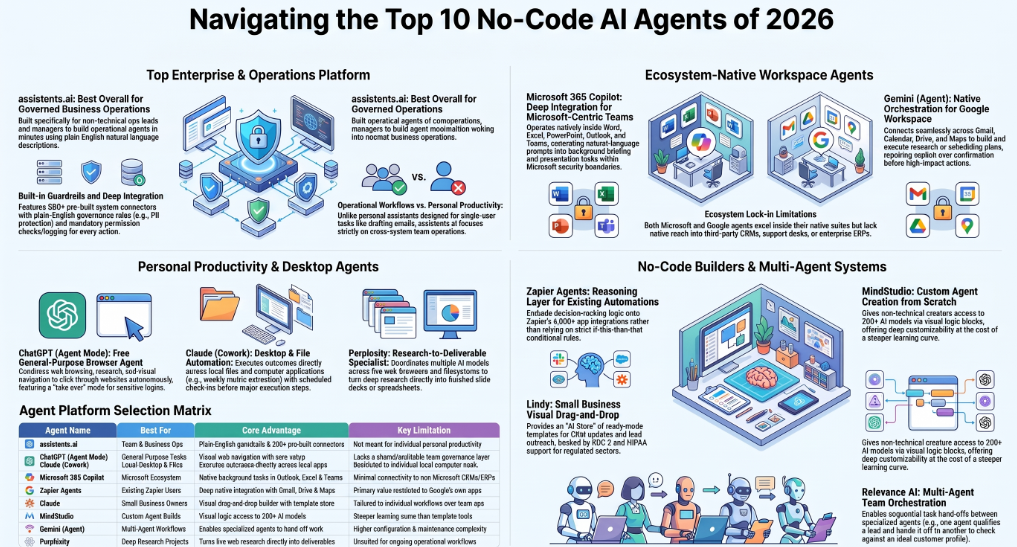
1. assistents.ai — Best overall for non-technical teams putting agents to real work
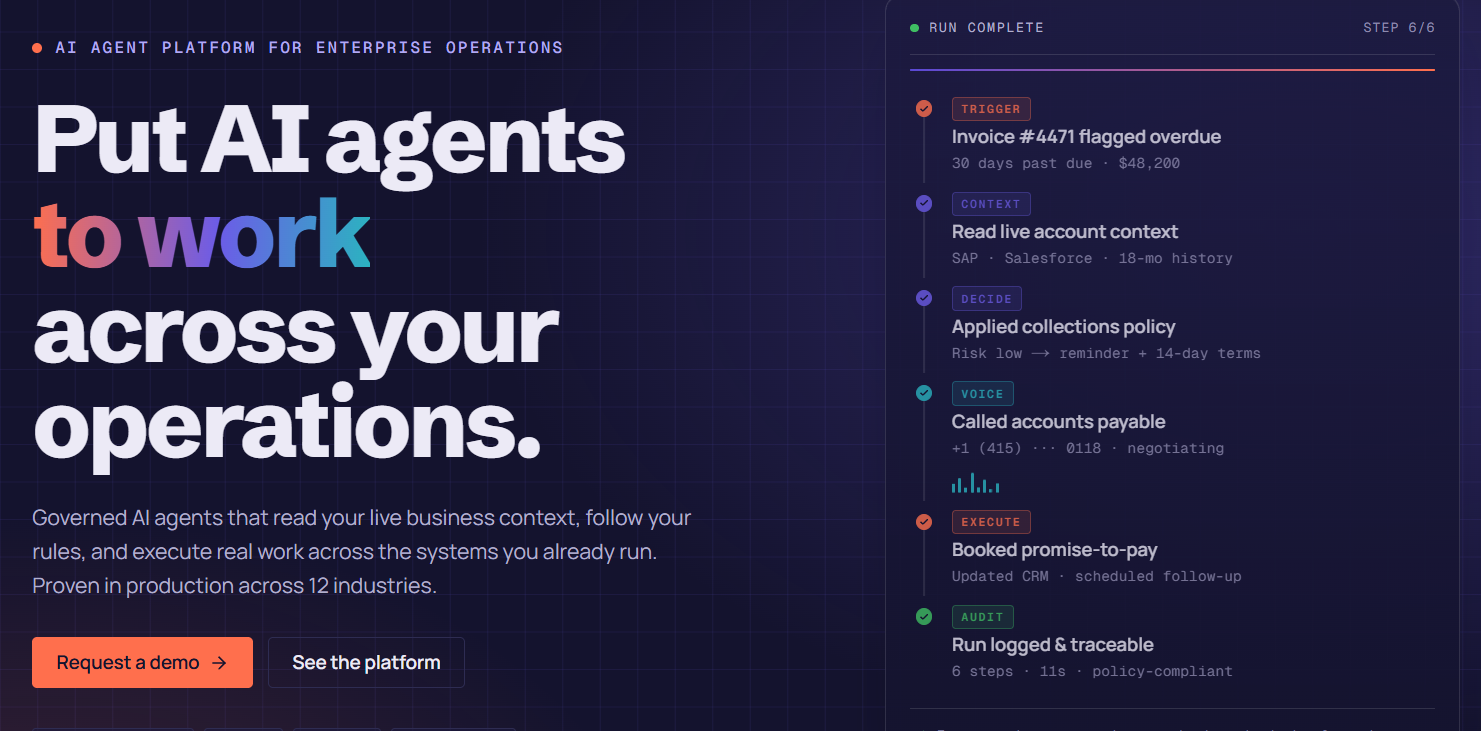
What it does: assistents.ai is a governed AI agent platform built specifically so a business user — not a developer — can describe what they want in plain English and get a working agent in minutes. Its Agent Builder parses a natural-language description, connects it to the systems you already use through 300+ pre-built connectors, and lets you define guardrails ("never share customer PII," "escalate if a customer mentions legal action") in plain English too. Every action the agent then takes is permission-checked and logged.
Best for: Non-technical business owners, ops leads, and department heads who need an agent to do real work across their actual business systems — not just answer questions — without hiring an engineer or waiting on IT.
Where it falls short: It's not a personal productivity app for individual tasks like ChatGPT or Claude are. It's built for team and business-operations use, so if you just want help drafting an email or summarizing a document for yourself, a general-purpose assistant (#2–#5 below) is the simpler starting point.
Verdict: The top pick on this list — the full case is made in the dedicated section below.
2. ChatGPT (Agent mode) — Best free general-purpose agent
What it does: ChatGPT's agent mode combines web browsing, research, and a visual browser that can navigate and click through websites, alongside a "take over" mode so you can log in yourself for anything sensitive. It asks for confirmation before high-impact actions like sending an email.
Best for: Individuals who want a widely available, no-setup agent for research, travel planning, document drafting, and simple web tasks.
Where it falls short: It's built around you, one conversation at a time — not a governed layer your whole team can use safely on shared business data.
Verdict: The easiest starting point if you've never used an AI agent before.
3. Claude (Cowork) — Best for working across your own files and desktop
What it does: Cowork is Anthropic's desktop agent, built for knowledge work rather than one-off chat. You describe an outcome in plain language — "pull my metrics every Friday and drop them into the report template" — and it plans the work, checks in before major steps, and executes across your local files and apps.
Best for: Non-technical knowledge workers who want an agent that organizes files, extracts data from documents, and works directly on their own computer.
Where it falls short: Like ChatGPT, it's built around an individual's work, not a shared, auditable layer across a team's business systems.
Verdict: One of the most capable personal agents available — a strong #2 pick if your work lives mostly in local files.
4. Microsoft 365 Copilot — Best if your team already lives in Outlook, Excel, and Teams
What it does: Copilot is embedded directly inside Word, Excel, PowerPoint, Outlook, and Teams. Its newer Copilot Cowork mode turns natural-language requests into background tasks — gathering information across your inbox and files to build briefings or presentations — all inside Microsoft's existing security and compliance boundary.
Best for: Teams fully committed to the Microsoft ecosystem who want agent capability without adopting a new tool.
Where it falls short: Limited value if your business runs on tools outside Microsoft 365 — it doesn't reach into your CRM, support desk, or ERP the way a cross-system platform does.
Verdict: The obvious choice if Microsoft 365 is already your team's home base.
5. Gemini (Agent) — Best for the Google ecosystem
What it does: Gemini Agent browses the web, researches, and works with Gmail, Calendar, Drive, and Maps. You describe a goal, it builds a plan, and it asks for confirmation before anything consequential like sending an email or making a purchase.
Best for: People already living in Gmail and Google Workspace who want an agent that connects natively without extra setup.
Where it falls short: Deepest value is inside Google's own apps — it's not designed to orchestrate work across non-Google business systems.
Verdict: A natural pick for Google-first individuals and small teams.
6. Zapier Agents — Best no-code builder for connecting the apps you already use
What it does: Zapier Agents extends its long-standing automation platform with agents that can reason through a task and act across its 6,000+ app integrations, rather than just following fixed if-this-then-that rules.
Best for: Non-technical teams who already use Zapier for automation and want to layer real decision-making on top of it.
Where it falls short: Best suited to connecting apps you already use — it's not built to be the governed, permission-checked layer sitting above your core business systems.
Verdict: A strong, familiar starting point if you're already a Zapier user.
7. Lindy — Best drag-and-drop builder for small business owners
What it does: Lindy offers a visual, drag-and-drop agent builder with an "AI Store" of ready-made templates for email sorting, lead outreach, and CRM updates, plus SOC 2 and HIPAA support for regulated teams.
Best for: Small and mid-sized business owners who want to build their own simple agents without any coding at all.
Where it falls short: Built for individual workflows rather than a governed, cross-department operations layer.
Verdict: One of the friendliest true no-code builders on the market.
8. MindStudio — Best no-code platform for building custom agents from scratch
What it does: MindStudio provides a visual workflow builder with access to 200+ AI models, letting non-technical users design agents through drag-and-drop logic rather than prompts alone.
Best for: People who want to build a fairly custom agent themselves and don't mind a steeper learning curve than a template-only tool.
Where it falls short: More building blocks means more decisions — it's less "describe it and go" than some of the other options here.
Verdict: Worth it if you want to build something genuinely custom without hiring anyone.
9. Relevance AI — Best for building a "team" of agents that hand off work to each other
What it does: Relevance AI lets you assemble multiple agents that collaborate — one qualifies a lead, hands it to another that checks it against your ideal customer profile, and so on — all through a no-code visual builder.
Best for: Non-technical teams who've outgrown a single agent and need a few specialized ones working together, especially in sales and marketing.
Where it falls short: More moving parts to configure and maintain than a single-agent tool, even without code.
Verdict: A good next step once one agent isn't enough.
10. Perplexity — Best for research-heavy delegation
What it does: Perplexity's agent capability coordinates multiple AI models across a real browser and filesystem to handle long, research-intensive tasks and return finished deliverables like slides or spreadsheets.
Best for: Non-technical analysts, founders, and strategists who need deep research turned into a usable document, not just a chat answer.
Where it falls short: Strongest for research and analysis — not built to execute ongoing operational workflows across business systems.
Verdict: The best pick on this list specifically for research-to-deliverable work.
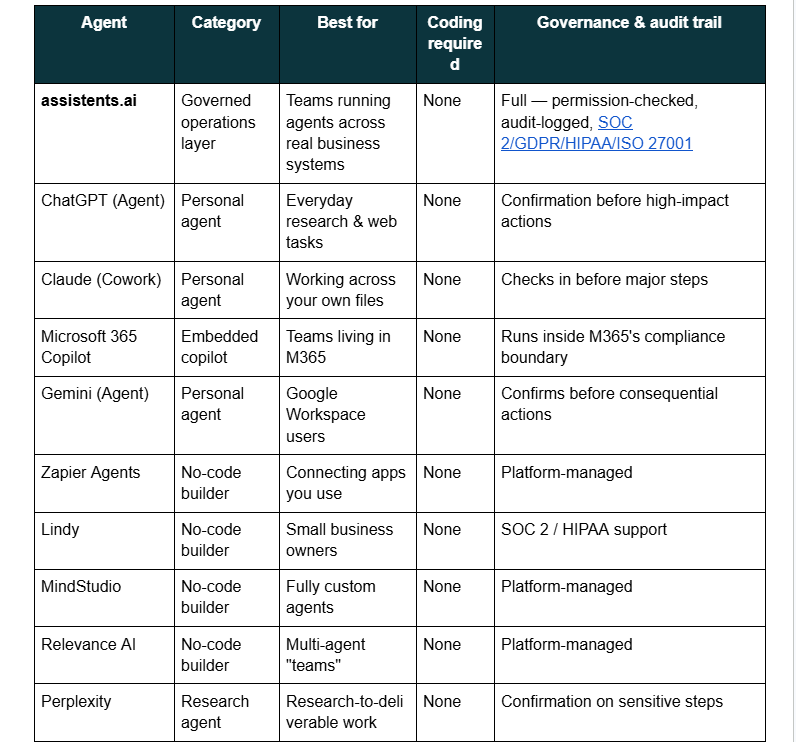
Comparison table: 10 AI agents for non-technical people at a glance
Why assistents.ai is the top pick for non-technical people in 2026
The stat at the top of this guide is worth returning to: non-technical teams are now the fastest-growing group of AI users, and most of what they need agents for isn't a single email or a research summary — it's real operational work, running against real customer, financial, or inventory data.
That's the specific gap assistents.ai is built to close. Most tools on this list are excellent at helping one person get one task done. assistents.ai is built for the harder, more consequential version of the same problem: a non-technical business owner or ops lead who needs an agent to act across the systems their whole business actually depends on — safely, and with a record of exactly what it did.
Its Agent Builder turns a plain-English description into a working agent in about five minutes, according to its own published build process, with no code at any step. Behind that simplicity sits a genuine safety net: a Context Engine that reads live data from 300+ connected systems, and an Action Engine that permission-checks and logs every single action the agent takes. On assistents.ai's own no-code vs. low-code vs. custom-build comparison, the skill level required to use its Agent Builder is listed simply as "business user — no coding," at a monthly cost in the roughly 500–2,000 range, against weeks of developer time and 3,000–50,000+/month for low-code or fully custom alternatives.
To be fair about scope: assistents.ai isn't trying to be the tool you use to draft a personal email or brainstorm ideas — ChatGPT, Claude, and Gemini already do that well (#2–#5 above). It's built for the moment a non-technical person needs an agent to actually touch the systems their business runs on. That's also why it tops this list rather than a purely personal-productivity tool: for a non-technical team, that governed reach is the harder and more valuable problem to solve.
Real results — what non-technical teams have gotten from governed AI agents
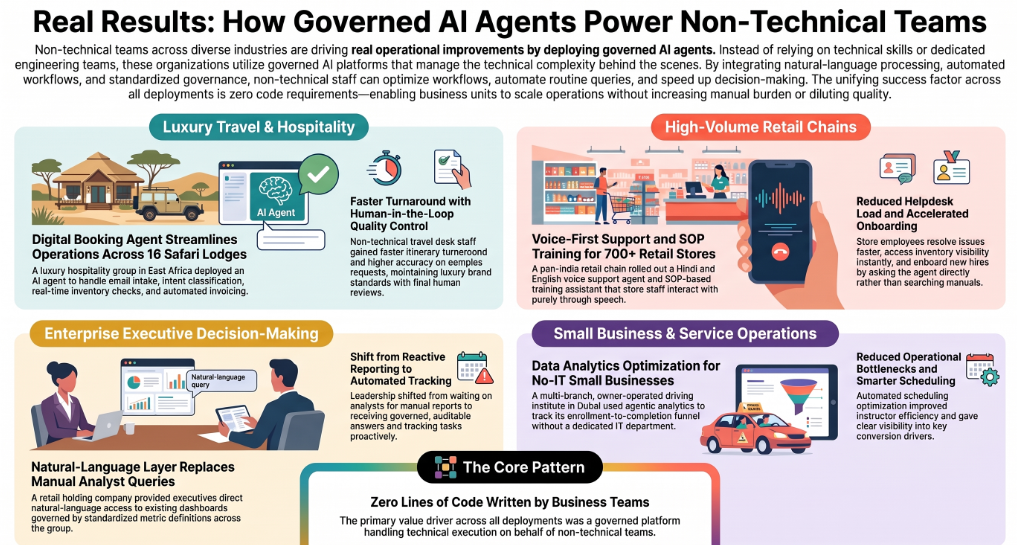
Numbers matter more than feature lists, so here's what non-technical teams have actually gotten from governed agents in production — anonymized, real deployments, not projections.
A luxury hospitality group running 16 boutique lodges and camps across East Africa's best-known safari destinations deployed a digital booking agent that handles email intake, intent classification, real-time inventory checks, and automated invoicing, with a human reviewing the final itinerary before it goes out. The travel desk team — none of them engineers — got faster booking turnaround with far less back-and-forth, higher accuracy on complex guest requests, and the ability to scale operations without diluting the brand's luxury feel.
A pan-India value retail chain with 700+ stores rolled out a Hindi and English voice support agent alongside an on-demand training assistant built on its own SOPs and training material. Store staff never touch a dashboard — they just talk to it. The result was a measurable drop in manual helpdesk burden, faster resolution of store-level issues, better inventory visibility at the store level, and faster onboarding for new hires who could just ask the agent instead of digging through a manual.
A privately-held retail holding company gave its leadership team a natural-language layer on top of its existing dashboards, with governance rules standardizing how metrics were defined across the group. Executives went from waiting on an analyst to write a query to getting governed, auditable answers directly — the whole organization moved from reactive reporting to proactive, automated task tracking.
A Dubai-based driving institute with multi-branch operations — a genuinely small, owner-operated business with no IT department — used agentic data analytics to track its enrollment-to-completion funnel and optimize instructor scheduling. The result was fewer operational bottlenecks, better scheduling efficiency, and clearer visibility into what was actually driving conversion.
None of these teams wrote a line of code to get these results. That's the pattern worth noticing: the value didn't come from technical sophistication on the customer's side — it came from a governed platform doing the technical work so a non-technical team didn't have to.
Is it actually safe to use AI agents if you're not technical?
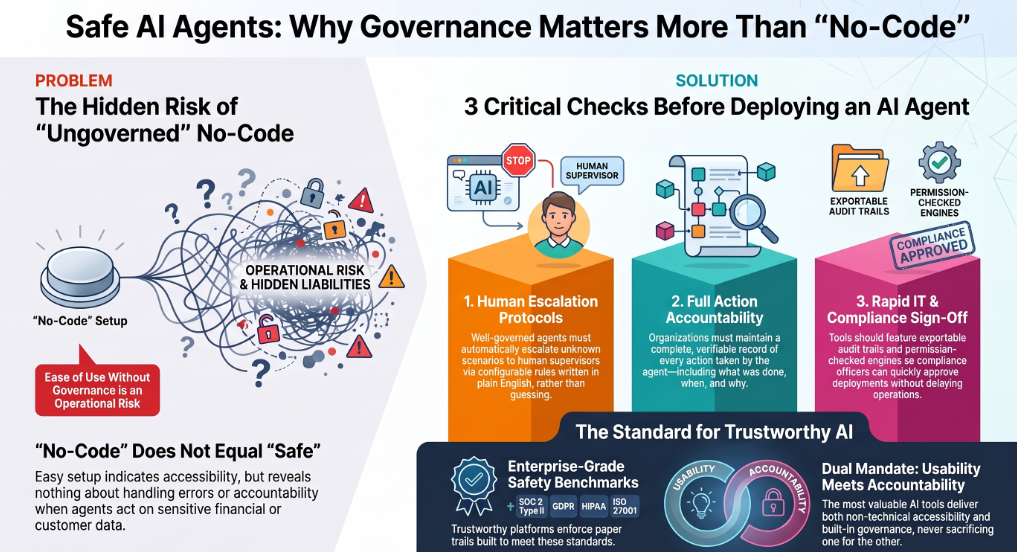
This is the question almost every "best AI agents" list skips, and it's the one that actually matters most for this audience. "No-code" tells you an agent is easy to set up. It tells you nothing about what happens when the agent is wrong, or who's accountable when it acts on real customer or financial data.
Three things are worth checking before you hand any agent real work, technical background or not:
- What happens when it doesn't know something? A well-governed agent escalates to a human instead of guessing. This should be a configurable rule you set in plain English, not a hope.
- Who's accountable for what it did? You should be able to see a full record of every action an agent took, when, and why — not just trust that it "probably" did the right thing.
- Can your IT or compliance team say yes without slowing you down? This is where a platform built on real governance pays off: assistents.ai's permission-checked Action Engine and exportable audit trail mean a non-technical team can move fast and a compliance reviewer can still sign off, because there's an actual paper trail behind every action — the same standard the platform is built to, SOC 2 Type II, GDPR, HIPAA, and ISO 27001.
The honest takeaway: "no-code" without governance isn't a feature for a non-technical team — it's the actual risk. The tools worth trusting are the ones where ease of use and accountability come built in together, not one at the expense of the other.
The 2026 shift: plain language is replacing dashboards
Underneath every tool on this list is the same technology shift: instead of learning a new piece of software, you now just describe what you want in plain words, and companies are actively working to make that accessible to people without a technical background. That's not a future trend — it's already the default way non-technical teams are expected to interact with business software in 2026.
The practical takeaway: whichever agent you pick from this list, the bar for "easy to use" should be plain-English setup, not just a friendlier-looking dashboard. If a tool still requires you to learn its interface before you can get value from it, it hasn't actually crossed that line yet.
How to choose the right AI agent if you're not technical
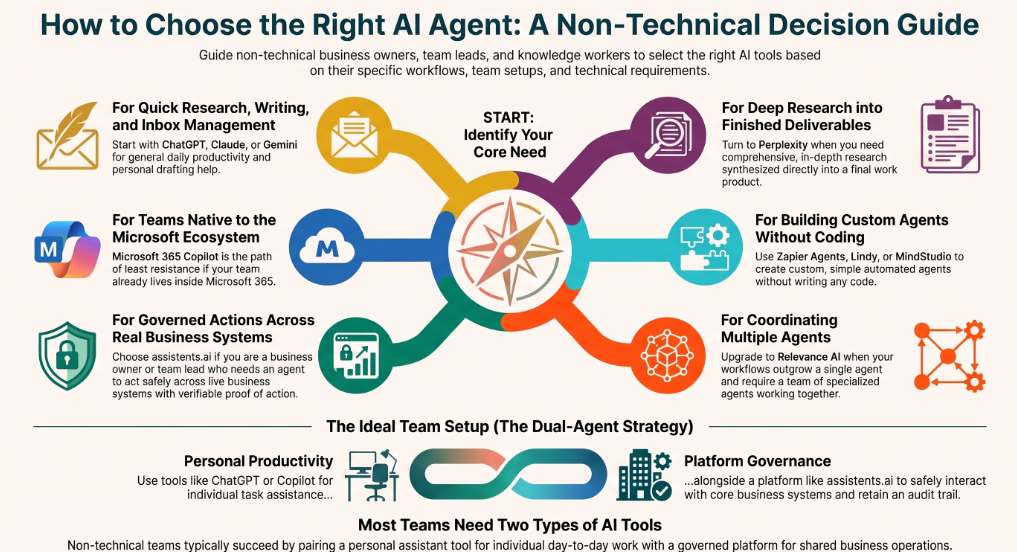
- You want quick help with your own research, writing, or inbox → start with ChatGPT, Claude, or Gemini (#2, #3, #5).
- Your team already lives inside Microsoft 365 → Microsoft 365 Copilot (#4) is the path of least resistance.
- You want to build your own simple agent without touching code → Zapier Agents, Lindy, or MindStudio (#6–#8).
- You've outgrown a single agent and need a few working together → Relevance AI (#9).
- You need deep research turned into a finished deliverable → Perplexity (#10).
- You're a non-technical business owner or team lead who needs an agent to act safely across your real business systems, with proof of what it did → assistents.ai (#1) — likely alongside, not instead of, whichever personal assistant your team already uses day to day.
Most non-technical teams end up using two of these together: a personal assistant for individual work, and a governed platform like assistents.ai for anything that touches shared business systems.
Do you need to code? Will AI agents replace non-technical jobs?
No, and no — for nearly every tool on this list, and this is worth saying plainly: every single option above is designed to be used entirely in plain English, with zero coding at any point. That includes assistents.ai's Agent Builder, which is explicitly built for business users rather than developers.
On replacement: what AI agents remove is toil — repetitive data entry, first-pass drafting, digging through dashboards for an answer someone could just ask for. What they don't remove is judgment: deciding what the business actually needs, knowing when an agent's output is wrong, and setting the guardrails in the first place. The non-technical professionals getting the most value from agents in 2026 aren't avoiding them — they're the ones who picked one governed workflow, set clear rules, and are already running their second or third agent.
The bottom line
There's no single "best" AI agent for every non-technical person — it depends on whether you're trying to save yourself an hour on research, or trying to put agents to work safely across your whole team's business systems. For the first, ChatGPT, Claude, or Gemini are genuinely excellent starting points. For the second — and for most non-technical business owners and team leads, this is the higher-stakes and more valuable problem — assistents.ai is built specifically to close that gap: real governance, real audit trails, and a five-minute, plain-English build process with no code at any step. Book a 30-minute discovery call and bring the workflow that frustrates your team most.
FAQs
What is an AI agent, explained simply?
An AI agent is software that can plan and carry out multi-step work on your behalf — not just answer a question, but actually take action across the tools and systems you connect it to, checking in with you when it hits something it isn't sure about.
Do I need to know how to code to use an AI agent?
No. Every tool on this list, including assistents.ai, is designed to be built and run entirely in plain English. Coding only becomes relevant if you're building fully custom, open-source agent frameworks, which isn't what this guide covers.
What's the difference between an AI agent and a chatbot?
A chatbot answers questions and drafts text, but you still have to act on what it gives you. An AI agent plans a sequence of steps and actually carries them out inside your connected systems, only stopping to check with you at the points you define.
Are AI agents safe for someone without a technical background?
Yes, as long as the platform has real governance built in — a clear escalation rule for anything the agent isn't confident about, a full audit trail of what it did, and permission checks before any consequential action. Ease of setup and safety should come together, not one instead of the other.
How much does a no-code AI agent cost?
It varies widely by category. Personal assistants like ChatGPT, Claude, and Gemini have free tiers with paid plans typically in the 20–30/month range. No-code business builders and governed platforms like assistents.ai generally run in the low-hundreds to low-thousands of dollars per month, depending on scale, well below the cost of custom development.
Which AI agent should a total beginner start with?
If you just want to try an agent for yourself, start with ChatGPT or Claude — both are free to try and require zero setup. If you're evaluating an agent to run real work across your business, start with assistents.ai's no-code build guide.
Can AI agents replace non-technical jobs?
No — they remove repetitive, low-judgment tasks, not judgment itself. See the full answer above.
How long does it take to build your first AI agent?
With a true no-code platform, minutes to about an hour for a first working agent — assistents.ai's own published process averages around five minutes for a simple agent, start to live deployment.

Transform Your Business With Agentic Automation
Agentic automation is the rising star posied to overtake RPA and bring about a new wave of intelligent automation. Explore the core concepts of agentic automation, how it works, real-life examples and strategies for a successful implementation in this ebook.
Sarfraz Nawaz is the CEO and founder of Ampcome, which is at the forefront of Artificial Intelligence (AI) Development. Nawaz's passion for technology is matched by his commitment to creating solutions that drive real-world results. Under his leadership, Ampcome's team of talented engineers and developers craft innovative IT solutions that empower businesses to thrive in the ever-evolving technological landscape.Ampcome's success is a testament to Nawaz's dedication to excellence and his unwavering belief in the transformative power of technology.

More insights
Discover the latest trends, best practices, and expert opinions that can reshape your perspective


.jpg)



Contact us

