
Best Agentic AI for Game Development in 2026: 12 Tools Ranked by Autonomy Level


To Summarize:
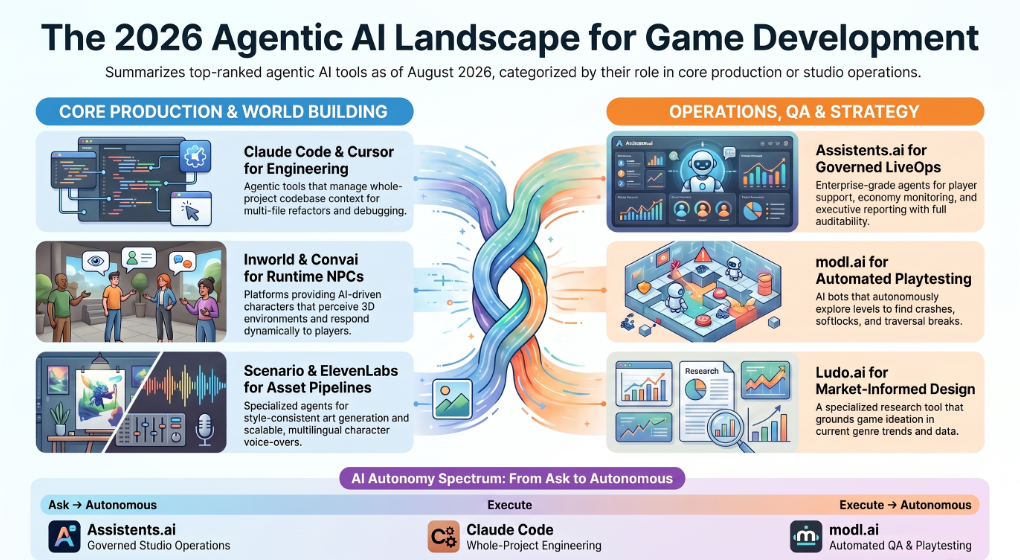
- Autonomy is the ranking axis that matters. We rate all 12 tools on the Studio Autonomy Ladder — Ask, Execute, Autonomous — because a tool that drafts a patch note and a tool that ships one are not the same product category, even when both are called "agents."
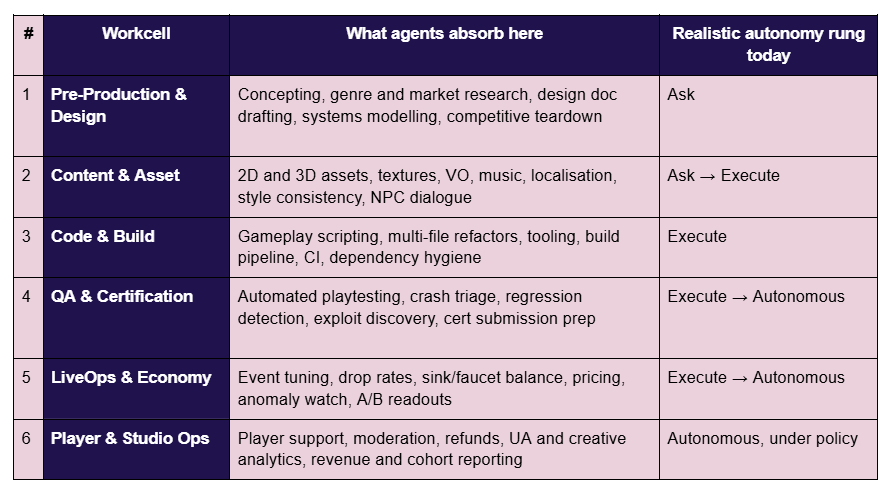
- Agents belong in six places, not two. The Six Workcell Studio Map covers Pre-Production, Content & Asset, Code & Build, QA & Certification, LiveOps & Economy, and Player & Studio Ops. Nearly every published list covers only the middle two.
- Workcells 5 and 6 carry the recurring cost. Live-service studios spend far more sustained headcount on economy tuning, player support, moderation and revenue analysis than on asset generation — and that is exactly the layer most tooling ignores.
- The blocker is not capability. It is permission. Source-code exposure, player data, storefront disclosure, runtime inference cost and reversibility decide what actually ships. We cover all five.
- Disclosure: Assistents.ai is Ampcome's product. It is ranked first for a specific workcell, with its limitations stated plainly, and every competitor on this list is recommended sincerely where it is genuinely better.
What Agentic AI for Game Development Actually Means
Agentic AI for game development is software that holds context across multiple steps, calls external tools, plans a sequence of actions, and continues working toward a goal without a new prompt at every turn. That is the whole definition. A model that answers a question is not an agent. A model that reads your crash logs, groups them by stack signature, opens a ticket for the top cluster, attaches the repro steps, and tells you what it did — that is an agent.
The word has been stretched badly. Vendor pages now call autocomplete an agent, call a text-to-image endpoint an agent, and in at least one widely-read roundup call a game engine an agent. That imprecision costs studios money, because it makes tools look substitutable when they solve completely different problems.
Agentic AI vs. game AI — the confusion that costs studios money
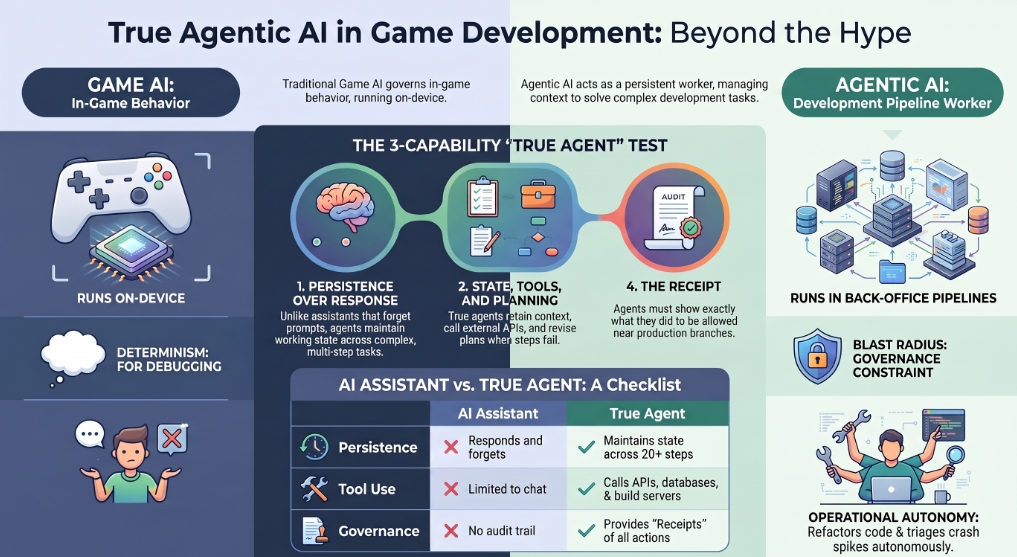
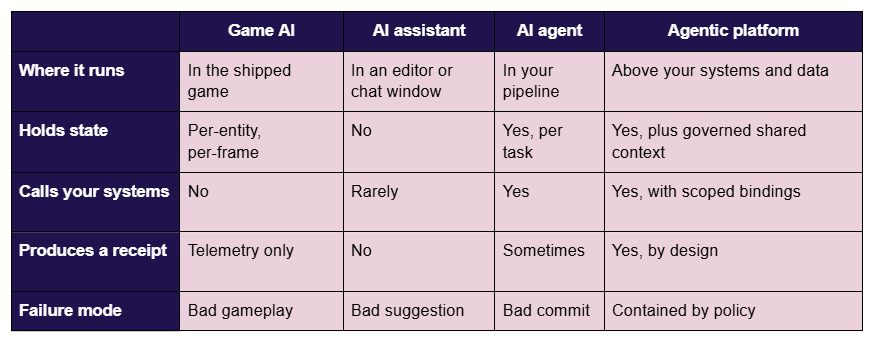
Game AI controls behaviour inside the shipped product. Agentic AI builds and operates the product around the player. They share almost nothing architecturally.
Game AI is behaviour trees, finite state machines, navmesh pathfinding, utility scoring, and reinforcement-learning agents trained with toolkits like Unity ML-Agents. It runs on the player's device, it must be deterministic enough to debug, and it has a frame budget measured in fractions of a millisecond.
Agentic AI runs in your pipeline and your back office. It refactors a gameplay system across eleven files. It triages a Tuesday-morning crash spike. It watches an in-game economy for sink-faucet drift and escalates when the drift crosses a threshold you set. It answers a player's billing question at 3am in Portuguese. None of that has a frame budget. All of it has a blast radius, which is a different and more dangerous constraint.
There is one overlap worth naming: runtime NPC agents like Inworld and Convai sit in both worlds. They are agentic in architecture — state, tools, planning — but they execute inside the game loop, which means they inherit game AI's performance and determinism problems on top of agentic AI's cost and consistency problems. That is why they are the hardest category on this list to ship well.
Agentic AI vs. an AI assistant
An assistant responds. An agent persists. The practical difference is that an assistant forgets you between prompts, while an agent maintains working state across a task that takes twenty steps and four tool calls.
Run this four-capability test against any vendor claiming to sell you an agent:
- State — does it retain working context across steps, or does each prompt start clean?
- Tools — can it call your systems: files, APIs, databases, build servers, ticketing?
- Planning — does it decompose a goal into steps and revise the plan when a step fails?
- Receipts — can it show you, afterwards, exactly what it did, in what order, and with what inputs?
Most tools marketed as agents pass the first three and fail the fourth. Capability four is the one that determines whether it is allowed near your production branch. An agent without receipts is not an agent you can govern, and an agent you cannot govern is one you will end up supervising manually, which removes the entire point.
How We Ranked: The Studio Autonomy Ladder
We ranked these tools by autonomy level — how much a studio can safely let each one do without a human in the loop — because that is the variable that actually decides adoption. Feature lists do not. Every vendor on this list can generate something impressive in a demo. Very few can be trusted with write access to a live game on a Friday.
The Studio Autonomy Ladder has three rungs. Each rung is defined by what the agent changes and what control the studio must have in place before granting it.
Rung 1 — Ask
At the Ask rung, the agent retrieves, reasons, explains and drafts. It produces no side effects. Nothing in your codebase, your live game, or your player-facing surfaces changes as a result of the agent doing its job.
What it looks like in a studio: "Why did D7 retention fall four points for the EU cohort after the 2.3 patch?" The agent queries telemetry, cross-references the patch notes, checks the crash tables, and gives you an answer with citations. Then it stops.
Control required: read-only data binding. That is genuinely all. Ask-rung agents are the safest thing in this article and the fastest to value, which is why almost every successful studio rollout starts here and why almost every failed one starts somewhere else.
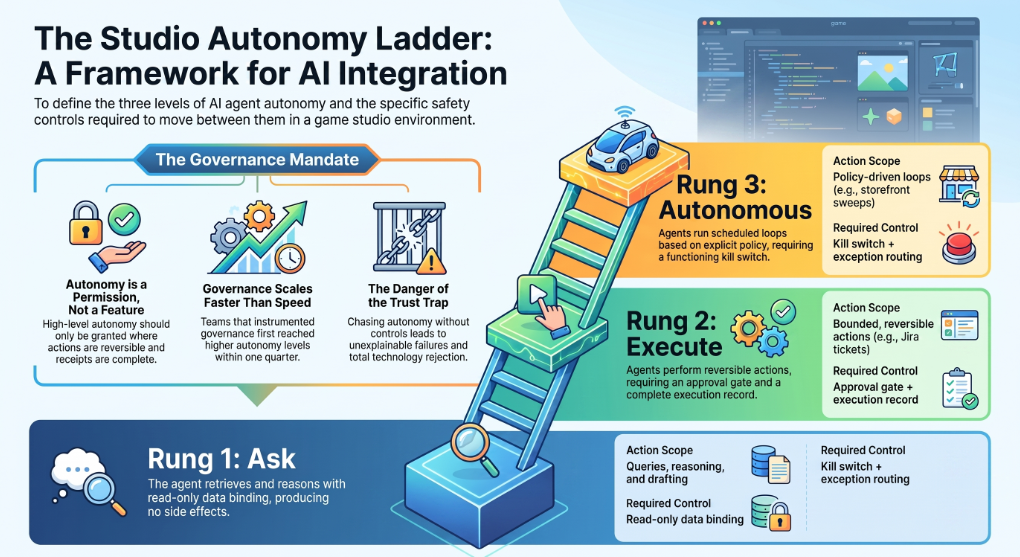
Rung 2 — Execute
At the Execute rung, the agent takes bounded, reversible action inside an approved scope. A human either approves before the action or reviews immediately after, and every action is undoable.
What it looks like: the agent opens a Jira ticket with the top crash cluster and grouped logs attached. It drafts a patch note from the commit range. It issues a refund inside a policy band you defined. It commits a refactor to a feature branch — never to main.
Control required: an approval gate plus a complete execution record. The word doing the work here is reversible. A branch commit is reversible. A ticket is reversible. A push notification to two million players is not, which is why push should never sit at Rung 2 regardless of how good the copy is.
Rung 3 — Autonomous
At the Autonomous rung, the agent runs a defined loop on a schedule or a trigger, without per-instance approval. The human moves up a level: they set policy, review exceptions, and read receipts. They stop approving individual actions.
What it looks like: an overnight sweep across storefronts and competitor titles for price and event changes, surfacing only what moved. A continuous watch on economy sinks and faucets that escalates when drift crosses a threshold. Tier-1 player support resolving password, billing and known-issue tickets end to end, escalating anything outside the pattern.
Control required: an explicit policy definition, exception routing to a named human, and a kill switch that works in seconds rather than in a support ticket.
Why a higher rung without a receipt is a downgrade
Autonomy is not a feature you buy. It's a permission you grant — and it should only be granted where the action is reversible and the receipt is complete.
This is the part vendors skip. Moving an agent from Rung 2 to Rung 3 without adding execution records, exception routing and a kill switch does not make your studio faster. It makes it slower, because the first time something goes wrong nobody can reconstruct what happened, and the organisational response to an unexplainable failure is always to switch the thing off entirely.
We have watched this pattern repeatedly across enterprise deployments: teams that instrumented governance first ended up running higher autonomy within a quarter. Teams that chased autonomy first ended up back at Rung 1 within a month, with a stakeholder group that no longer trusted the technology.
Methodology. We screened tools that are in active production use by game teams as of August 2026, evaluated against six criteria: engine and pipeline fit, production readiness, blast radius, auditability, cost predictability at scale, and IP posture. We excluded pure model providers, single-modality generators with no agentic loop, and game engines. Pricing was checked in August 2026 and should be re-verified before procurement, as several vendors on this list changed pricing structure during the year.
Disclosure: Assistents.ai is built by Ampcome, the publisher of this article. It is ranked first for one specific workcell, its limitations are stated as plainly as everyone else's, and it is explicitly not recommended for the workcells where other tools on this list are better.
The Six Workcell Studio Map
Agentic AI belongs in six distinct workcells across a game studio, not the two that most tool roundups cover. The Six Workcell Studio Map exists because "AI for game development" has quietly come to mean "AI for making art and writing scripts," which describes maybe a third of where the work actually is.
Why most lists only cover workcells 2 and 3
Because those are the workcells with the most visually impressive demos. A generated character sheet screenshots well. A crash-triage agent that quietly removes four hours a week from a QA lead's Monday does not.
But look at where a live-service studio's recurring cost actually sits. Asset production is front-loaded and project-shaped — it spikes and subsides. Player support, moderation, economy tuning and revenue analysis are permanent, they scale linearly with player count, and they never end. A mid-size studio running a live title will typically have more permanent headcount attached to workcells 5 and 6 combined than to workcell 2.
That is the arbitrage. The workcells with the least tooling attention carry the most sustained cost. It is also why the tool ranked first on this list is not a tool that makes anything you can see on screen.
One more thing the map makes obvious: the six workcells demand fundamentally different governance. An agent that writes to a feature branch and an agent that talks to a fourteen-year-old player about a billing dispute are both "AI agents," and treating them as one procurement category is how studios end up with twelve subscriptions and no policy.
Best Agentic AI for Game Development in 2026 (Ranked)
Every entry below follows the same structure — what it is, where it sits on the Studio Autonomy Ladder, which workcell it serves, standout capabilities, honest limitations, pricing, and who it is actually for. Pricing verified August 2026.
1. Assistents.ai by Ampcome — Best for governed studio operations, LiveOps and player ops
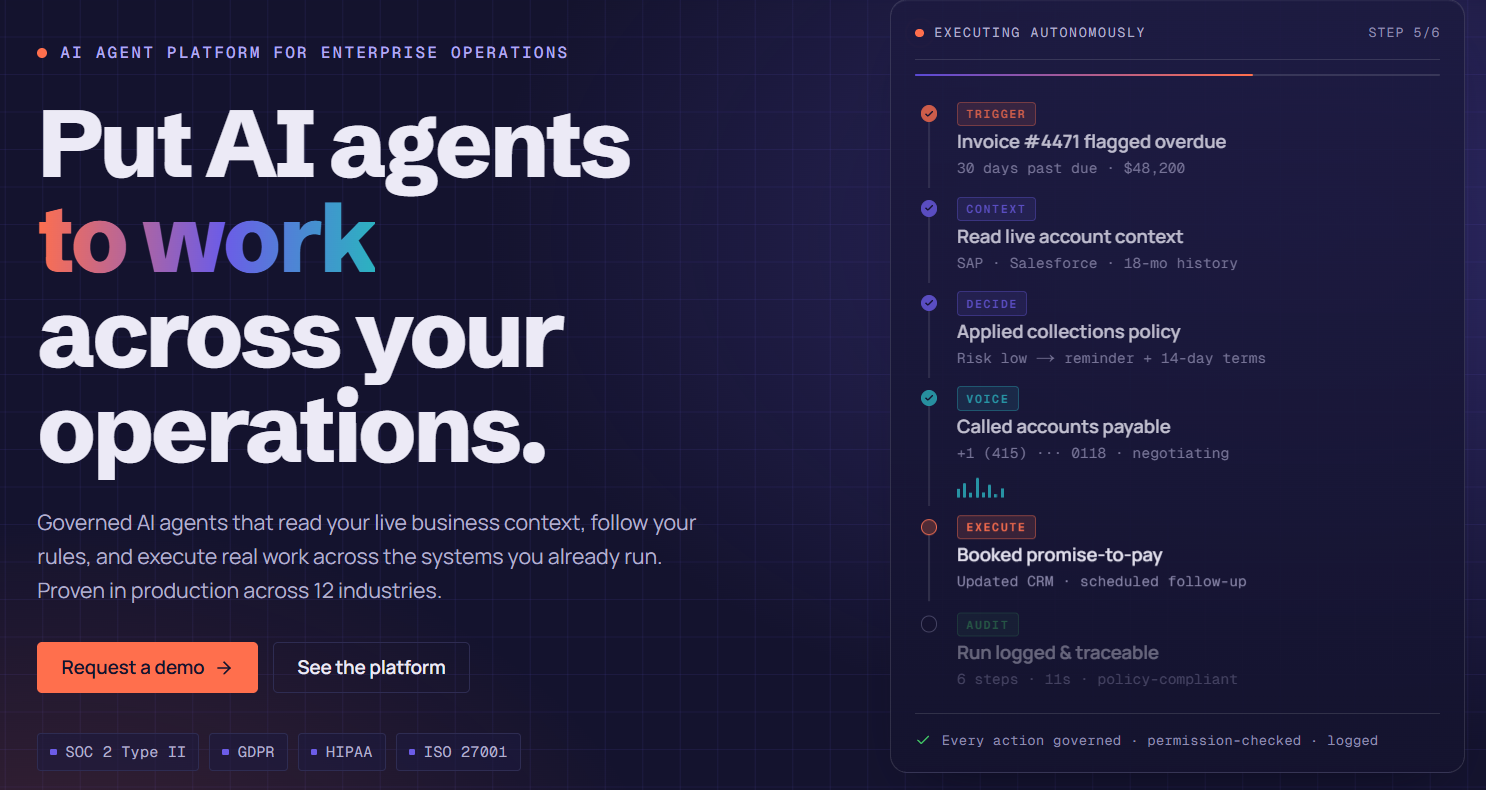
Autonomy rung: Ask → Autonomous (policy-gated) · Workcells: 5, 6, and parts of 4
What it is. Assistents.ai is a governed enterprise agentic platform. It sits above your data and systems rather than inside your engine, which makes it the wrong tool for writing C# and the right tool for everything that happens after the build ships: player support at volume, economy and pricing watch, crash and ticket triage, UA and creative performance analysis, and executive reporting that agents can act on rather than just render.
The design premise is that autonomy without governance does not survive contact with a real organisation. So the platform is built around a semantic business layer that pins down what every metric means, a deterministic rule engine for the decisions that must never be probabilistic, versioned workflow graphs, and an execution record for every step an agent takes.
Standout capabilities
- Semantic business layer — a governed glossary of metrics with formulas, thresholds, business rules and hierarchies, so "active player," "whale," "churn" and "D7 retention" mean exactly one thing across every agent, dashboard and team
- Deterministic rule engine — decision tables and expressions, versioned and checksummed, with full execution traces; a published rule version cannot be silently altered, which is what makes refund bands, eligibility logic and moderation thresholds auditable
- Workflow orchestration — versioned graphs with subflows and draft-cannot-execute change control, so an in-progress edit can never accidentally run against production
- Multi-provider model addressing — across seven-plus providers plus any OpenAI-compatible endpoint, so model choice, cost and routing stay under your control rather than a vendor's
- Retrieval across structured data and documents, with citations — telemetry tables and design docs, patch notes, community guidelines and SOPs, in the same answer
- Full BI layer — datasets, roughly 23 chart types, dashboards with cross-dataset filtering, so the analytics surface and the agent surface are the same system
- Audit trail — execution records, per-step logs and rule execution traces on every run
- Governed data access — single-connector binding, optional table allowlist and a read-only flag, which is how you put an agent at the Ask rung and make it structurally incapable of leaving it
- Delivery surfaces — in-app chat, embeddable widget, and shareable direct URL
Limitations — stated plainly
- It is not an in-engine tool. It does not live inside Unity or Unreal, does not touch prefabs, scenes or serialized assets, and has no view of runtime behaviour. If your problem is a gameplay bug, use Cursor or Claude Code.
- It does not generate art, 3D assets, music or voice. Scenario, ElevenLabs and Runway are the right answers for workcell 2, and this list ranks them accordingly.
- It is not a runtime NPC system. Nothing here executes inside your game loop. Inworld, Convai and Charisma.ai own that category.
- Reaching a specific application — a ticketing system, an analytics service, a storefront API — is a scoped integration project through that system's API, not a switch to flip. The platform evidences database and API connectivity; packaged application connectors are integration work, and any vendor telling you otherwise is setting up a delivery problem.
- It expects your data to exist. Studios with no telemetry warehouse and no event schema will spend their first sprint on data foundations, not on agents.
Pricing. Enterprise, scoped to deployment. Contact Ampcome.
Best for. Mid-size and larger studios running live-service titles that have more operational surface than they have people, and that need agents which can be audited by someone who was not in the room when they were built.
2. Claude Code — Best for codebase-level agentic engineering
Autonomy rung: Execute · Workcell: 3
What it is. Anthropic's agentic coding tool, running in a terminal against your actual repository. It reads files, understands project structure, edits across multiple scripts, and runs commands — which means it works from a goal ("add a stamina system and wire it into the existing status-effect pipeline") rather than from a line-completion prompt.
For game code specifically, this matters because gameplay changes are rarely local. One mechanic touches gameplay scripts, UI, save serialisation, analytics events and tests. Claude Code is one of the few tools that can hold all of that in view at once.
Standout capabilities
- Whole-project context across gameplay systems, tooling and supporting logic
- Multi-step execution — decomposes a feature into sequential file changes
- Runs tests, builds and validation steps as part of the loop
- Iterative debugging: identifies, fixes, re-checks
- Multi-file refactors that keep dependent systems consistent
Limitations
- It can break engine-level references. Prefabs, scenes, serialized data and asset GUIDs in Unity and Unreal are invisible to a text-level tool, and a clean-looking refactor can quietly detach half a scene.
- No runtime awareness. It cannot play your game, so gameplay bugs still need in-engine testing.
- It works on files, not inside editors. Scene and asset work stays manual.
Pricing. Pro $20/month, Max $200/month, Team per-seat, Enterprise custom.
Best for. Programmers who want an agent that operates on the whole codebase — feature implementation, debugging, refactors, tooling — and who have branch discipline strong enough to review what comes back.
3. Cursor — Best for in-editor multi-file gameplay scripting
Autonomy rung: Execute · Workcell: 3
What it is. An AI-first code editor with agentic capability built into the core workflow rather than bolted on. It understands project structure rather than individual files, which lets it update interconnected scripts together and trace an issue across gameplay, UI and backend in one workspace.
The honest comparison with Claude Code: Cursor keeps you in a visual editing environment with excellent inline completion, which suits developers who want to stay close to the diff. Claude Code goes further with terminal and build integration. Plenty of teams run both, and there is no strong argument against that.
Standout capabilities
- Full project awareness across gameplay scripts, tools and systems
- Strong multi-file editing for gameplay loops, UI systems and backend logic
- Generates and modifies C#, C++ and tooling scripts used in Unity and Unreal workflows
- Natural-language edits translated into structured changes
- Best-in-class inline completion for day-to-day work
Limitations
- No visibility into engine runtime behaviour
- Large refactors in tightly coupled game projects can affect dependent systems in ways that only show up at play time
- Same prefab and serialized-asset blindness as any text-level tool
Pricing. Hobby free, Pro $20/user/month, Business $40/user/month, Ultra $200/user/month.
Best for. Day-to-day gameplay scripting, debugging and refactoring across Unity or Unreal codebases, particularly for teams that want an agent without leaving the editor.
4. Inworld — Best for runtime NPC behaviour and dialogue
Autonomy rung: Execute (runtime) · Workcell: 2
What it is. A platform for building AI-driven characters that respond dynamically during gameplay. Rather than a fixed dialogue tree, you define personality, background, goals, knowledge and scene context, and the character generates text or voice in response to game state and player action.
It integrates with Unity and Unreal, which is the thing that separates it from a chatbot embedded in a game — an Inworld NPC can react to what is actually happening in the world, and trigger animation alongside speech.
Standout capabilities
- Real-time NPC interaction in text or voice
- Character behaviour design: personality, tone, memory, response rules
- Unity and Unreal integration with access to runtime game state
- Voice output with animation trigger support
Limitations
- Consistency across long sessions requires deliberate design work; characters drift
- Cost and performance scale hard when many NPCs run simultaneously — model this before you build around it
- Deep gameplay integration needs custom engine-side engineering
- Narrative-critical moments still need authored fallback dialogue; you cannot ship a generated quest-giver with no deterministic path
Pricing. On-Demand free, Creator $25/month, Developer $300/month, Growth $1,500/month, Enterprise custom.
Best for. Teams building companion characters, ambient NPCs and interactive storytelling where responsiveness matters more than exact narrative control.
5. Convai — Best for embodied NPCs in 3D and XR
Autonomy rung: Execute (runtime) · Workcell: 2
What it is. A platform for embodied characters that see, hear, speak and act inside virtual worlds. The distinction from Inworld is emphasis: Convai leans harder into perception and action — characters that understand spatial context, follow roles, and perform animation-driven actions — which makes it a natural fit for XR, social worlds and training simulations alongside games.
Standout capabilities
- Perception plus action, not just conversation
- Unity, Unreal, web and XR device support
- Role-following behaviour with contextual understanding
- Animation-linked action execution
Limitations
- Same simultaneous-NPC cost curve as any runtime LLM character system
- Perception features add integration complexity on top of dialogue
- Strongest fit is 3D and XR; less compelling for 2D or text-forward games
Pricing. Tiered with a free entry point; enterprise custom. Verify current tiers directly.
Best for. 3D games, social worlds, XR experiences and simulation training where characters need to act in the world, not just talk about it.
6. modl.ai — Best for automated playtesting and QA agents
Autonomy rung: Execute → Autonomous · Workcell: 4
What it is. AI bots that play your game to find what human testers cannot cover — traversal breaks, softlocks, unreachable geometry, crash conditions, balance outliers — run at a volume no QA team can match. This is one of the clearest cases on the list of agents doing work that was previously simply not done, rather than doing existing work faster.
Standout capabilities
- Automated exploration of levels and game states
- Regression detection across builds
- Bug and crash discovery at scale, overnight and on every build
- Balance and difficulty signal from bot playthroughs
Limitations
- Requires integration work to give bots meaningful access to your game
- Bots find mechanical failures, not experiential ones — they will not tell you the second act drags
- Best value on games with substantial traversal or systemic complexity; less useful for narrow, linear experiences
Pricing. Custom, scoped to project. Contact vendor.
Best for. Studios with enough build cadence that manual regression testing has become the bottleneck.
7. Scenario — Best for style-consistent art pipelines
Autonomy rung: Ask → Execute · Workcell: 2
What it is. A game asset generation platform built around custom model training. Instead of prompting a generic model, you train on your own reference art and style guides so outputs match your project's visual direction — which is the difference between a generator that is fun and one that is usable in production.
Standout capabilities
- Custom model training on your reference art
- Style-consistent generation across characters, props, environments, icons and UI
- Multi-model workspace for comparing trained models in one project
- Batch generation for volume variation work
- Pipeline-ready export formats
Limitations
- Output quality is entirely bounded by training data quality
- Complex art direction still needs iterative prompting and manual cleanup
- Custom model workflows are compute-heavy at scale
- Everything still needs an artist review pass before it enters the build
Pricing. Starter $10/month, Pro $30/month, Max $50/month, Enterprise $125/month.
Best for. Teams that need visual consistency across a large asset volume and have enough existing reference art to train on.
8. ElevenLabs — Best for VO and localisation at scale
Autonomy rung: Ask → Execute · Workcell: 2
What it is. AI voice generation for character dialogue, narration, tutorials and localised VO. Its real value in game production is iteration economics: when your script changes weekly through production, booking studio time for every rewrite is impossible, and temp VO from a text file removes that constraint entirely.
Standout capabilities
- Natural speech for characters, narration and system voice
- Voice cloning with consistency across sessions, which keeps recurring characters coherent
- Multilingual output for localisation
- Low-latency speech suitable for real-time NPC responses
- API integration into existing pipelines
Limitations
- Costs scale with usage; dialogue-heavy titles with constant iteration and multi-language coverage get expensive quickly
- Tone, pacing and character consistency drift across long sequences — lines need a human review pass
- Licensing and voice-rights questions need legal review before shipping generated VO commercially
Pricing. Starter $6/month through Business $990/month, Enterprise custom.
Best for. Temp VO through production, multilingual coverage, and dynamic speech systems without a full recording pipeline for every iteration.
9. Unity AI / Muse — Best for in-editor Unity workflows
Autonomy rung: Ask → Execute · Workcells: 2, 3
What it is. Unity's own in-editor AI capability, with the structural advantage nothing else on this list has: it understands the editor. Prefabs, scenes, serialized assets and the project hierarchy are native concepts to it, not opaque binary files. Unity has been building toward human-in-the-loop agentic workflows inside the editor, and that direction matters more than any current feature.
Standout capabilities
- Native understanding of Unity project structure and assets
- In-editor generation and assistance without context switching
- Integrated into the Unity account and licensing you already have
Limitations
- Unity only, obviously — no help for Unreal, Godot or custom engines
- Capability is narrower than dedicated coding agents for large refactors
- Feature set and packaging have moved repeatedly; verify current state before planning around it
Pricing. Bundled with Unity subscription tiers; verify current packaging.
Best for. Unity-native teams who want editor-aware assistance without adding another vendor.
10. Ludo.ai — Best for market-informed ideation and design
Autonomy rung: Ask · Workcell: 1
What it is. A game ideation and design research tool that grounds concepting in market data — genre trends, comparable titles, mechanic patterns — rather than in a blank page. It sits at the Ask rung by design and does not pretend otherwise, which is refreshingly honest positioning.
Standout capabilities
- Concept and mechanic generation informed by market signal
- Comparable-title and genre trend research
- Fast pre-production exploration and pitch material
Limitations
- Research grounding is not the same as taste; it will point you at what has worked, which is not always what should be made next
- Output is directional, not a design document
- Limited value once a project is past pre-production
Pricing. Free tier with paid plans; verify current tiers.
Best for. Pre-production, pitch development and portfolio planning, especially for studios making genre bets.
11. Charisma.ai — Best for narrative-driven branching characters
Autonomy rung: Execute (runtime) · Workcell: 2
What it is. A platform for narrative-led interactive characters, with more emphasis on authored story structure than the pure-generative NPC platforms. That trade-off is the point: you get less emergent surprise and more control over where a conversation can go, which is what narrative teams usually actually want.
Standout capabilities
- Authored narrative structure combined with generative response
- Believable character reaction to player choice
- Cross-platform deployment including non-game interactive experiences
Limitations
- More authoring effort than a pure-generative platform
- Less suited to open-ended ambient NPCs
- Custom pricing makes budgeting harder early
Pricing. Custom, scoped to project.
Best for. Narrative games and interactive experiences where story integrity matters more than emergence.
12. Runway — Best for cinematics, trailers and marketing creative
Autonomy rung: Ask → Execute · Workcells: 2, 6
What it is. Generative video and image tooling for short clips, animated sequences, visual concepts and stylised scenes. In a game studio it is mostly a pre-production and marketing tool: mood videos, cutscene previz, trailer concepts, and store-page and social creative.
Standout capabilities
- Text-to-video and image-to-video generation
- AI video editing on existing footage
- Cinematic style, motion and composition controls
- Fast iteration across many variations
Limitations
- Long-sequence consistency is poor; characters and environments drift between cuts
- Most output needs manual cleanup before it is production-ready
- Rights and provenance questions apply to anything shipped in marketing
Pricing. Standard $12/user/month, Pro $28, Unlimited $76, Enterprise custom.
Best for. Previz, concept exploration and performance-marketing creative volume.
Comparison Table: All 12 at a Glance
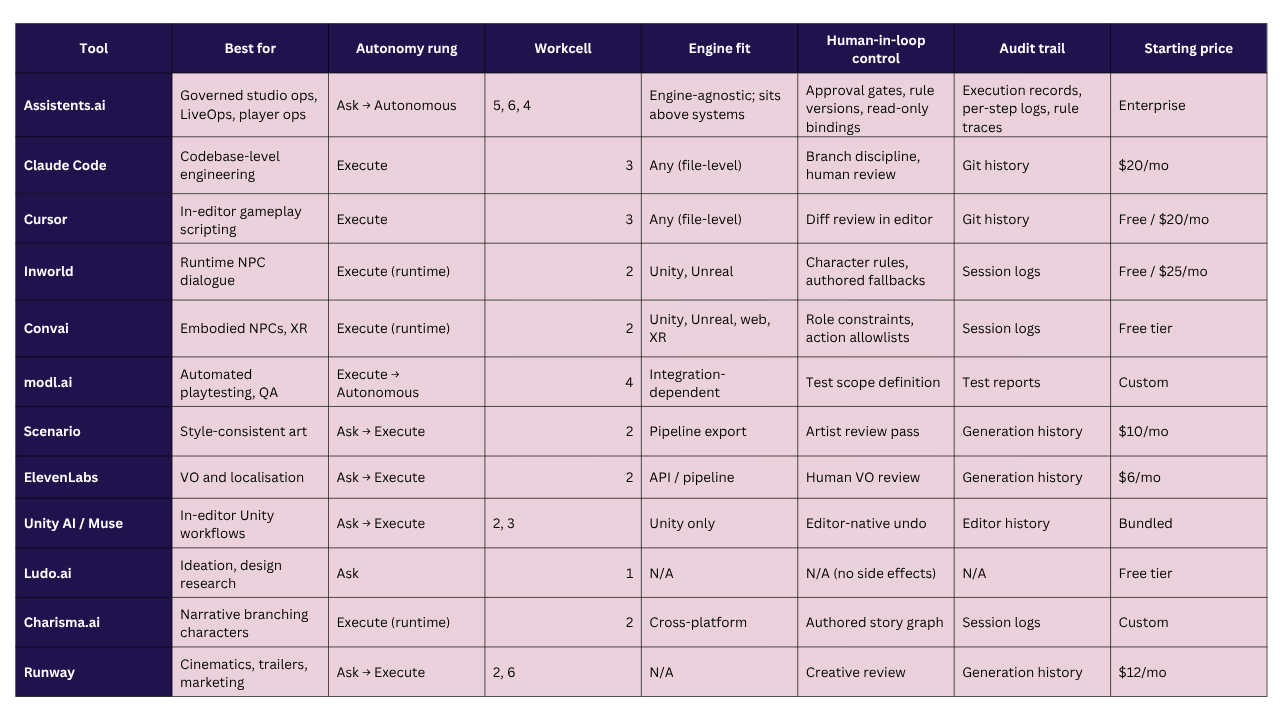
Pricing verified August 2026. Several vendors changed structure during the year — confirm before procurement.
Why Assistents.ai by Ampcome
The problem engine-side agents don't solve
Cursor edits your scripts. Inworld animates your NPCs. Scenario keeps your art consistent. All three are good at what they do, and none of them can answer this question:
"ARPPU fell 11% in Southeast Asia after Tuesday's patch. Which cohort, which SKU, is it the patch or the competitor's event, and what should we do before the weekend?"
More importantly, none of them can act on the answer — open the incident, brief the LiveOps lead, adjust the offer within an approved band, notify support with a canned response for the inbound wave, and leave a record showing exactly what was done and on whose authority.
That gap is not a tooling gap in workcell 3. It is the entire missing layer in workcells 5 and 6. It is also, in most studios, the layer with the largest permanent headcount and the least automation.
What Assistents.ai is — and what it isn't
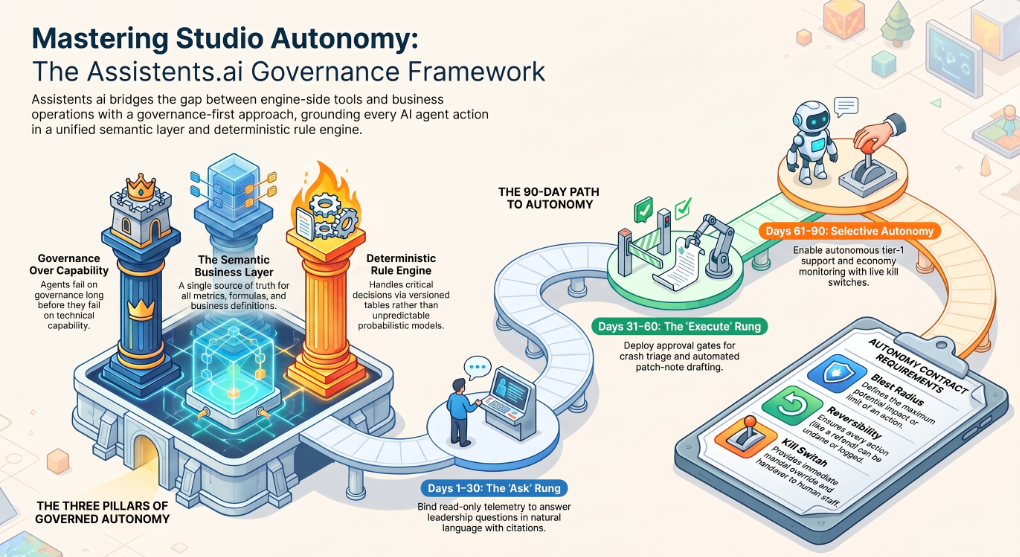
Assistents.ai is a governed enterprise agentic platform that sits above your data and systems, not inside your engine. The whole architecture is organised around one conviction: agents in an enterprise fail on governance long before they fail on capability.
The semantic business layer is where that starts. It holds a governed glossary of metrics with formulas, thresholds, business rules and hierarchies. In practice this means "D7 retention," "active player," "whale" and "churn risk" have exactly one definition, and every agent, dashboard and report is bound to it. Studios routinely discover during this step that three teams have been using three different definitions of the same metric for two years — and that discovery alone tends to justify the exercise.
The deterministic rule engine handles the decisions that must never be probabilistic. Refund eligibility bands. Moderation escalation thresholds. Offer targeting rules. Compliance gates. These are decision tables and expressions, versioned and checksummed, with full execution traces — and a published rule version cannot be silently altered. When someone asks in six months why a specific player got a specific refund, the answer is a rule version and an execution trace, not a model's recollection.
Workflow orchestration runs on versioned graphs with subflows and draft-cannot-execute change control, so an in-progress edit cannot accidentally run against production. Multi-provider model addressing spans seven-plus providers plus any OpenAI-compatible endpoint, which keeps model choice, cost and routing under your control — meaningful when runtime inference is a live P&L line rather than a fixed subscription.
Retrieval works across both structured data and documents, with citations — your telemetry tables and your design docs, patch notes, community guidelines and SOPs, answered together. The BI layer provides datasets, roughly 23 chart types, and dashboards with cross-dataset filtering, so the analytics surface and the agent surface are the same system rather than two systems that disagree.
Governed data access is the mechanism that makes the Autonomy Ladder real rather than aspirational: single-connector binding, an optional table allowlist, and a read-only flag. An Ask-rung agent is not asked politely to avoid writing. It is structurally incapable of it.
And every run produces an execution record — per-step logs and rule execution traces. That is capability four from the four-capability test, and it is what makes higher rungs grantable at all.
What it is not. It is not an in-engine tool. It does not touch prefabs, scenes or serialized assets. It does not generate art, 3D models, music or voice. It is not a runtime NPC system. And reaching any specific application — a ticketing system, an analytics service, a storefront API — is a scoped integration through that system's API, not a switch to flip.
On our published direction, capabilities including a work kernel, capability registry, action gateway, autonomy policy service and operations control tower are directional roadmap items and are not available commitments.
The Autonomy Contract in practice
Before an agent touches production, write one page. Seven clauses. If you cannot fill them in, the agent is not ready.
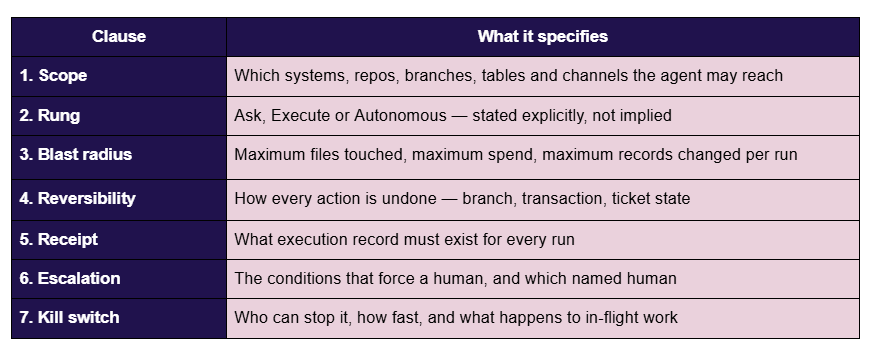
If you can't write the Autonomy Contract, the agent isn't ready for your production branch.
Worked example — Player Support Agent. Scope: support inbox, knowledge base over community guidelines and known-issues docs, ticketing system, read-only account lookup. Rung: Autonomous for tier-1 categories, Execute for anything touching money. Blast radius: refunds capped at a policy band; no account state changes. Reversibility: every refund reversible within the payment window; every ticket state change logged and undoable. Receipt: per-conversation execution record with the rule version that governed the decision. Escalation: sentiment threshold, any minor-account indicator, any category outside the tier-1 list. Kill switch: support lead, immediate, in-flight conversations handed to a human queue.
Worked example — Economy Watch Agent. Scope: read-only telemetry tables for sinks, faucets, currency balances and conversion. Rung: Autonomous, but Ask-only in effect — read-only flag on, no write path exists. Blast radius: none; it cannot change anything. Reversibility: not applicable. Receipt: daily execution record with the queries run. Escalation: drift beyond threshold routes to the LiveOps lead with the anomaly and the supporting series. Kill switch: schedule disable.
Worked example — Crash Triage Agent. Scope: crash reporting service, ticketing system, build metadata. Rung: Execute. Blast radius: maximum ten tickets per run, no ticket closure, no priority override above P2. Reversibility: tickets deletable, no code touched. Receipt: per-ticket execution record with the cluster signature and grouped logs. Escalation: any cluster above a volume threshold pages the on-call engineer directly. Kill switch: QA lead, immediate.
What a 30/60/90 deployment looks like
Days 1–30 — Ask rung. Bind read-only to telemetry. Build the semantic layer: agree the definitions of your fifteen core metrics. Ship one analytics agent that answers LiveOps and leadership questions in natural language with citations. Success metric: time-to-answer on recurring questions drops from days to minutes, and the analytics team stops being a queue.
Days 31–60 — Execute rung. Add approval gates. Ship crash triage and patch-note drafting. Encode refund bands and moderation thresholds in the rule engine. Success metric: ticket triage cycle time, and the number of decisions now traceable to a rule version rather than a person's judgement.
Days 61–90 — Autonomous rung, selectively. Move tier-1 player support and the economy anomaly watch to scheduled autonomous operation, with exception routing and kill switches live. Success metric: percentage of tier-1 tickets resolved without human touch, and — the one that actually matters — zero unexplainable actions in the execution log.
Why Ampcome
Ampcome has delivered production agentic and analytics systems across more than thirty enterprise deployments spanning retail, logistics, fintech, healthcare, energy, real estate, manufacturing and creator-economy platforms. Those are not adjacent industries with adjacent problems. They are the same problem shapes a game studio has — high-volume multilingual support, real-time anomaly detection on operational signals, governed decisioning at scale, multi-agent systems with hard guardrails — solved in environments where getting it wrong has regulatory consequences.
The next section shows the mapping directly.
Proof: Agentic Patterns Already Running in Production
Every other article ranking for this keyword lists features. None show a single production deployment. Below are eight anonymised patterns from Ampcome's delivery record, each mapped to the studio workcell it corresponds to. Clients are identified by industry, geography and scale only.
NPC voice and dialogue pipeline → Workcell 2 For a consumer entertainment app on iOS and Android, we built a real-time voice agent that ingests scripts, manages scenes, and holds character voice, pacing and cue logic through long interactive sessions — with inference cost engineered as a hard design constraint rather than an afterthought. That is the same problem shape as production NPC dialogue: hold character across a long session, respond in real time, and never let per-session cost outrun the unit economics. The cost constraint is the part most NPC deployments discover too late.
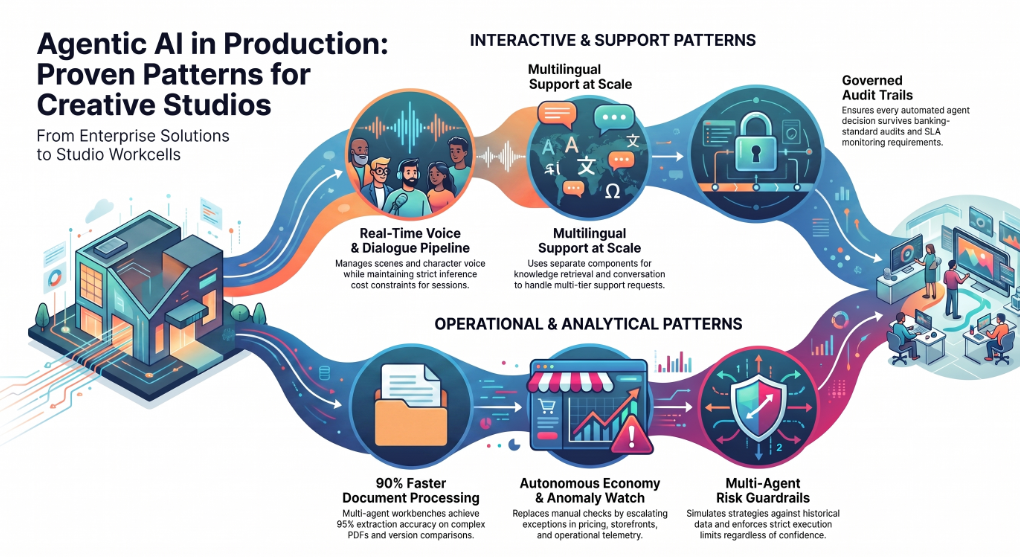
Player support at scale, multilingual → Workcell 6 A pan-India retail operator with a 700-plus location footprint runs a voice support agent using a speech-to-text, LLM, text-to-speech pipeline in Hindi and English, alongside a knowledge agent retrieving over internal SOP documents, with an admin console, analytics and ticketing integration. Substitute "player" for "store manager" and the architecture is a studio's tier-1 support desk — including the part studios usually underestimate, which is that the knowledge agent and the conversational agent are two different components with two different failure modes.
Governed support with a full audit trail → Workcell 6 For a global fintech serving banks and credit unions, the same approach runs omnichannel intake across chat, email and phone with workflow routing, agent-assist summarisation, next-best-action suggestions, auditability and SLA monitoring. The design constraint there was that every automated decision had to survive a banking audit. An agent built to that standard handles a refund dispute without breaking a sweat.
Economy, pricing and competitor watch → Workcell 5 For a consumer durables manufacturer competing in a highly price-sensitive market, we run continuous monitoring across e-commerce and channel data — pricing, discounts, offers, availability, ratings — with agentic question-answering mapped to the questions leadership actually asks, and analytics views for pricing gaps and portfolio movement. The live-service equivalent is a nightly sweep across storefronts and competitor titles that surfaces only what moved, replacing a manual check nobody enjoys and everybody skips under deadline.
Anomaly watch on continuous operational signals → Workcell 5 Utility and campus research deployments ingest continuous sensor and telemetry streams, detect anomalies, and route automated alerts into resolution workflows for field teams. Swap the sensor stream for an economy sink-and-faucet stream and the pattern is identical: an autonomous watch that escalates exceptions rather than reporting everything. The engineering difficulty in both cases is not detection. It is threshold tuning that produces alerts people still read after month three.
Multi-agent systems with hard guardrails → Workcell 5 An AI-first trading terminal client runs a network of specialised agents combining research, analysis, signals and execution, with strategy simulation and explicit risk guardrails before anything executes. That is the reference pattern for an economy-tuning agent: simulate the change against historical player behaviour before acting, and never let the agent past the guardrail regardless of how confident it is.
Creator and UA campaign analytics → Workcell 6 For a creator-economy platform, we automate creator discovery and enrichment, campaign workflow, content KPI monitoring and brand-safety checks, with campaign ROI and engagement analytics on top. For a studio, that is influencer-led user acquisition and creative performance analysis without a dedicated analyst per channel — and brand-safety screening that runs before a campaign goes live rather than after a community manager sees it.
Insights-to-action governance layer → Workcells 5 and 6 A privately held retail holding group runs a unified context engine over structured and unstructured data, a semantic governance layer of rules, hierarchies and formulas, and an orchestrator that converts dashboard insights into governed, auditable tasks. This is the layer most studios are missing. The problem was never a shortage of dashboards. It was that nobody agreed what the numbers meant, and nothing connected an insight to an action with a record attached.
Document workbench for complex documents → Workcell 4 An Australian remedial construction specialist runs a multi-agent Intelligent Document Workbench with vision-LLM extraction from complex PDFs, revision and change detection between document versions, deep system integration with full CRUD, quote locking and audit logs. It was engineered for up to roughly 90% faster document processing, with a target of approximately 95% extraction accuracy on standard formats, in that deployment. For a studio, the analogue is design-document revision tracking and certification submission packs — both of which are version-comparison problems dressed up as reading problems.
The Five Gaps Every "Best AI for Game Dev" List Misses
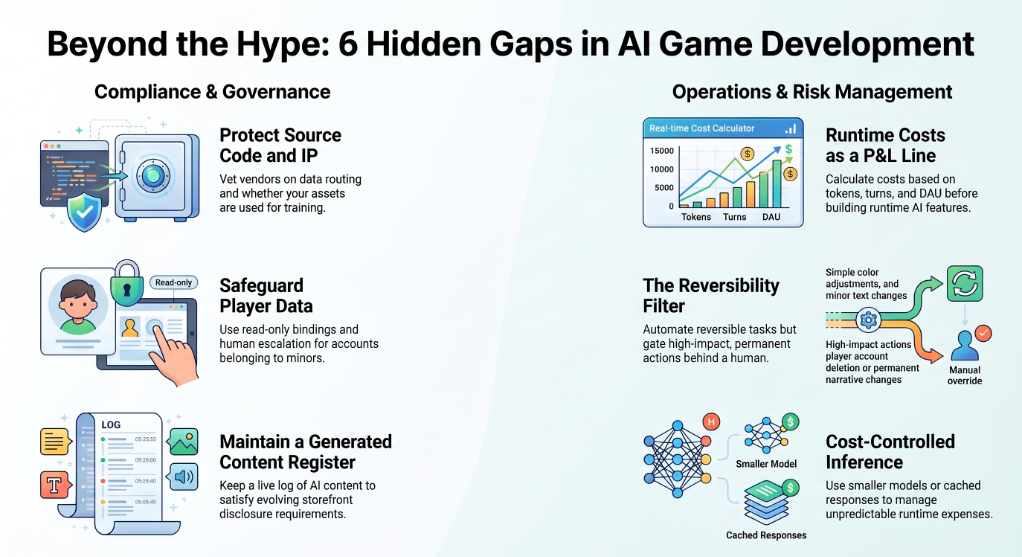
1. Your source code and unreleased assets are training-data risk
Every agent that helps you write gameplay code has read your gameplay code. Every agent that keeps your art consistent has seen your unreleased character designs. For an indie project this is a manageable risk. For an unannounced AAA title under NDA with a platform holder, it is a legal question, and it should be answered before the tool is installed, not after.
Ask every vendor four questions. Is my code or content used for training, by default or ever? What is the retention period for prompts and outputs? Which model providers is my data routed to, and can I control that routing? What happens to my data if I terminate?
The routing question is the one most teams miss. A tool that lets you choose your model provider — or point at your own endpoint — turns an unanswerable data-governance question into a procurement decision you already know how to make.
2. Player data is not enterprise data
Games skew young. That single fact changes the governance calculus for every player-facing agent, because a support agent handling a billing dispute may be talking to a minor, and the obligations that attach — around data collection, retention, age assurance and duty of care — differ by jurisdiction and are getting stricter, not looser.
The practical controls are unglamorous and effective: read-only bindings so agents cannot mutate account state, table allowlists so an agent handling support cannot reach the payments table, and escalation rules that force a human the moment a minor-account indicator appears. Build those in at design time. Retrofitting them after an incident is how programmes get cancelled.
3. Storefront and platform disclosure
Storefronts have added AI-disclosure requirements for published games, and console certification pipelines have limited patience for nondeterministic output in player-facing surfaces. If your NPCs generate dialogue at runtime, that is a disclosure question and potentially a cert question, not just a design one.
The practical implication: keep a register of where generated content appears in the shipped product, and keep it current. The register is boring to maintain and extremely useful the week before submission. Check each target platform's current requirements directly — they have changed more than once and will change again.
4. Runtime inference cost is a live P&L line, not a subscription
A code agent costs a fixed amount per seat per month. A runtime NPC agent costs money every time a player talks to a character. Those are not the same kind of expense, and treating them as one is how a successful launch turns into a margin problem.
Do the arithmetic before you build: expected sessions per day, conversational turns per session, tokens per turn, cost per token, multiplied by your projected DAU at the good outcome rather than the conservative one. Then decide what you will do when the number is uncomfortable — smaller models for ambient characters, cached responses for common exchanges, hard per-session caps, or authored dialogue for anything that does not need generation.
The consumer entertainment deployment described above treated cost-controlled inference as a hard design constraint from the first sprint. That is the correct order of operations.
5. Reversibility is the real ship-blocker
The question that decides whether an agent gets autonomy is not "is it accurate?" It is "what happens when it is wrong?"
A commit to a feature branch is wrong and then reverted. A ticket is wrong and then closed. A push notification to two million players is wrong and permanent. A refund issued outside policy is wrong and expensive. An economy change applied to a live game on a Friday evening is wrong and, by Monday, a community relations problem.
Sort every candidate agent action by reversibility before you sort it by value. Automate the reversible things aggressively. Gate the irreversible things behind a human, permanently, and stop feeling bad about it — that gate is not a failure of automation, it is the thing that lets you automate everything else with confidence.
How to Choose: A Buyer's Checklist for Studios
Twelve questions. Run every candidate tool through them.
- Which workcell does this actually serve? If the answer is "several," be suspicious.
- What rung on the Studio Autonomy Ladder does it realistically operate at? Not what the demo showed — what you would let it do unsupervised.
- Can it produce an execution record? If not, it cannot go above Rung 1.
- What is the blast radius of its worst plausible failure?
- Is every action it takes reversible? Enumerate the ones that are not.
- Does it understand engine-managed assets — prefabs, scenes, serialized data — or will it silently break them?
- Where does my data go, and can I control model routing?
- What does this cost at 10× my current scale? Per-seat and per-inference tools diverge violently here.
- Who on my team owns it? A tool with no owner becomes a tool with no governance.
- What is the exit cost? Trained custom models, encoded rules and accumulated context all create lock-in.
- Does it integrate with what we already run, and is that integration a project or a configuration? Get this in writing.
- Can a person who was not in the room reconstruct what the agent did? This is the audit question, and it is the one that decides whether the programme survives its first incident.
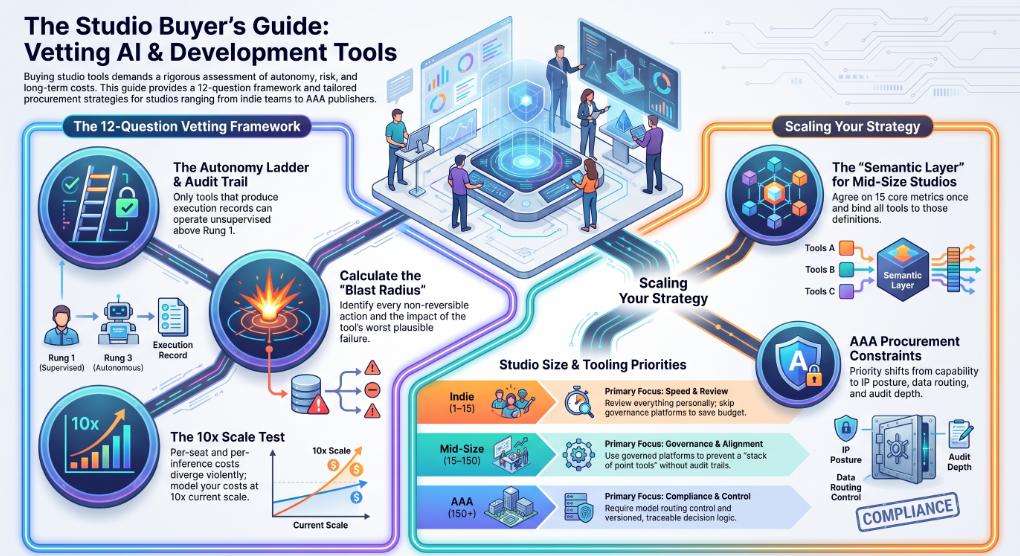
If you're an indie or small team (1–15)
Start with workcell 3 and workcell 2. Cursor or Claude Code for code, Scenario for art consistency if you have reference material, ElevenLabs for temp VO. Skip governance platforms — at this size the governance is that you personally review everything, and that is genuinely sufficient. Budget roughly $50–150/month.
The mistake at this scale is buying a runtime NPC platform because it demos beautifully. Ambient generative NPCs are a live-cost commitment on a game that may not have live revenue.
If you're a mid-size studio (15–150)
This is where the Six Workcell Studio Map starts to bite, because you now have permanent headcount in workcells 5 and 6 and no tooling attached to it.
Run Cursor or Claude Code for engineering, modl.ai once your build cadence makes manual regression the bottleneck, and one governed platform for workcells 5 and 6 — this is where Assistents.ai is the recommendation, because the alternative is a stack of point tools with no shared metric definitions and no audit trail across them. Add Inworld or Convai only if generative NPCs are a design pillar rather than a feature.
The single highest-leverage move at this size is the semantic layer: agreeing what your fifteen core metrics mean, once, and binding everything to it.
If you're AAA or a publisher (150+)
Your constraints are procurement constraints. IP posture, data routing control, audit depth and integration reality decide the shortlist before capability does.
Require: model routing control or bring-your-own-endpoint; execution records at step granularity; versioned, traceable decision logic for anything touching money or moderation; and written clarity on which integrations are configuration and which are projects. Run governance and tooling procurement as one decision, not two — and put the Autonomy Contract template into your standard vendor onboarding.
Your First 90 Days with Agentic AI in a Studio
Weeks 1–2 — Pick one painful, reversible problem. Not the most valuable one. The most boring reversible one with a clear owner. Crash triage and recurring analytics questions are the two best starting points in almost every studio.
Weeks 3–4 — Build the definitions before the agent. Agree what your core metrics mean. This is unglamorous and it is the step that determines whether anything you build afterwards is trusted.
Weeks 5–8 — Ship at the Ask rung. Read-only, no side effects, citations on every answer. Measure time-to-answer on recurring questions. Let people find the edges safely.
Weeks 9–12 — Add one Execute-rung agent with an approval gate. Write its Autonomy Contract first. Ship it. Watch the execution log daily for two weeks — not because you expect failure, but because reading the log is how the team learns what the agent actually does.
Week 13 — Promote one agent to Autonomous, or don't. The honest answer for many studios at week 13 is "not yet," and that is a healthy outcome. The teams that promote successfully are the ones that spent weeks 9–12 reading receipts.
Five Mistakes Studios Make with Agentic AI
1. Starting at Rung 3 because the demo was impressive. Autonomous agents are the end state of a governance process, not the first purchase. Teams that start here are back at Rung 1 within a month with a stakeholder group that no longer trusts the technology.
2. Buying twelve point tools and no governance layer. Each tool is individually defensible. Collectively you now have twelve definitions of "active player," twelve audit surfaces, and no way to answer a question that spans two of them.
3. Letting agents write to main. There is no version of this that ends well. Feature branches, always, with human promotion to trunk.
4. Measuring agent activity instead of cycle time. "The agent handled 4,000 tickets" is not a result. "Median time-to-resolution fell from 19 hours to 40 minutes and CSAT held" is a result. Activity metrics make dashboards look good and tell you nothing.
5. Treating player-facing autonomy like internal autonomy. An agent that is wrong on a feature branch costs an hour. An agent that is wrong to a player costs a Reddit thread. These need different rungs, different gates, and different review cadences — and most studios discover this the expensive way.
The Bottom Line
The best agentic AI for game development in 2026 is not one tool. It is a small stack, chosen per workcell, with each tool granted only as much autonomy as its receipts justify.
For code, Claude Code and Cursor are the strongest options and either is a defensible default. For runtime NPCs, Inworld and Convai lead, with Charisma.ai better where narrative control outweighs emergence. For art consistency, Scenario. For voice and localisation, ElevenLabs. For automated playtesting, modl.ai. For ideation, Ludo.ai. For cinematics and marketing creative, Runway.
And for the layer almost every list ignores — LiveOps, economy watch, player support, and the governance that makes any of it auditable — Assistents.ai by Ampcome is built specifically for that problem, with the semantic layer, deterministic rules and execution records that make higher autonomy something you can grant rather than something you hope goes well.
The studios that get furthest with agentic AI over the next two years will not be the ones that adopted the most tools. They will be the ones that could still explain, six months later, exactly what their agents did and why.
Ready to map agentic AI to your studio's workcells?
Book a working session with Ampcome →
FAQs
What is agentic AI in game development?
Agentic AI in game development is software that holds context across multiple steps, calls external tools, plans a sequence of actions, and works toward a goal without a new prompt at every turn. It is used across the studio pipeline — code, assets, QA, LiveOps and player operations — rather than inside the shipped game itself. The distinction that matters is state and side effects: an agent remembers what it did and can change things, which is why it needs governance that a chat assistant does not.
What is the difference between agentic AI and game AI?
Game AI controls behaviour inside the shipped product — enemy logic, pathfinding, NPC movement, difficulty systems — and runs on the player's device within a frame budget. Agentic AI builds and operates the game around the player, running in your pipeline and back office with no frame budget but a significant blast radius. The only meaningful overlap is runtime NPC platforms, which are agentic in architecture but execute inside the game loop.
Can AI agents build a full game on their own?
No. Agents can meaningfully accelerate scripting, asset generation, testing, content variation and operations, but core system design, gameplay feel, art direction, performance tuning and creative judgement still require humans. The realistic 2026 picture is human-supervised agents doing bounded work on internal branches, not autonomous studios.
Which AI agent is best for Unity?
For gameplay code, Cursor and Claude Code both work well against a Unity codebase, with the caveat that neither understands prefabs, scenes or serialized assets and both can break engine-level references during a refactor. For editor-native work, Unity's own AI capability has the structural advantage of understanding the project hierarchy. For runtime NPCs, Inworld and Convai both integrate with Unity.
Which AI agent is best for Unreal Engine?
Claude Code and Cursor for C++ gameplay code and tooling; Inworld or Convai for runtime NPC behaviour; modl.ai for automated playtesting. Blueprint-heavy projects get less value from text-level coding agents, since Blueprints are not text files an agent can meaningfully edit.
Are AI agents worth it for indie game developers?
Yes, for a narrow set of uses. A coding agent and an asset consistency tool deliver real value at indie scale for under $150 a month. Governance platforms and runtime NPC systems generally do not — the first because you are the governance, the second because per-session inference cost is a commitment a pre-revenue game should not make.
How much do AI agents cost for game development?
Coding agents run roughly $20–40 per seat per month. Asset and voice tools start around $6–30 per month and scale with usage. Runtime NPC platforms range from free tiers to $1,500 per month plus per-session inference cost. Enterprise governance platforms are custom-scoped. The critical distinction is subscription cost versus inference cost — the latter scales with your player base and belongs in your unit economics, not your tooling budget.
Is it safe to give an AI agent access to my game's source code?
It depends entirely on the vendor's data posture, and you should get answers in writing before installing anything. Ask whether your code is used for training, what the prompt and output retention period is, which model providers your data is routed to, whether you can control that routing, and what happens on termination. For unannounced titles under platform NDA, this is a legal review, not an engineering decision.
Do I have to disclose AI use when publishing on Steam?
Storefronts have added AI-disclosure requirements for published games, and the specifics have changed more than once. Keep a current register of where AI-generated content appears in your shipped product and check each target platform's requirements directly before submission. Runtime-generative content generally carries more disclosure and certification weight than AI-assisted development.
Can AI agents do QA testing for games?
Yes, for mechanical failures. Automated playtesting agents explore levels and game states at volumes no human team can match, finding traversal breaks, softlocks, unreachable geometry and crash conditions on every build. They cannot evaluate experience — they will not tell you the second act drags, and they do not replace human QA judgement on feel, difficulty or narrative pacing.
How do AI agents handle player support at scale?
A working player support agent is two components, not one: a conversational agent handling intake and dialogue, and a retrieval agent grounded in your community guidelines, known-issues documentation and policies. Tier-1 categories — password, billing status, known issues — can run autonomously under policy, with anything touching money gated behind an approval band and anything indicating a minor account escalated immediately to a human.
What are the risks of using AI agents in game production?
Five, in rough order of how often they cause problems: source-code and unreleased-asset exposure to third-party models; player data handling in an audience that skews young; storefront disclosure and certification exposure for generated content; runtime inference cost outrunning unit economics at scale; and irreversible actions taken without a receipt. The last one causes the most organisational damage, because an unexplainable failure usually results in the whole programme being switched off.
How do you keep an AI agent from breaking Unity prefabs and scenes?
Constrain scope and enforce branch discipline. Text-level agents cannot see asset GUIDs or serialized references, so restrict them to script directories, never let them touch .prefab, .unity or .meta files, always work on feature branches, and always open the project in the editor before merging. Editor-native tooling is the structural answer, but scope constraints are the practical one today.
What autonomy level should an AI agent have in a live game?
Read-only monitoring can run fully autonomously. Bounded, reversible actions — ticket creation, drafting, policy-band refunds — can run at the Execute rung with approval gates. Anything irreversible and player-facing, including push notifications, economy changes and account actions, should stay behind a permanent human gate regardless of how accurate the agent has been.
Do AI agents work with custom game engines?
Coding agents work fine, since they operate on files rather than engine concepts. Runtime NPC platforms generally do not without significant custom integration, as their value comes from packaged Unity and Unreal SDKs. Operations and analytics platforms are engine-agnostic by nature, since they sit above your data rather than inside your build.
Can AI agents replace game developers?
No. They absorb typing, searching, triage and repetitive variation work, and they add a review burden in exchange. The scarce skills — knowing what to build, why a mechanic feels wrong, where a system will break at scale — are exactly the ones agents do not have. What changes is the ratio of authoring to reviewing in a developer's week.

Transform Your Business With Agentic Automation
Agentic automation is the rising star posied to overtake RPA and bring about a new wave of intelligent automation. Explore the core concepts of agentic automation, how it works, real-life examples and strategies for a successful implementation in this ebook.
Sarfraz Nawaz is the CEO and founder of Ampcome, which is at the forefront of Artificial Intelligence (AI) Development. Nawaz's passion for technology is matched by his commitment to creating solutions that drive real-world results. Under his leadership, Ampcome's team of talented engineers and developers craft innovative IT solutions that empower businesses to thrive in the ever-evolving technological landscape.Ampcome's success is a testament to Nawaz's dedication to excellence and his unwavering belief in the transformative power of technology.

More insights
Discover the latest trends, best practices, and expert opinions that can reshape your perspective


.jpg)




Contact us

